
Every person on the planet today is familiar with the term “IP address”. You may have heard it at work, on the internet or somewhere else. But the modern world creates conditions where everyone should know a little more about Internet safety, anonymity, privacy and IT specialities in order to understand things which are happening in the world and protect themselves better. That’s why we decided to face and compare two types of IPs. Dynamic vs Static IP – which is better?
In today’s world, where we’re connected almost around the clock— whether it’s work, entertainment, study, or just socialising—there’s a seemingly inconspicuous thing behind the scenes: an IP address. It’s not just a set of numbers. This is a kind of “digital address” of your device on the Internet, without which no website will know where to send data. And that’s where the fun begins — IP addresses can be dynamic and static.
Dynamic IP address is like a rented apartment: Today you’re at one address, tomorrow you’re at another. It’s convenient, cheaper, and great for everyday tasks. A static IP is like having your own house: permanent, reliable, with a sign at the entrance. It’s indispensable if you manage a server, do video surveillance, or work with remote access.
Choosing between these two options is not just a technical formality. This decision affects security, connection stability, and even whether you can smoothly conduct an online presentation or play a multiplayer game. In a world where everything happens online, a properly selected IP address is the foundation of a strong digital presence. Dynamic Internet Protocol or Static Internet Protocol.
What is Static IP?
A static IP address is a fixed, unchanging address manually assigned to a device by a network administrator or Internet Service Provider (ISP). Unlike dynamic IPs, which change periodically, a static IP remains constant, ensuring that the device can always be reached at the same address.
How Static IP Works:
- You always have the same address. It’s as if your house has the same number on the plate, which no one changes.
- It is assigned manually. The provider says: “Here’s your IP, take care of it!” — and you save it in the settings.
- Stays with you even if you restart the router. He doesn’t jump back and forth, doesn’t disappear, and doesn’t change.
- It’s easy to “reach out” to you from the outside. Whether it’s access to a webcam, a server, or a computer at work, you’re always connected.
- But you need control. A permanent address is convenient, but it also requires protection. Otherwise, someone uninvited might knock.
Advantages of Static IP Addresses
- Always connected. No surprises, you are like a beacon in the network: you shine steadily, you are visible.
- It is easy to set up remote access for yourself and others – everything connects without dancing with a tambourine.
- Perfect for servers and cameras. Any equipment that needs a constant “way home” will appreciate such an IP.
- Needed for serious tasks in business, IT, remote work – where reliability decides.
Disadvantages of Static IP Addresses
- It costs money. Providers don’t always provide it for free, it’s like renting a VIP spot on the network.
- Less privacy. The same address makes it easier to track where you’ve been and what you’ve done.
- It attracts attention. Attackers love stable targets. Therefore, good protection is necessary.
- You need to know how to configure it. It’s not critical, but basic knowledge is useful.
A static IP is like a solid foundation: if you need something serious on the Internet, it’s better to choose stability right away. The main thing is not to forget about security. If you want to know more anonymity on your phone – feel free to check our “How to Hide IP Address on iPhone: A Complete Guide” article.
Top 10 Static IP Use-Cases and Scenarios
Static IP addresses are essential in situations where stability, reliability, and consistent connectivity are critical. Below are key scenarios where a static IP is the better choice:
1. You host your website at home
Don’t want to pay for hosting? Launched a website right on your computer? Then without a permanent IP your visitors will just get lost. It’s like if a cafe changed its address every day – who will come there? ISPs often block home servers on dynamic IPs because they’re associated with residential connections. A static IP avoids this + improves SEO since search engines rank sites with 100% uptime higher. Without it, your DIY blog or e-commerce site might disappear from search results whenever your IP changes.
2. Remote access to a work computer
Working from home and want to connect to the office PC? A static IP is your bridge to the office. It always knows where to find you and how to connect. IT departments love static IPs because they can create firewall rules that only allow your specific IP. No static IP? You’ll be calling tech support every morning to whitelist your new address. Some corporate VPNs will straight-up refuse dynamic IP connections for security reasons.
3. Video surveillance via the Internet
Have you installed cameras in your store or at your dacha? To watch from anywhere in the world, you need a stable IP address — otherwise, you’ll have to guess where your cameras are every time. While cloud cameras hide behind dynamic IPs, self-hosted systems like Blue Iris or ZoneMinder give you full control – but only if you have a static IP. Otherwise you’re stuck with janky workarounds like port forwarding that reset every time your ISP decides to change your address.
4. A server for online games.
Do you invite your friends to play on your server? If your IP address keeps changing, no one will be able to connect. With a stable IP address, you can simply share the address in the chat, and everyone will be able to join. Dynamic IPs completely break port forwarding configurations. Your friends will keep getting “connection failed” errors, and you’ll become that admin who’s always sending “hey guys, new IP again” messages in Discord. Some games like Minecraft won’t even show your server in listings without a stable IP.
5. Your own email server
Yes, you can be the one who has their own mailer. And for stable delivery of letters, without getting into spam – you need a static IP. Otherwise, mail systems will be shocked. Major providers like Gmail automatically flag 90% of emails from dynamic IPs as spam. Even with a static IP, you’ll need proper PTR records and SPF/DKIM setup – but without one, your carefully crafted newsletters will go straight to recipients’ junk folders, if they arrive at all.
6. VPN server for access to the home network
Do you want to enter your home router or NAS from anywhere on the planet? VPN is cool, but it doesn’t work as it should if its “door” changes its coordinates all the time. Sure, you can use Dynamic DNS services like No-IP, but they add extra hops that slow down your connection. More importantly, many corporate networks block known DDNS domains for security. A static IP gives you direct, unfiltered access to your home network from anywhere.
7. Stable VoIP (IP-telephony)
Working calls over the Internet? A static IP reduces delays and connection failures. And the quality of communication is more stable — colleagues will appreciate it. Internet providers prioritize traffic from static IPs in their QoS systems. This means your Zoom meetings won’t freeze when someone starts streaming Netflix, and your SIP phone calls will maintain crystal clear quality. Dynamic IPs get lumped in with regular residential traffic.
8. Working with CRM, databases, or accounting from the office
If you or your employees connect to important systems remotely, a static IP allows you to precisely configure access and keep outsiders out. Financial institutions and large corporations maintain strict IP whitelists for security. With a dynamic IP, you’ll constantly trigger their fraud detection systems, leading to account lockouts and angry calls from your company’s security team. Some accounting software won’t even launch without a recognized IP.
9. Cloud storage on your own server
Have you set up Nextcloud or another service at home? To connect from your phone, tablet, and even your smart toaster, you need a static address. Services like Nextcloud and Synology Drive rely on consistent addresses for synchronization. With a dynamic IP, you might find your phone can’t sync photos halfway through upload, or your important work documents fail to update across devices. The constant reconnections can even corrupt files over time.
10. Freelance and stability for clients
If you are an IT specialist, designer or administrator and work with clients who need a reliable connection to your resources – a static IP shows that you are a serious person, not a digital vagabond. Clients expect 24/7 access to your demo servers, portfolio sites, or development environments. A static IP shows you’ve invested in professional-grade infrastructure. When they see you’re not using some flaky residential connection that changes every 12 hours, they’ll take you much more seriously.
Overall, if your use case involves servers, remote access, or business-critical applications, a static IP is mandatory.
What is Dynamic IP?
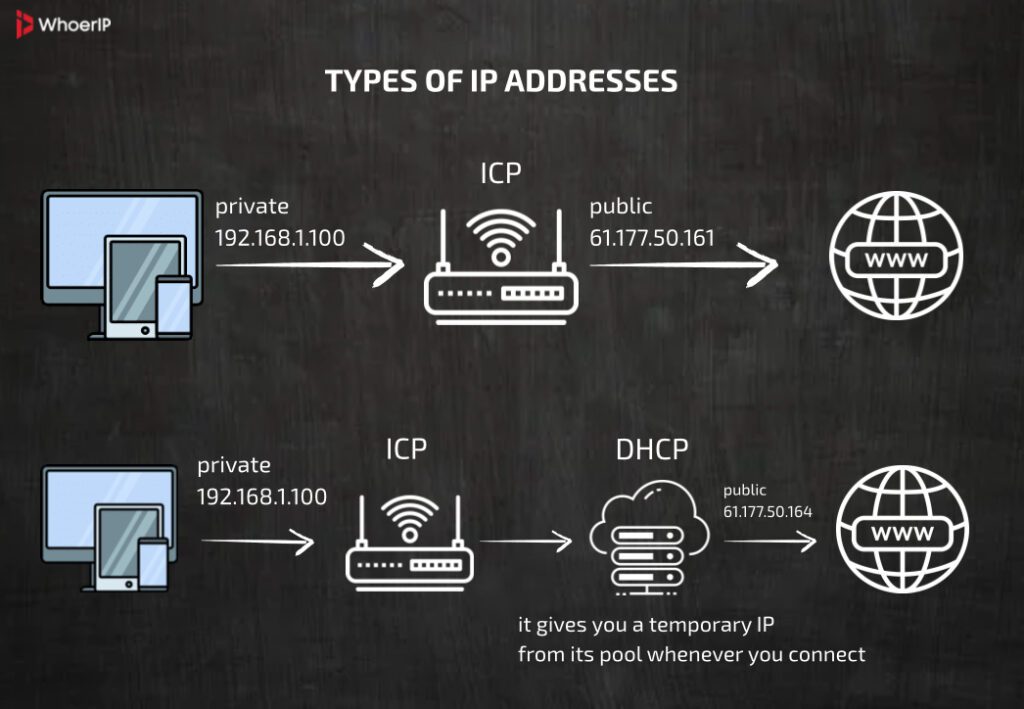
A dynamic IP address is a temporary address automatically assigned to a device by a DHCP (Dynamic Host Configuration Protocol) server, typically provided by an Internet Service Provider (ISP) or a local network router. Unlike static IPs, dynamic IPs change periodically—usually when the device reconnects to the network or after a set lease time expires. This is often used in order to change IP of a user.
How Dynamic Protocol Works
- You don’t choose an address, it comes to you. Every time you connect to the internet, your provider gives you a new IP address. It’s like checking into a hotel; the room is different each time.
- It’s managed automatically with special “manager,” the DHCP server, handles everything. It assigns IP addresses to everyone who connects, like room keys in a hotel.
- It can change every day. You turn off the router, turn it on again — and voila, you already have a different IP. Sometimes it lasts longer, sometimes it changes more often — it depends on the provider.
- Does not require manual configuration. Everything happens on its own: you connect — the IP is already there. There are minimal settings, and there are no nerves.
Advantages of Dynamic IP Addresses
- It is free and is the default option and most users have this type of IP. It does not require payment as a “personal” static one.
- More anonymity, you are more difficult to track on the Internet (well, by IP for sure). In cases you are interested “How to Remain Anonymous On The Internet in 2025” feel free to rad our guide.
- Safer from attacks because It’s difficult for hackers to “aim” if you’re on the move all the time. Today here, tomorrow there.
- Easy to use with mo complicated settings — I just turned on the Internet and went to watch YouTube or write my diploma.
- Perfect for regular tasks like surfing, streaming, and playing don’t require a stable IP. Why pay more?
Disadvantages of Dynamic Internet Protocol Addresses
- No permanent “address”, If you want to connect to your computer from another part of the world, it won’t work. Today, it’s at one address, and tomorrow, it’s at another.
- Difficulties with remote access, working with video surveillance, a server, or a VPN through a dynamic IP is like trying to call a friend whose number changes every day.
- Not suitable for hosting you want your own website, email server, or database. Forget about it. A dynamic IP won’t provide the necessary stability.
A dynamic IP is like renting a scooter: cheap, convenient, and fast. But if you want your own “bicycle” with a lock, headlights, and stand, you’ll need a static one. It all depends on how you use the internet. For most tasks, the dynamics are sufficient.
Top 10 Dynamic IP Use-Cases and Scenarios
1. Normal surfing on the Internet
Watching YouTube, flipping through TikTok, reading articles – why pay for a permanent IP if everything works just fine? Just turned on Wi-Fi – and go! Dynamic IPs automatically assign you an address, so you don’t even notice the difference. No setup, no extra costs—just instant internet.
2. Online shopping and banks
Making purchases, checking the balance on the card? All this works perfectly with a dynamic IP. The main thing is that there is an Internet, and what kind of address it has – what does it matter? A dynamic IP doesn’t hold you back. Banks and shops care more about encryption (HTTPS, 2FA) than your IP address. As long as you have a connection, it works—no need for a fixed IP.
3. Working from home through a browser
If you don’t connect directly to an office server, but use Google Docs, Zoom, or email, a dynamic IP is more than enough. You’re not directly connecting to a company server—just logging into cloud services. No IT department will complain about your changing IP.
4. Games and streaming
Do you want to play games in the evening or watch Netflix? A dynamic IP is not a problem at all. Most gamers and streamers can live without a static IP. Your dynamic address updates silently in the background, and you won’t even notice. Only hardcore server hosts need fixed IPs—everyone else is good to go.
5. Smartphones and tablets
Phones constantly connect to new networks, such as cafes, subways, homes, and workplaces. Why do they need a permanent IP if it’s going to change anyway? Dynamic addressing is built into 4G/5G and public hotspots. It’s designed for mobility, so no need to overcomplicate things.
6. Rented apartments or dormitories
Are you living temporarily, connecting to shared Wi-Fi? Dynamic IP is the ideal solution. Minimum hassle, maximum comfort. A dynamic IP means zero setup—just plug and play. No need to configure routers or worry about IP conflicts. It’s the “set it and forget it” solution.
7. Parents have Wi-Fi
I set up the router at my dacha or at my mother’s house and forgot. No one will bother with the IP, everything works that way. The main thing is to catch and not slow down. Dynamic IP means no maintenance—no one’s hosting servers or needing remote access. Just reliable internet without the hassle.
8. Public networks and cafes
In a coffee shop or at the airport? Everyone connects and gets a temporary IP. And that’s a good thing – no one is tracking, no one is breaking anything. Just coffee and Wi-Fi. Public Wi-Fi gives you a temporary IP, and that’s fine—you’re just browsing, not running a server. No tracking, no complicated setups. Connect, sip your latte, and move on.
9. Remote work through cloud services
Working in Trello, Notion, Figma – no problems. All cloud platforms work perfectly with any IP, even if it’s a new one every day. Everything syncs online, so you could switch from home Wi-Fi to a mobile hotspot mid-task with no issues.
10. Home internet for the whole family
Children watch cartoons, parents read the news, and someone works — and all of this is perfectly handled by a dynamic IP. You don’t have to pay for things you don’t use. No need for a static address unless you’re hosting a game server or security cameras. Why pay extra when the basics work just fine?
The takeaway? A dynamic IP is like a subway or a bus: it’s simple, convenient, and affordable. You don’t need to pay for a private helicopter (static IP) if you’re just going to work or visit someone. It’s perfect for everyday life.
Dynamic IP vs Static IP: How to Choose Correct IP Address Type?
Choosing between a static and a dynamic IP is like choosing between renting and buying an apartment. It all depends on what you really need.
If you’re a regular user who watches videos, uses social media, plays online games, and works in the cloud, a dynamic IP is 100% suitable for you. It’s automatically assigned, requires no configuration, and is provided free of charge by most providers. It’s convenient, simple, and secure: you’re constantly “on the move,” making it harder to track.
But if you’re running a server, working with remote access, managing video surveillance, or setting up a VPN, you’ll need a static IP. It provides stability, control, and a consistent entry point. While it may require a slight additional cost and security considerations, it ensures a smooth and reliable online experience.
Consider whether you want to be easily discoverable online. Alternatively, if you prefer a worry-free browsing experience, the answer to this question will guide your decision. The key is not to overpay for things you don’t use, and not to cut corners where stability is the key to success.
Dynamic vs Static IP Addresses: Key Differences
| Feature | Dynamic IP | Static IP |
| Assignment | Automatically assigned by DHCP | Manually configured by admin/ISP |
| Stability | Changes periodically (lease expires) | Permanent, never changes |
| Cost | Usually free (standard with ISPs) | Often requires extra fees from ISP |
| Security | More private (harder to track) | More exposed (easier to target) |
| Hosting Services | Poor (IP changes disrupt connections) | Ideal (stable for servers, VPNs, etc.) |
| Remote Access | Unreliable without DDNS | Always accessible |
| Configuration | Automatic (no setup needed) | Manual (requires technical setup) |
| Best For | Home users, casual browsing, IoT | Businesses, servers, hosting, VoIP |
Bare in mind your needs, compare and choose the one which suits your personal needs
Static vs Dynamic IP: Which are more secured?
Let’s be honest: no one wants to be spied on online. But in a world where even your refrigerator can be online, cybersecurity is no longer a matter of paranoia but of common sense. The security of an IP address depends on how it’s used, but generally this brings us to the important choice: static or dynamic IP?
Dynamic IP – when you want to be invisible
It’s like renting a scooter: convenient, fast, and no one remembers where you’ve been. The IP changes every time you connect to the network — and that’s cool, because:
- It’s harder to track you. Today you’re in one “digital apartment”, tomorrow in another. Good luck to those who try to follow.
- Less chance of hacking. If the address is constantly changing, attackers lose interest in you — you’re too “slippery” for them.
- No hassles. Just turn on the internet — and go: video, social networks, work, streams. Everything flies.
Static IP is convenient, but be careful
It’s like having your own house with a sign on the door. The same address, always. Is it reliable? Yes. But:
- You’re always visible. This makes it easier to attack. The target doesn’t move.
- Anonymity is at risk. A single IP day after day = a clear digital history.
- You’ll have to protect yourself. VPN, firewall, closed ports. Without it, it’s like living with a door without a lock.
Static vs Dynamic IP Address, What to Choose?
- If you’re an ordinary user and don’t run a server in your bedroom, go with a dynamic one. It’s convenient, secure, and doesn’t require any fancy tricks.
- If you’re an IT specialist, an administrator, or have your own security system, you can use a static IP, but be prepared to defend it like a fortress.
IP is your “internet address.” Just like in real life, some people prefer to live in a new place every day, while others want their own corner with a good security system. The key is to remember that the easier it is to find you, the more important it is to know how to protect yourself.
Dynamic VS Static IP Conclusion
In today’s digital world, IP addresses are like house addresses in the city of the internet. They help devices find each other, establish connections, and transfer data. There are two main types of IP addresses: dynamic and static, and there are important differences between them.
A dynamic IP address changes over time, like a hotel room that is rented temporarily. This is convenient for everyday activities such as web browsing, watching videos, or communicating. In addition, such addresses are usually cheaper and increase the level of security, because they change often.
A static IP address, on the contrary, is constant — like a personal mailbox. It is needed if you run a server, want to remotely connect to your computer, or provide stable communication, for example, for video conferences or online games.
Facing dynamic IP vs static IP leads to the fact that the choice between these two types depends on your tasks. The main thing is to understand that a static IP gives control and reliability, and a dynamic one — flexibility and simplicity.
- NodeMaven provides premium proxy services with high-quality static IPs, perfect for businesses needing reliable, secure connections for automation, web scraping, or server management. Their infrastructure ensures uptime and performance while maintaining security standards.
- Multilogin revolutionises secure browsing with its anti-detect technology, allowing professionals to manage multiple accounts across platforms without triggering fingerprint-based security alerts.
Remember: in cybersecurity, there’s no universal “best” solution—only what’s best for your particular use case. Regularly reassess your needs as they evolve, and don’t hesitate to adjust your IP strategy alongside emerging threats and technologies.
Frequently Asked Questions
1. How to set static IP?
On Windows: Go to Control Panel > Network and Sharing Center > Change adapter settings > Right-click your network > Properties > IPv4 > Use the following IP address. - On Linux: Edit /etc/netplan/*.yaml or /etc/network/interfaces. - On macOS: System Preferences > Network > Advanced > TCP/IP > Configure IPv4 Manually.
2. How often do dynamic IP addresses change?
Depends on the DHCP lease time (usually 24 hours, but can vary).
3. What is dynamic IP addressing?
A temporary IP assigned by a DHCP server, which can change over time.
4. How do I get a Dynamic IP?
Connect to a network with DHCP enabled (most home networks use DHCP by default).
5. How to assign static IP?
Manually configure IP settings in network adapter properties (as in Q1).
6. How to assign static IP in VirtualBox?
In VM settings: Network > Attached to: Bridged/NAT > Advanced > Port Forwarding (or configure inside the guest OS).
7. Can static IP address printers connect to Windows?
Yes, if the printer’s static IP is on the same subnet as the Windows PC.
8. How to find static IP address?
On Windows: ipconfig (look for manually set IPv4 address). On Linux/macOS: ifconfig or ip a. Check router’s DHCP client list to see assigned static IPs.
9. How to change my IP?
Dynamic IP (DHCP): Restart your router (gets a new IP from ISP). Release & renew IP (Windows: ipconfig /release then `ipconfig /renew`). Static IP: Manually set a new IP in network settings. VPN/Proxy: Use a VPN or proxy service to mask your IP. Contact ISP: Request a new IP (may not always work).