

There are so many antidetect browsers, it’s hard to pick and choose. It might be not easy to get all the valuabale information on loaded sites, but don’t worry! This article will help you to discover best antidetect browsers, explore their key features, pros and cons and compare them!
Quick Showdown
We tested the top antidetect browsers used for social media, affiliate marketing, and multi-account management. Each has its strengths — whether it’s fingerprint masking, automation, or collaboration tools. Here’s a quick overview of what each browser does best:
| Browser | Core Focus Description |
|---|---|
| Multilogin | Android cloud phones, built-in proxies, and a desktop app for real device identity at multi-profile scale |
| GeeLark | Balanced solution with team tools and automation support |
| Undetectable | Best for large-scale operations and crypto farming. Local storage, handles hundreds of accounts, avoids data leaks and rising costs. |
| Octo Browser | High encryption and privacy control for crypto and finance |
| GoLogin | Cloud-based multi-account management with user-friendly UX |
| 1Browser | Built-in proxies and instant profile setup, no separate provider needed |
| AdsPower | High-scale profile management with strong RPA automation |
| Kameleo | Mobile fingerprint emulation and advanced automation options |
| Incogniton | Simple, organized profile sharing for teams and budget users |
| NSTBrowser | Built-in automation and headless mode for large ops |
| MoreLogin | Cloud collaboration and cost tracking for distributed teams |
| Hidemyacc | Low level browser engine customization to ensure consistent fingerprints and minimize detectable logical inconsistencies |
What are Anitidetect Browsers
What Are Antidetect Browsers?
Think of an best antidetect browser as your digital disguise. It’s a web browser, but instead of acting like a regular one, it’s built to help you blend in. It hides or fakes your device details — like your operating system, screen resolution, browser type, and more — so that websites can’t easily track or recognize you.
Unlike a VPN, which mainly changes your IP address, an antidetect browser adjusts everything else. This way, your digital fingerprint doesn’t stand out online, even if you open dozens of tabs with different identities.
Your browser fingerprint includes far more than just cookies or your IP. Sites can detect your hardware specs, fonts, extensions battery level and even more.
Here’s a comprehensive list of what browsers can expose to websites*:
IP address, User-Agent, Accept-Language, Referer, Cookies, Screen resolution, Color depth, Timezone offset, Local time, Locale, Platform (OS), Browser name and version, Installed plugins, Touch support, WebGL fingerprint, Canvas fingerprint, Audio fingerprint, Fonts list, Device memory, Hardware concurrency (CPU cores), Battery status, Network type and speed, Media device info (camera, mic), Geolocation (if permitted), WebRTC IP leaks, Installed extensions, Number of open tabs/windows (partially), Session storage, Local storage, IndexedDB data, Device orientation/motion sensors (mobile), Navigator properties (vendor, product, etc.), Client Hints (UA-CH), Mouse movement and typing behavior, Viewport size, Window size, Referrer policy, SSL/TLS info (via headers), Content Security Policy (CSP), Cross-Origin Resource Sharing (CORS) behavior, HSTS status, AudioContext fingerprint, WebSocket fingerprint, Media capabilities (e.g. codec support), Navigator.deviceMemory, Navigator.webdriver flag (if enabled), Bluetooth/Wi-Fi scan data (on some devices).
* either directly via HTTP headers or through JavaScript APIs.
Testing Antidetect Browsers
How to know they’re doing their job? Before trusting any antidetect browser, you need to verify how well it hides your real identity. Fingerprinting tools let you see exactly what websites can detect: your IP, device specs, browser behavior, and dozens of subtle signals. These services give you a snapshot of what your browser is “leaking.”
To check if an antidetect browser does what it promises, visit tools like:
These platforms show what websites can see about you. A good antidetect browser should limit that visibility and avoid producing a unique profile.
Even the most advanced antidetect browser can fall short without proper setup. Testing tools help you catch weak points early—like detectable fingerprints or WebRTC leaks—so you can fix them before real-world tracking systems do. Think of it as checking your disguise in the mirror before heading into a surveillance zone.
Pro Tip: Try opening a few profiles in your antidetect browser and run the tests. If each profile appears like a completely different person, you’re on the right track.
Top Antidetect Browsers to Consider in 2025
Antidetect browsers have become essential tools for privacy-conscious users, affiliate marketers, e-commerce operators, and agencies managing multiple online identities.
These browsers mask your digital fingerprint, isolate sessions, and integrate proxies to avoid detection and bans. In 2026, standout names like GoLogin, Multilogin, Incogniton, Octo Browser, and GeeLark continue to lead the pack.
Below, we break down each of these platforms to help you choose the best one for your workflow and security needs.
1. Multilogin

Key Features from Multilogin
- Real Android cloud phones (IMEI, Android ID, MAC, system settings) running native Android apps, one per account
- Built-in residential proxies and mobile minutes included in every plan
- Isolated browser profiles for web-based accounts in the same dashboard
- 30+ Android device types and multiple Android versions per profile
- 24/7 expert support in 5 languages — EN, VI, RU, ZH, PT
- App data and login history persist between sessions, so each account builds its own history
- Automation-ready: API and full ADB access for cloud phones; Selenium, Puppeteer, and Playwright for browser profiles
- Team seats and permissions for sharing and assigning profiles
- App storage, cache, and login states persist between sessions for natural account warm-up.
If you need a reliable platform for multi-account social media work, privacy-first browsing, or geo-flexible operations, Multilogin remains one of the most established names in the space. It’s used by social media marketers, agencies, creators, affiliate and media buyers, e-commerce operators, and increasingly AI workflow builders.
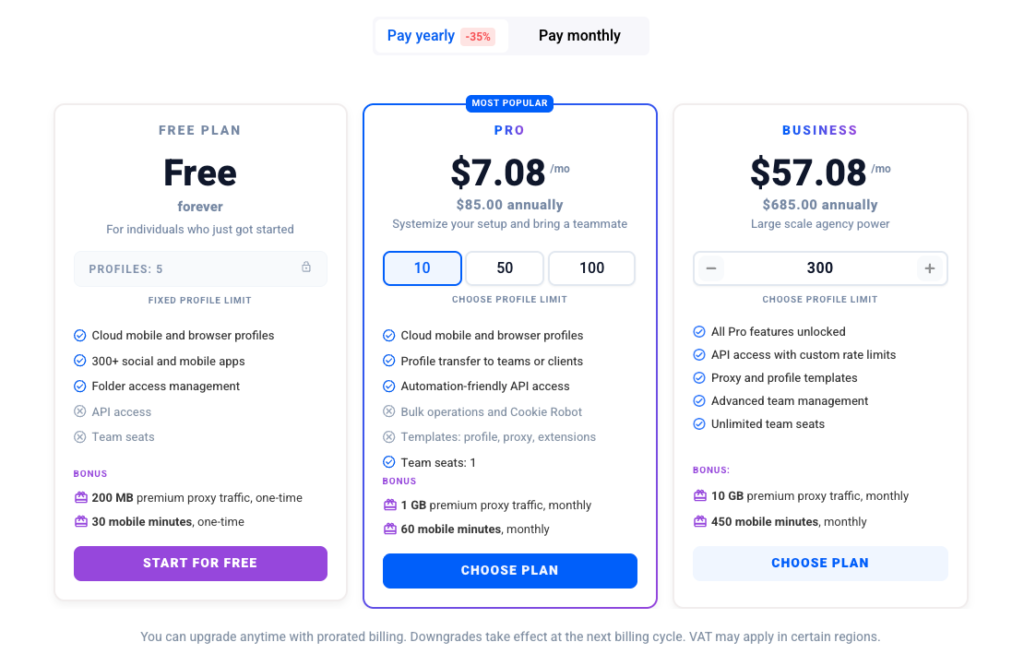
FYI: as of the July 2026 pricing update, Multilogin became one of the most cost-effective platforms in the cloud phone market. The Free plan now lets you try a real Android cloud phone at no cost, no credit card required, no time limit on the plan itself.
Core Strengths
- Real Android cloud phones: each mobile profile runs on a genuine Android device in the cloud, not an emulator, with real hardware identifiers (IMEI, Android ID, MAC address).
- Multi-profile environment: create, manage, and switch between hundreds of isolated cloud phone and browser profiles, each with its own identity and proxy.
- Proxy flexibility: built-in residential proxies included in every plan, plus support for HTTP, HTTPS, ISP, and SOCKS5, giving you full control over IP and location.
- Clean, beginner-friendly interface: manage cloud phones, browser profiles, and proxies from one dashboard, with no technical setup required.
Try a Cloud Phone for Free
You can actually test a real Android cloud phone at zero cost. The Free plan includes:
- Up to 5 profiles total (browser + up to 1 mobile cloud phone)
- 30 free mobile minutes (one-time allocation)
- 200 MB of free proxy traffic (one-time allocation)
- No time limit on the plan and no credit card needed
Who Is It Best For?
- Social media marketers and agencies managing multiple profiles across TikTok, Instagram, Facebook, Reddit, and YouTube.
- Affiliate and media buyers running campaigns across multiple accounts.
- E-commerce and marketplace operators managing multiple storefronts or accounts.
- AI workflow builders who need isolated mobile and web environments for agents.
- Scrapers and researchers who need stealth access to websites.
| Pros | Cons |
|---|---|
| ✅ Multilogin has a genuinely free plan | ❌ Proxy setup can require initial configuration |
| ✅ Strong fingerprint masking | ❌ Requires learning for full automation use |
| ✅ Built-in residential proxy support | |
| ✅ Versatile for marketing, gaming, crypto etc. | |
| ✅ Chrome/Firefox emulation (Mimic, Stealthfox) | |
| ✅ Team collaboration features | |
| ✅ Cloud sync across devices & VPS | |
| ✅ Automation-ready (anti-bot evasion) | |
| ✅ Beginner-friendly and easy to use | |
| ✅ 24/7 customer support |
Multilogin remains a powerful option for users who prioritize control, privacy, and scale. While not the most budget-friendly, its stability and flexibility make it a smart pick for professionals and teams. If you’re comparing antidetect browsers in 2025, Multilogin is still a heavyweight contender worth testing.
2. Afina Browser

Afina Browser is an antidetect browser built for teams and professionals who run many accounts at scale. Every account lives in a fully isolated profile with its own real-device fingerprint — an authentic one, not a synthetic set of values — so sessions look genuinely distinct and stay unlinked.
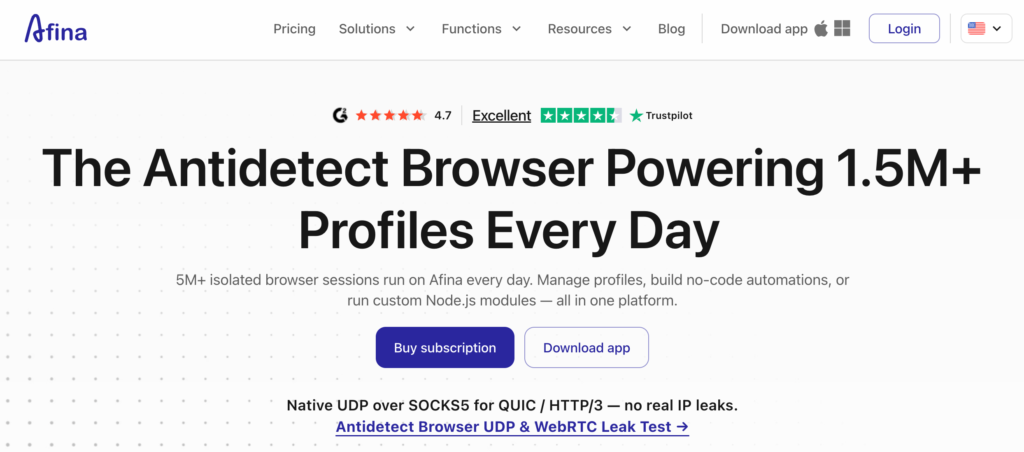
It’s a natural fit for affiliate marketers, media buyers, e-commerce sellers and agencies that need each account to hold on its own. Secure. Isolated. Scalable.
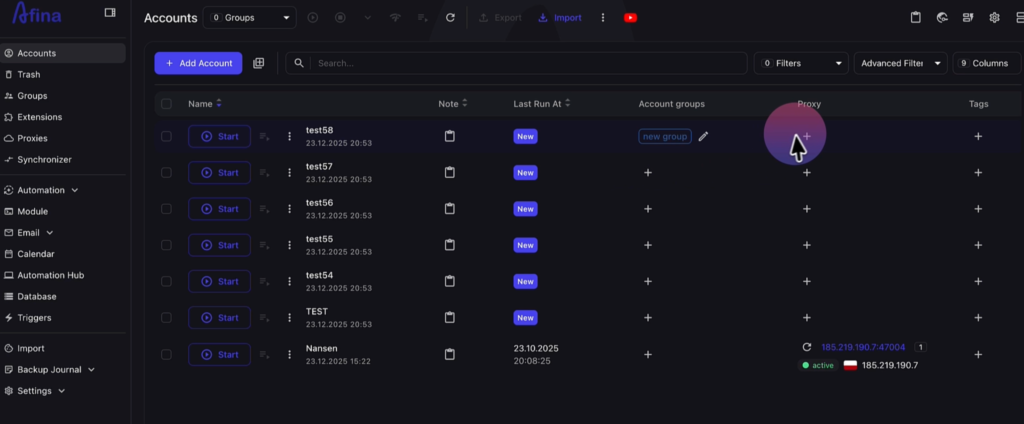
Key Features from Afina Browser
- Fully isolated profiles built on real-device fingerprints — not generated values
- Passes Pixelscan, CreepJS and similar detection checks
- Canvas / WebGL spoofing with WebRTC & DNS leak protection
- WebRTC & UDP leak protection incl. QUIC / HTTP-3 — the real IP never leaks over UDP transports
- Built-in proxy management — HTTP / HTTPS / SOCKS5, incl. mobile & UDP proxies
- No-code visual automation builder plus full Node.js / npm scripting
- Run scenarios and receive reports straight from a Telegram bot
- Cookie import — restore sessions without passwords
- Client-side AES-256 encryption; keys never leave your device (local-first)
- Team collaboration (2–10 seats) · up to 1,000 profiles per workspace
- Automation & API on every plan · familiar Chromium engine
Core Strengths
- Leak protection that goes further. Blocks real-IP leaks across UDP transports — WebRTC and QUIC / HTTP-3 — not just WebRTC like most tools.
- Fingerprints that hold up to scrutiny. Built on real-device data and verified against the checks that matter — Pixelscan, CreepJS and the rest — so profiles read as genuine, not generated.
- Automation without a ceiling. A no-code visual builder for quick flows and full Node.js / npm for complex ones — you can even trigger runs and pull reports from Telegram.
- Your data stays yours. Client-side AES-256 encryption with keys that never leave your device, and local-first storage by default.
- Scales with your team. 2–10 seats and up to 1,000 isolated profiles from a single workspace.
- Familiar Chromium base. Compatible, extension-friendly, no learning curve — plus flexible payment via cards, Apple / Google Pay and 25+ cryptocurrencies.
Who Is It Best For?
- Affiliate marketers & media buyers running many accounts
- E-commerce and marketplace sellers
- Agencies and teams needing shared, isolated profiles
- Privacy-focused users who need strong anti-leak protection
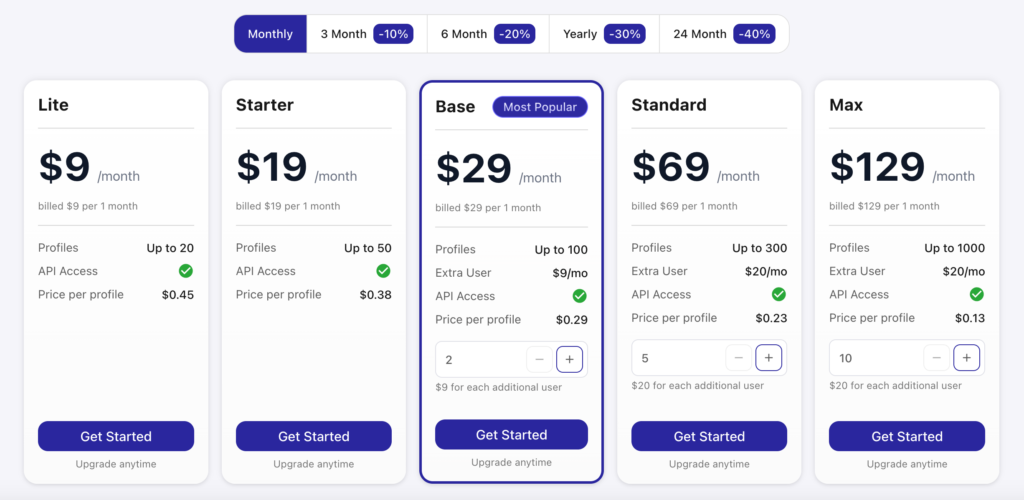
Pricing
| Plan | Monthly | Profiles | Team seats |
|---|---|---|---|
| Lite | $9 | 20 | — |
| Starter | $19 | 50 | — |
| Base | $29 | 100 | 2 |
| Standard | $69 | 300 | 5 |
| Max | $129 | 1,000 | 10 |
All plans include API. Period discounts up to −40%. Payment: cards, Apple/Google Pay, 25+ crypto.
| Pros | Cons |
|---|---|
| ✅ WebRTC & UDP leak protection incl. QUIC / HTTP-3 | ❌ Windows & macOS only (no Linux yet) |
| ✅ Passes Pixelscan & CreepJS detection checks | ❌ Newer to market than incumbents |
| ✅ Real-device fingerprints, not generated values | |
| ✅ Canvas / WebGL spoofing, WebRTC & DNS leak protection | |
| ✅ Built-in proxy support (HTTP / HTTPS / SOCKS5, mobile & UDP) | |
| ✅ No-code automation builder + full Node.js / npm scripting | |
| ✅ Telegram bot to run scenarios & get reports | |
| ✅ Client-side AES-256 encryption; keys never leave your device | |
| ✅ Cookie import — restore sessions without passwords | |
| ✅ Team collaboration — up to 10 seats · up to 1,000 profiles | |
| ✅ Automation & API on every plan · Chromium engine | |
| ✅ Free 4-day trial · cards, Apple/Google Pay & 25+ crypto |
Verdict. Afina Browser earns its place near the top. Leak protection reaches where most tools stop — real IPs stay hidden across WebRTC and QUIC / HTTP-3 — fingerprints are built from real-device data and pass Pixelscan and CreepJS, and automation runs from a no-code builder up to full Node.js. Add client-side AES-256 encryption, team seats and pricing that starts at $9, and it’s a genuinely strong pick for anyone running many accounts at scale.
3. Undetectable.io
Best, for: the large scale operations, crypto farming and privacy focused teams that need the data storage. In my experience Undetectable Browser takes an approach, from cloud based competitors. Undetectable Browser is built to manage hundreds or thousands of accounts. Undetectable Browser avoids data leaks and rising costs.
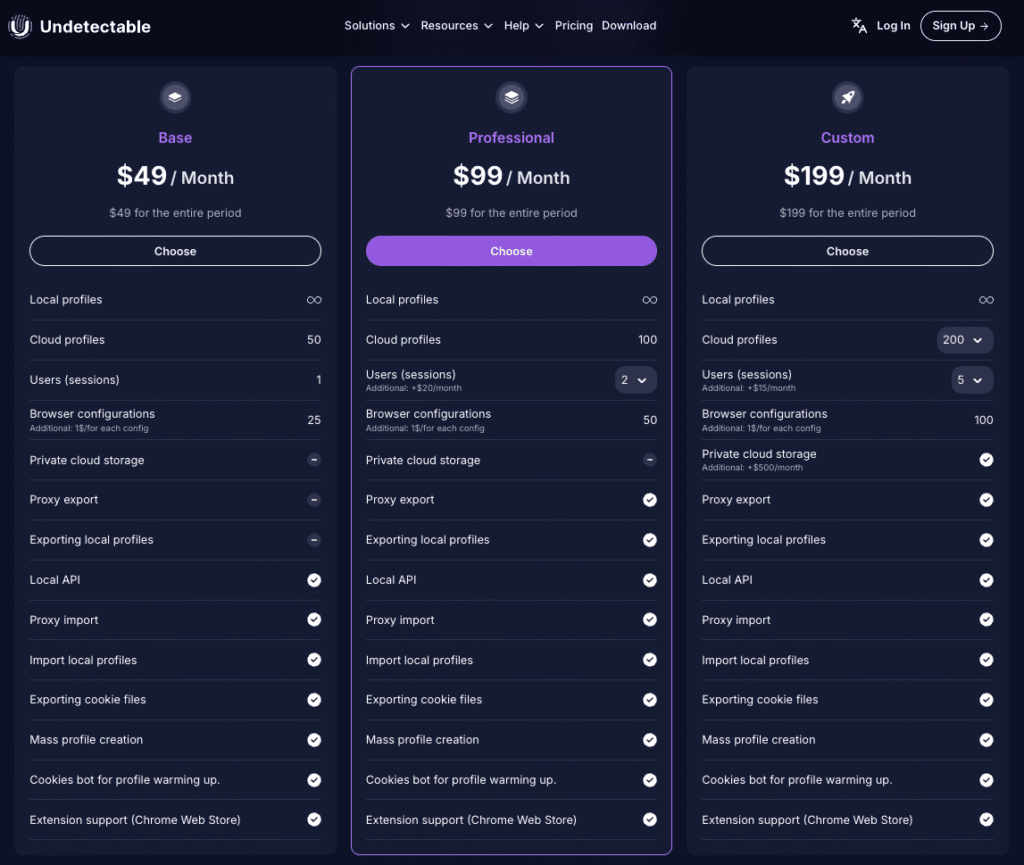
Unlike browsers that charge for each profile slot I have seen Undetectable offer local profiles on every paid plan. That makes Undetectable a cheap choice, for agencies and for setups with accounts. I also notice that Undetectable uses a zero trust architecture. In that design, profiles and sensitive data such as keys and cookies stay on the local device. This keeps the data, in the user’s control. Lowers the risk of cloud breaches.
Key Features
- Unlimited Local Profiles: Save many profiles as the hard drive can hold. Unlimited Local Profiles do not care about the subscription plan.
- Local Storage & Security: I keep my data on my device. The data never leaves the device unless I decide to sync the data. Local Storage & Security helps me manage high-value crypto wallets.
- Fingerprints: The browser works around systems. The browser gives device fingerprints instead of just masking device fingerprints.
- Synchronizer: I use Synchronizer for farming. Synchronizer lets me control dozens of browser windows at the time. When I type, click or scroll, in the window Synchronizer copies those actions to all the windows instantly.
- Mass Extension Management: Install MetaMask, 2FA, or other extensions into hundreds of profiles with just a few clicks.
Who is Undetectable Browser for?
Crypto & Airdrop Hunters are perfect, for users who manage farms of wallets. The local storage makes sure the private keys never touch a server. The Synchronizer and the mass extension installer save hours on tasks.
Affiliate Marketers: The “Unlimited Local Profiles” feature makes high volume traffic arbitrage easier. The “Unlimited Local Profiles” feature lets Affiliate Marketers run hundreds of ad accounts, on Facebook or Google and avoid bans and rising software costs.Marketing Agencies: I find Marketing Agencies for teams that manage client accounts. Undetectable builds an isolated environment, for each client. Undetectable prevents cross‑linking. Stops blocks.
For webscrapers and analysts who need isolation and scale.
| Pros | Cons |
|---|---|
| ✅ Unlimited Local Profiles: Cost-effective scaling without paying for extra slots. | ❌ The Synchronizer feature is currently available for Windows OS only. |
| ✅ Privacy First: The profiles and the data stay on the device. Privacy First stores the profiles and the data locally. The security is high. | ❌ Cloud limits: Local profiles have no limit. Cloud limits, for cloud‑synced profiles depend on the plan. |
| ✅ Advanced Automation: API, Built-in Synchronizer,”Smart Paste” and mass extension installer. | |
| ✅ Free Plan includes five profiles and the basic functionality. Free Plan lets you test before you buy. |
Verdict: In my view if you are tired of paying for extra profile slots or you need security, for data storage Undetectable Browser is the best choice. Undetectable Browser is the tool, for professionals. Undetectable Browser gives you stability and unlimited growth at a fixed price.
4. GeeLark
Key Features from GeeLark
- True cloud‑hosted Android devices that behave like real smartphones
- Each cloud phone gets its own unique hardware identifiers
- Built‑in support for proxies (HTTP/HTTPS/SOCKS5)
- Bulk & Phone Farm Management
- The Synchronizer feature lets you mirror actions from one phone to others
- Automation & RPA Workflows
- Integrated AI assistance and creative tools
Simple on the surface, but don’t underestimate it. GeeLark is a great pick for those who need solid fingerprint protection without a steep learning curve.
GeeLark is an anti-detect browser designed for users who need to manage multiple online identities securely and efficiently. It’s especially relevant for digital marketers, affiliate managers, web scrapers, and anyone who values privacy and operational flexibility.
Core Strengths
- Manage multiple identities with isolated browser profiles
- Built-in proxy support for each profile
- Automation tools, API access, and team features
- Profile sync, operation logs, and usage tracking
Who Is It Best For?
- Marketers & Affiliates running multiple accounts
- Scrapers & Analysts needing diverse IPs and setups
- Teams & Agencies managing profiles collaboratively
- Privacy-focused users avoiding tracking and detection
| Pros | Cons |
|---|---|
| ✅ Advanced fingerprint protection | ❌ Subscription cost may be high for heavy users |
| ✅ Account management with unique profiles | ❌ Demands more system resources |
| ✅ Proxy integration for location masking | ❌ Detection risk from advanced anti-fraud systems |
| ✅ User-friendly interface, beginner accessible | ❌ Free plan is limited in functionality |
| ✅ Automation support for repetitive tasks | ❌ Takes time to learn automation tools |
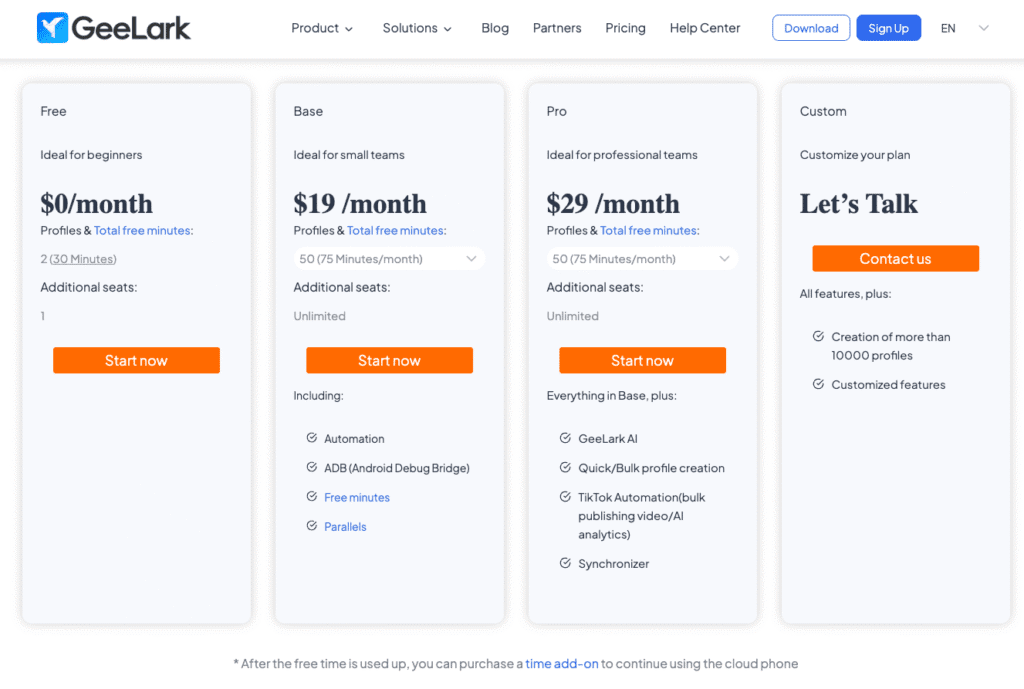
GeeLark stands out for its balance of robust features, flexible pricing, and ease of use. It’s a strong choice for both individuals and teams who need reliable, scalable anti-detect browsing.
If you’re serious about privacy, operational efficiency, and managing multiple online identities, GeeLark is well worth considering.
4. Octo Browser
Octo is built for high-stakes tasks like crypto, finance, or cybersecurity. It features high encryption and flexible settings. Power users love it, but it’s also getting easier for non-tech folks to use.
Core Features
- Separate browser profiles with unique cookies and fingerprints
- Proxy setup per profile for location masking
- Profile templates for quick setup
- Shared access for teams and agencies
- Fine control over browser behavior
- Referral rewards for inviting users
- Docs and support available when needed
Who Is It Best For?
- Marketers with multiple ad accounts
- E-commerce sellers with several stores
- Teams managing shared profiles
- Users avoiding tracking and fingerprinting
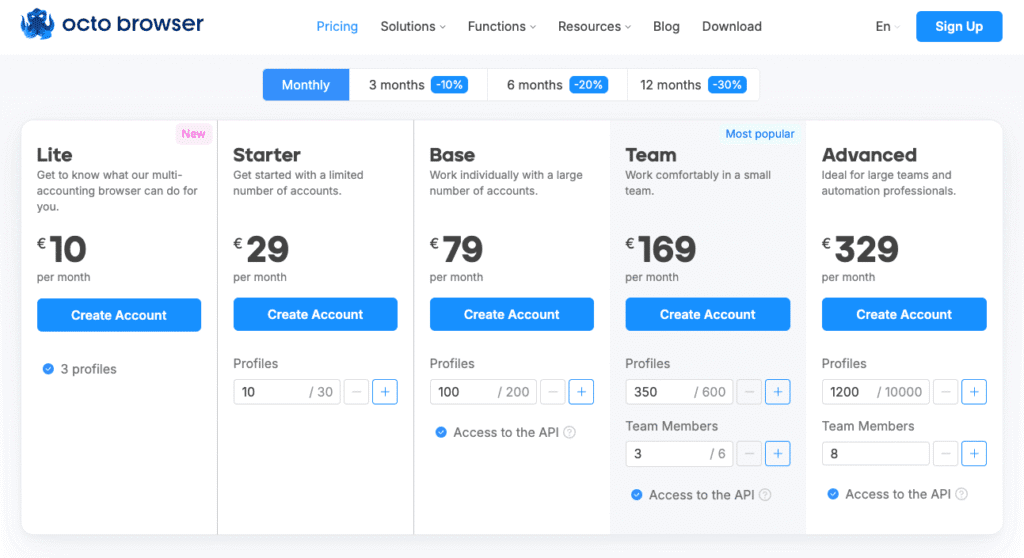
| Pros | Cons |
|---|---|
| ✅ Strong privacy and fingerprint control | ❌ Higher cost for solo users |
| ✅ Team collaboration tools | ❌ Some features require setup/learning |
| ✅ User-friendly interface | |
| ✅ Flexible subscription plans |
Octo Browser is a user-friendly anti-detect browser for secure multi-account management, with fingerprinting, proxy support, team tools, and flexible plans — ideal for marketers and agencies.
5. GoLogin

GoLogin is an anti-detect browser that helps you stay anonymous, bypass blocks, and run multiple accounts safely on a single platform — without getting flagged by fraud detection systems.
It works by creating unique digital fingerprints for each browser profile and supports automation via RPA scripts for advanced users.
Core Strengths
- Browser Fingerprint Isolation: Each profile functions like a unique device — with its own IP, timezone, cookies, WebRTC, and more.
- Multi-Account Protection: Avoid bans when managing multiple accounts on platforms like Facebook, Google, and TikTok.
- Cross-Platform Use: Works on Windows, macOS, Linux, and even Android.
- Automation-Ready: Run custom scripts via Puppeteer or Selenium for routine tasks or scraping workflows.
- Cloud Features: Launch and sync profiles from the cloud — useful for teams and remote workflows.
Who Is It Best For?
- Affiliate marketers juggling multiple ad accounts.
- SMM agencies managing dozens of social profiles.
- eCommerce sellers running regional store versions.
- Data collectors and researchers who need anonymity and control.
- Distributed teams who collaborate across multiple devices and regions.
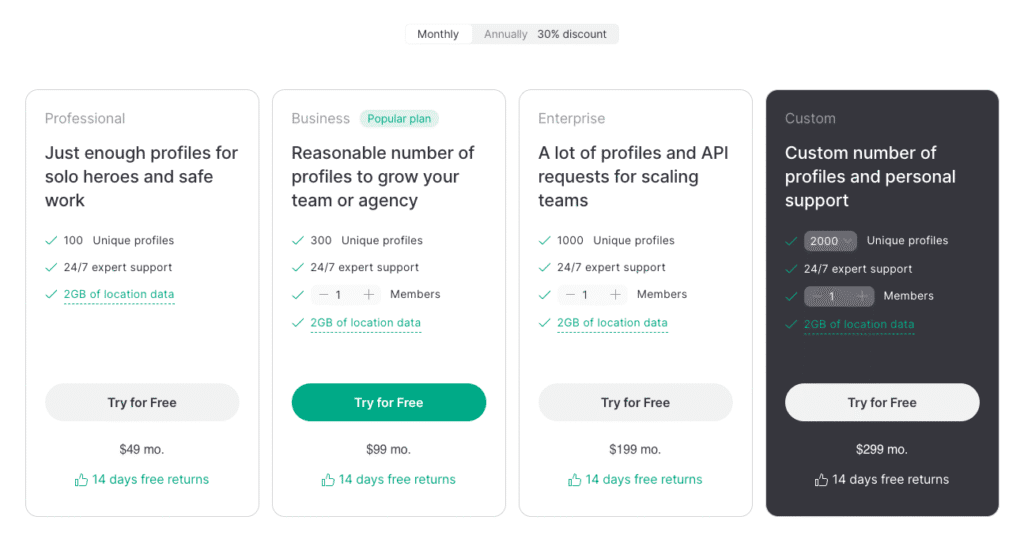
| Pros | Cons |
|---|---|
| ✅ Fingerprint protection | ❌ Pricey for heavy use |
| ✅ Multi-account support | ❌ Steep learning curve |
| ✅ Cloud profile sync | ❌ Possible detection on some sites |
| ✅ Proxy support | ❌ High system load |
| ✅ Beginner-friendly interface | ❌ Free plan limited |
| ✅ Cross-platform (Windows, macOS, Linux) |
GoLogin is a strong pick for individuals and teams who value anonymity, control, and ease of use. Its feature set is rich but approachable, making it great for both beginners and pros. With a free 7-day trial, you can explore its full potential risk-free.
6. 1Browser
1Browser is an antidetect browser with built-in proxies. It works like regular Chrome, but each profile is fully isolated — its own IP, fingerprint, cookies, and timezone. No complex setup — a profile is ready to use in a couple of minutes.
Unlike most tools, proxies are already inside. No need to find a provider, pay separately, or configure anything manually.

Key Features from 1Browser
- Profile Isolation: Each profile functions like a unique device — with its own IP, timezone, cookies, WebRTC, and Canvas.
- Built-in Proxies: Residential, Tor, and free proxies are included in every plan. Select a country and the proxy connects automatically.
- Simplicity: Chromium-based interface. If you've used Chrome, you'll figure it out immediately.
- Cloud Sync: Profiles are accessible from any device without additional configuration.
- Cross-Platform: Windows, macOS, and Linux.
Who Is It Best For?
- Beginners with no prior experience with antidetect browsers
- Affiliate marketers and SMM specialists
- Sellers on Amazon, eBay, and Shopify
- Anyone who wants proxies and fingerprint protection in one tool
| Pros | Cons |
| ✅ Built-in proxies on every plan | ❌ No API automation |
| ✅ Setup in 2 minutes | ❌ Smaller proxy pool than enterprise tools |
| ✅ Chrome-like interface | ❌ No mobile emulation (Android/iOS) |
| ✅ 10 free profiles, no credit card needed | |
| ✅ Cloud sync across devices |
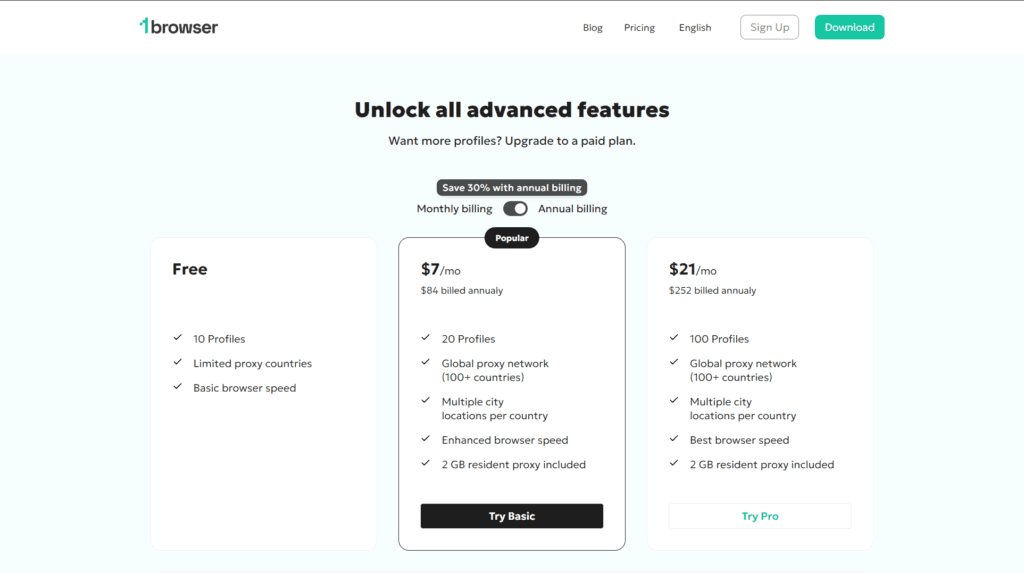
A solid choice if you need a simple start without overpaying. The free plan covers most basic use cases.
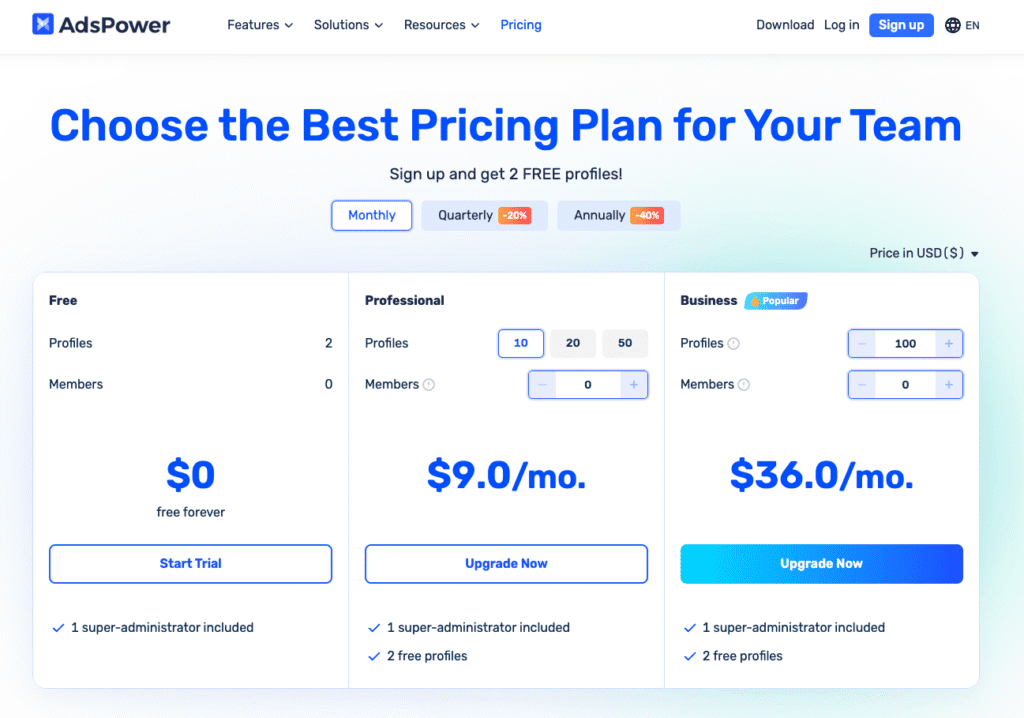
7. AdsPower

AdsPower is built for serious multitasking. Think hundreds of browser profiles, each with their own identity. It also includes automation tools that save time if you’re handling a large operation in e-commerce or marketing.
Core Strengths
- Unique fingerprints for each profile to avoid detection
- Sync browsing across profiles for faster multi-account actions
- Built-in RPA tools for automating repetitive tasks
- Simple, clean interface for quick setup and management
- Team access with role control and activity logs
- Proxy support per profile for better anonymity
- Flexible pricing for solo users and teams
Who Is It Best For?
- Affiliate marketers running multiple ad accounts
- E-commerce sellers managing several stores
- Arbitrage teams scaling campaigns across platforms
- Agencies coordinating account access across teams
- Privacy-focused users avoiding tracking and profiling
| Pros | Cons |
|---|---|
| ✅ Handles thousands of browser profiles | ❌ High resource usage on weak machines |
| ✅ Strong team collaboration tools | ❌ Takes time to learn advanced features |
| ✅ RPA + automation via Selenium, Puppeteer | ❌ Can still be detected by some platforms |
| ✅ Flexible proxy support | ❌ Free plan is limited in features |
| ✅ Simple and user-friendly interface | ❌ Support quality may be inconsistent |
| ✅ Competitive pricing |
AdsPower is a robust anti-detect browser that delivers on its promise to help users manage multiple accounts without getting banned.
Its combination of fingerprint management, automation, and team features makes it a top choice for professionals and businesses operating at scale. If you need a reliable solution for multi-account management in 2025, AdsPower is definitely worth considering.
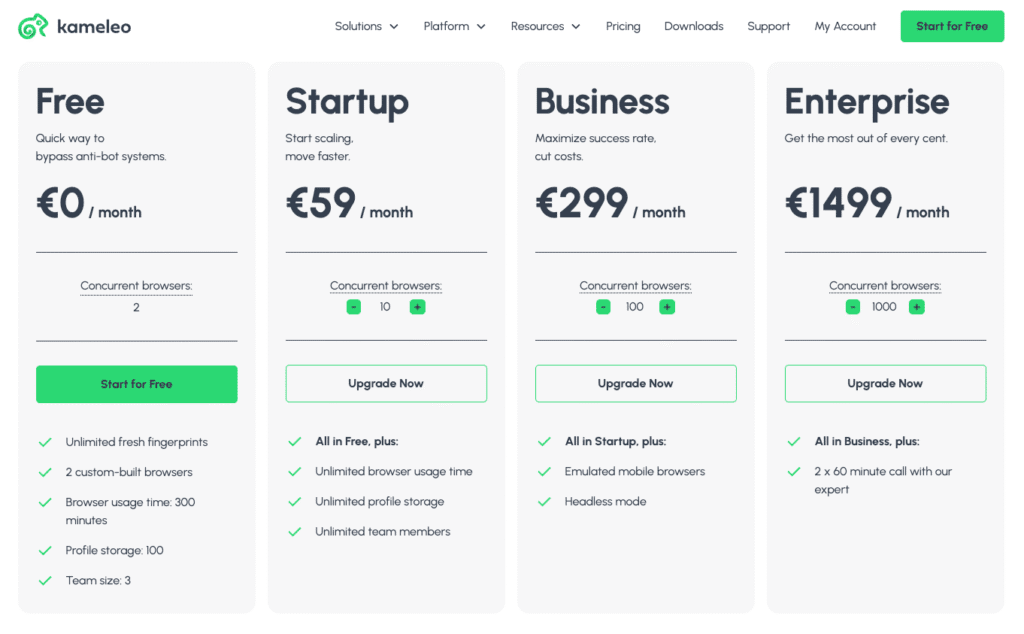
8. Kameleo

Need mobile fingerprinting? Kameleo nails that. It lets you emulate Android devices — useful when certain sites behave differently on phones. It’s tech-heavy, but powerful.
Core Strengths
- Multiple profiles with separate browser fingerprints
- Automation support for scripts and bulk actions
- Works with private proxies for traffic routing
- Simple interface with sections for profiles, groups, automation, support, and settings
Who Is It Best For?
- Digital marketers managing multiple ad accounts
- E-commerce sellers running several storefronts
- QA and automation testers simulating user environments
- Privacy-conscious users browsing anonymously
- Affiliate marketers separating account activity
| Pros | Cons |
|---|---|
| ✅ Advanced fingerprint control | ❌ Paid plans can be expensive |
| ✅ Works on Windows, Android, macOS (beta) | ❌ High resource use with many profiles |
| ✅ Mobile browser emulation | ❌ Learning curve for advanced features |
| ✅ Supports multiple proxy types | ❌ Possible detection on strict platforms |
| ✅ Built-in automation tools (API, Selenium) | ❌ Limited free trial |
| ✅ Clean, user-friendly interface |
If your work or interests involve juggling multiple accounts, automating browser actions, or maintaining a high level of online privacy, Kameleo is a strong choice.
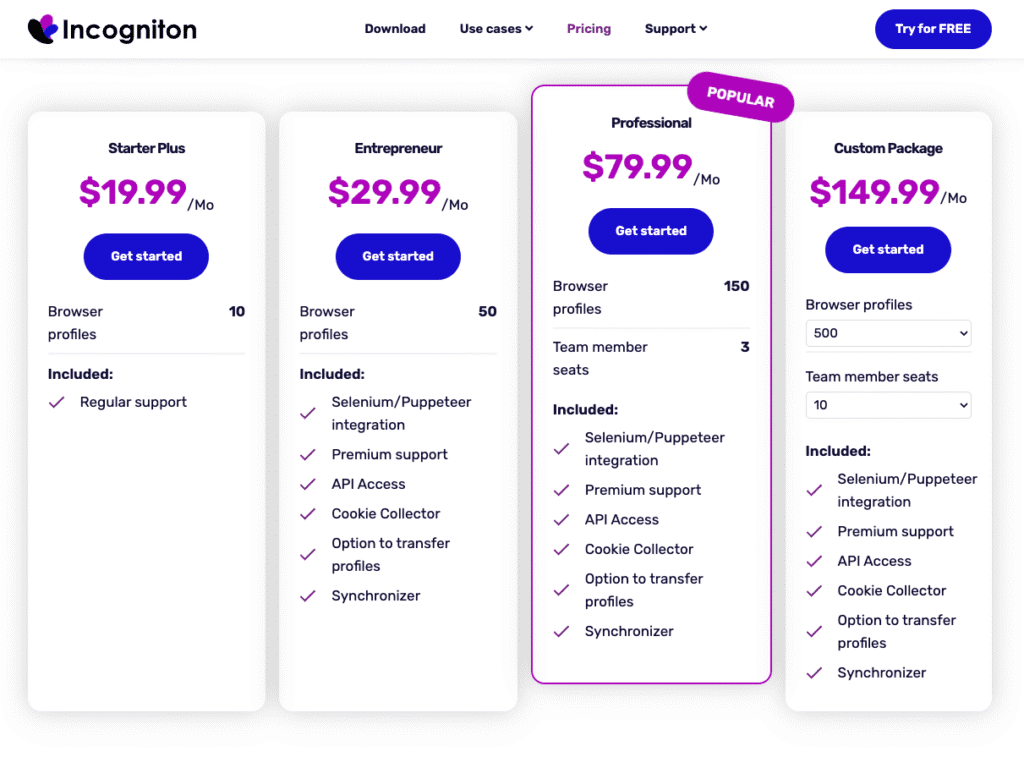
9. Incogniton

A budget-friendly Incognition is a good option that works well for teams. Profiles are easy to share, and there’s support for scripting with Selenium. You can sort profiles, add tags, and keep notes. A tidy, organized choice.
Core Features
- Manage multiple profiles with separate fingerprints and cookies
- Assign proxies per profile for geo and IP masking
- Customize key settings: WebRTC, location, timezone, etc.
- Import/export cookies for session control
- Team access with shared profiles and permissions
- Simple, intuitive dashboard
- Built-in help for quick issue resolution
Who Is It Best For?
- Marketers and affiliates managing multiple accounts
- Scrapers and analysts collecting data anonymously
- Agencies working in teams
- Privacy-focused users avoiding tracking
| Pros | Cons |
|---|---|
| ✅ Comprehensive profile management | ❌ Higher cost for automation plans |
| ✅ Strong automation support | ❌ Requires time to learn advanced features |
| ✅ User-friendly interface |
Incogniton is a privacy-focused anti-detect browser for managing multiple accounts with unique fingerprints, proxy settings, and automation — ideal for marketers and e-commerce users.
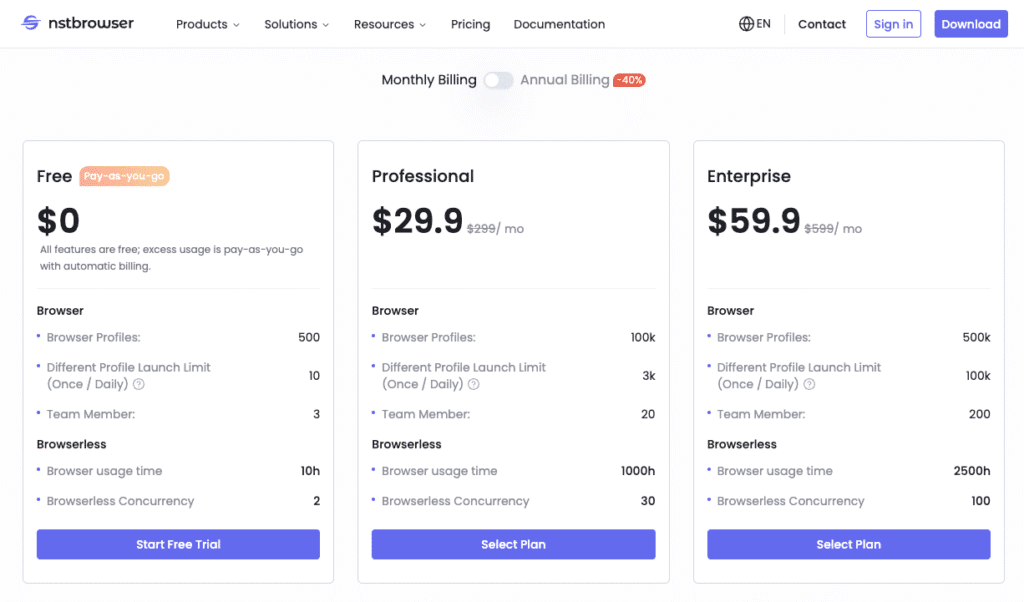
10. NSTBrowser

Often chosen by users facing heavy online restrictions. NSTBrowser known for stability when running dozens of sessions at once. Proxy management is built-in and fingerprinting options are solid.
Core Features
- Multiple Profiles: Create isolated browser environments with unique fingerprints
- Team Management: Group profiles and share access with teammates
- Proxy Support: Assign proxies per profile for location control
- Headless Mode: Run tasks without opening the browser window
- RPA Tools: Automate routine browser actions
- Extensions & API: Add browser extensions or integrate via API
- Billing Tools: Manage subscriptions and payments easily
- Advanced Options: Includes templates, custom settings, and more
Who Is It Best For?
- Marketers running multiple campaigns
- Online sellers managing several accounts
- Agencies handling client work with teams
- Developers building or testing automation
- Users focused on privacy and stealth
| Pros | Cons |
|---|---|
| ✅ Comprehensive privacy tools | ❌ Steeper learning curve for advanced features |
| ✅ Built-in automation (RPA, browserless) | ❌ Higher cost for full-feature team |
| ✅ Team and group collaboration support | ❌ High cost for automation plans |
| ✅ API and extension integration |
NSTBrowser offers isolated browser profiles with unique fingerprints and proxy support, built-in automation, team management, and API integration — ideal for managing multiple accounts securely.
11. MoreLogin

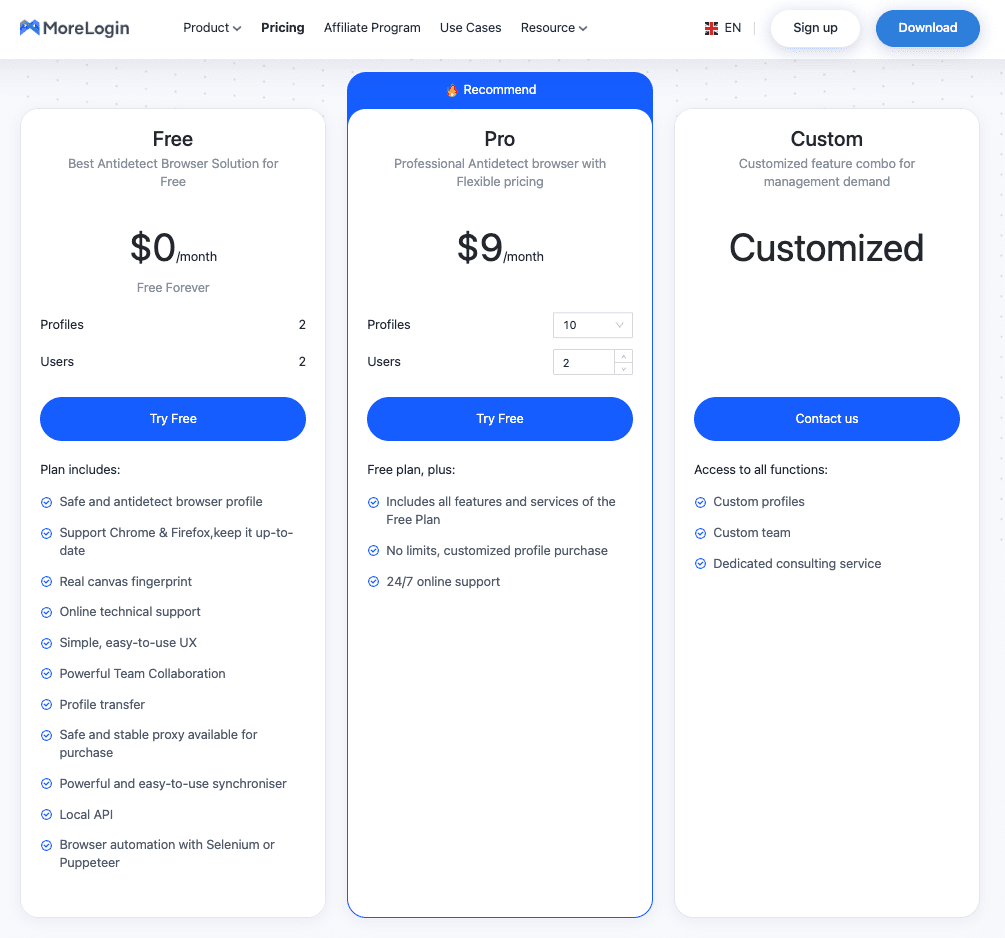
Offers a clean, cloud-based setup for collaboration. MoreLogin good for agencies or companies that need to separate accounts by geography or project. Easy to access from different devices.
Core Features
- Separate browser profiles for managing different accounts
- Proxy setup per profile to change IP and location
- Simple interface with easy access to tools and settings
- Support for extensions within each profile
- Team features for sharing access and setting permissions
- Recycle bin to restore deleted profiles
- Logs and cost tracking to keep things organized
- Interface and profile settings can be customized
- Invite program with rewards for referrals
Who Is It Best For?
- Marketers running multiple ad accounts
- E-commerce users with several shops or platforms
- Teams and agencies that need shared access
- Anyone who values privacy and anti-detection tools
| Pros | Cons |
|---|---|
| ✅ Strong privacy and profile isolation | ❌ Some advanced tools require learning |
| ✅ Team and collaboration features | ❌ Higher cost for full-feature plans |
| ✅ Intuitive design for all skill levels | |
| ✅ Built-in cost tracking and profile logs |
MoreLogin stands out as a reliable anti-detect browser with a balance of privacy, usability, and collaboration features. Its competitive pricing, combined with strong management tools, makes it a solid choice for both individuals and organizations managing multiple online identities
12. Hidemyacc

Key Features from Hidemyacc
- Chromium based fingerprint engine emulating Chrome, Edge, Brave, and Opera across multiple versions
- Desktop client for Windows and macOS.
- Custom OS fingerprints with Windows, macOS, and Linux on all plans, plus iOS and Android emulation from the Base plan and above
- No code automation builder with a drag and drop script editor, action recorder, and script import included on every plan, including the trial
- Ready made script library for common platforms such as Facebook, Amazon, and others
- Synchronizer with custom window layouts that can mirror actions across multiple profiles at once
- Proxy Manager plus a free proxy pool from partners on the Base plan and above
- Magic Link profile transfer that allows users to move profiles from another antidetect browser through a single link
- Cloud sync across devices, session backup covering the last 10 sessions, 24 hour trash restore, and full profile activity logs
- REST API access from the Base plan and above
- 24 hour support via live chat, Telegram, and Facebook; interface available in English, Vietnamese, Chinese, Spanish, and Russian
Trial: 7 days free with 30 profiles and no credit card required
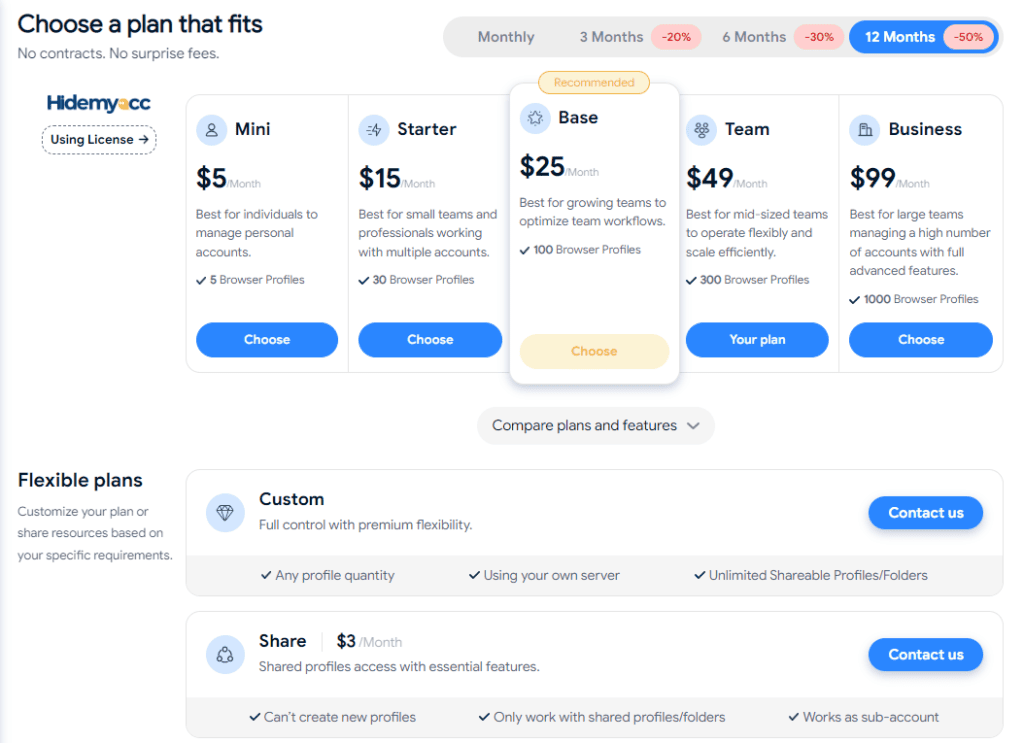
Starting Price: $10 per month for Mini with 5 profiles, or $5 per month on the yearly plan
Business Price: $199 per month for 1,000 profiles, or $99 per month on the yearly plan
Hidemyacc is a Vietnam built antidetect browser that has grown mostly through the e commerce and social media multi account crowd in Southeast Asia. Its pitch is straightforward: keep the entry cost low, and do not paywall automation.
That second point is the real differentiator. Most tools in this category treat scripting and RPA as a premium add on. Hidemyacc ships its drag and drop script builder, action recorder, and Synchronizer on every tier, including the 7 day trial, so you can automate a repetitive posting or registration flow without writing code and without upgrading first.
Core Strengths
- Automation on every plan: Build workflows visually, record your own actions, or pull from the built in script library. No coding, no premium tier required.
- Low cost per profile at scale: The Business plan covers 1,000 profiles at $99 per month on annual billing, which works out to roughly $0.10 per profile.
- Easy migration: Magic Link imports existing profiles, including cookies, history, and local storage, from other browsers, so switching does not mean rebuilding your account base from scratch.
- Practical team controls: Shared folders, per profile activity logs showing who opened or edited what and when, and 1 to 5 free sub accounts depending on tier.
- Recovery features: Session backup covers the last 10 sessions with full cookie and history restore; deleted profiles can be recovered within 24 hours.
Who Is It Best For?
- E commerce sellers running multiple storefronts on Amazon, eBay, Etsy, Shopify, Shopee, or Lazada
- Social media and SMM managers handling large account sets
- Affiliate marketers and traffic arbitrage teams who need automation without a developer
- Small teams and solo operators who want a low monthly cost per profile
- Users in Southeast Asia who want support in their own language and time zone
| Pros | Cons |
|---|---|
| ✅ Deep fingerprint-level engine modification | ❌ No permanent free plan, only a 7 day trial |
| ✅ No-code automation builder (with screen recording). Available right from the trial version | ❌ Mobile support is fingerprint emulation only, with no cloud Android devices |
| ✅ Proxy Manager integration & Proxy Store offers from partners | ❌ Windows and macOS only, with no Linux client and no mobile app |
| ✅ Magic Link migration from other antidetect browsers | |
| ✅ Cloud sync, session backup, and 24 hour profile recovery | |
| ✅ 24 hour support via live chat and Telegram; multilingual interface | |
| ✅ Detailed activity logs for team accountability |
Verdict: Hidemyacc is a strong choice for users who want affordable automation, with a visual script builder and Synchronizer included from $10/month. It is especially suitable for budget conscious e commerce and social media multi account management.
Comparison Table of the Best Antidetect Browsers (2026)
This table helps you quickly compare the key features of the top antidetect browsers in 2025. It’s designed for users who want to evaluate which solution best fits their needs — whether for managing multiple accounts, staying anonymous online, or conducting marketing, testing, or research activities securely.
| Browser | Engine Base | OS Supported | Mobile App | Built-in Proxy | Starting Price |
|---|---|---|---|---|---|
| Multilogin | Chromium | Windows, macOS | No | Yes | from $99/month |
| GeeLark | Chromium | Windows, macOS | No | No | from $59/month |
| GoLogin | Chromium | Windows, macOS, Linux | Yes (limited) | No | from $49/month |
| AdsPower | Chromium | Windows, macOS | No | No | from $9/month |
| 1Browser | Chromium | Windows, macOS | No | Yes | from $7/month |
| Kameleo | Firefox, Chromium | Windows, Android | Yes | No | from €59/month |
| Incogniton | Chromium | Windows, macOS | No | No | Free / Paid tiers |
| Octo Browser | Chromium | Windows, macOS, Linux | No | No | from €29/month |
| Nstbrowser | Chromium | Windows | No | Yes | from $20/month |
| MoreLogin | Chromium | Windows, macOS | No | No | from $19/month |
| Undetectable.io | Chromium | Windows, macOS | No | No | Free trial / Paid |
| Hidemyacc | Chromium | Windows, macOS | No | No | From $10 per month |
Why Use Antidetect Browsers with Proxies
Proxies and antidetect browsers go hand-in-hand. A browser changes how your machine looks to the internet, while a proxy changes where it comes from.
For the best results, use:
- Residential proxies (appear like real users)
- Mobile proxies (harder to detect)
- Rotating proxies (change automatically over time)
Most of the best antidetect browsers support proxy integration by default, letting you assign a different proxy to each profile. This combo gives you both identity separation and location flexibility — critical for staying under the radar.
FYI: Don’t mix datacenter proxies with advanced fingerprint masking — it defeats the purpose.
Where to Get the Right Proxies
Look for proxy providers that offer:
- Location options (so your fake profile looks local)
- Session types (sticky or rotating)
- SOCKS5 or HTTPS compatibility
On our site, you’ll find detailed reviews of all major residential proxy providers—covering speed, reliability, geo-targeting, and ease of integration. Check out the full guide here to choose the best match for your setup.
Best Free Antidetect Browsers — Are They Worth It?
There are a few that won’t cost you upfront:
- GoLogin: Free with limits
- Incogniton: Entry-level access with caps
- AdsPower: Free trial and lite features
Use them to get a feel for how profiles work. But for anything serious, the limitations on fingerprinting, automation, and support may hold you back.
Pro Tip: Free versions are fine for testing or learning, not for running mission-critical tasks.
Why You Might Need an Antidetect Browser
Most people don’t realize how exposed they are online. Even incognito mode doesn’t stop trackers from building a profile on you.
If you:
- Manage accounts for clients
- Work in advertising, affiliate networks, or e-commerce
- Need to access geo-restricted platforms
- Just value your digital privacy
…then an antidetect browser is worth considering.
Real Use Cases for Antidetect Browsers
You might have heard about best antidetect browsers and thought, “Sounds shady.” But actually, they’re used in a lot of different industries — some gray, some white, some black.
Let’s break it down into real, understandable use cases:
1. Running Multiple Ad Accounts Without Getting Banned
Let’s say you’re launching multiple ad campaigns on Facebook or Google. Normally, if you use the same browser for different accounts, the platforms will link them together and shut them down.
What antidetect browsers do:
They let you run each account in its own little bubble — new IP, new browser fingerprint, no shared cookies. To the platform, it looks like each account is on a different device in a different city.
2. Managing Many Social Media Accounts at Once
If you’re running 10+ Instagram, TikTok, or Twitter accounts — whether for clients, influencers, or bots — you’re walking a fine line.
What antidetect browsers do:
Each account gets its own isolated environment. So even if one account gets flagged, the others are safe. It’s like using 10 separate phones — but all on your laptop.
3. Scraping Websites Without Getting Blocked
Whether you’re collecting price data, product info, or reviews — scraping at scale gets you CAPTCHAs and bans real fast.
What antidetect browsers do:
They help you rotate fingerprints and avoid detection, so you can collect the data you need without getting kicked off the site after the first 50 pages.
4. Accessing Crypto or Finance Platforms From Restricted Regions
Some crypto exchanges don’t let users from certain countries in. Others don’t allow more than one login per device/IP.
What antidetect browsers do:
They help you change your digital identity — not just your IP, but everything else: location, time zone, device type. You can appear to be in Germany while sitting in Brazil.
5. Testing Websites Like Real Users Would
Let’s say you’re on a QA team or building a website. You need to see how it behaves for users on different devices, in different places, with different settings.
What antidetect browsers do:
They let you simulate all those environments — Android, iPhone, old laptops, different screen sizes — without actually owning the devices.
6. Running Influencer or Creator Accounts Behind the Scenes
Got a network of TikTokers or YouTubers? Managing their accounts from one place can get risky — one flag can lead to a mass ban.
What antidetect browsers do:
They keep each creator’s account completely separate — so their success isn’t tied to your IP or device.
7. Simulating Students or Test-Takers
If you’re running an online education platform or testing environment, sometimes you need to simulate multiple logins.
What antidetect browsers do:
They help you test as if you’re 10 different students logging in from different devices — great for load testing or platform demos.
8. Affiliate Marketing (Without Getting Kicked Out)
Some marketers run the same offer across multiple accounts to test what works — but affiliate programs usually hate that.
What antidetect browsers do:
They help you stay anonymous across platforms and accounts, so your entire setup doesn’t collapse if one account gets flagged.
9. Traffic Arbitrage: Buying Cheap, Selling High
If you’re buying traffic from one source and reselling it on another, you probably need lots of ad accounts running at once.
What antidetect browsers do:
They give you the ability to test multiple ad creatives and accounts without worrying about bans or account linking.
10. Seeing Local Prices and Content (Wherever You Are)
Some websites show different content or prices depending on where you are. Think Booking.com, Amazon, or even Google search results.
What antidetect browsers do:
They let you “be” in another country — you can see what a user in Paris sees, then switch to Tokyo, then to New York — all from the same laptop.
Pro Tip: Use folders, tags, or naming conventions to keep profiles clean and easy to track.
Antidetect browsers aren’t only for hackers or shady deals — they’re tools that offer flexibility, control, and privacy. When paired with reliable proxies, they give you the power to shape your online identity however you need.
Conclusion
There’s no single antidetect browser that fits everyone.
- If you need full control over fingerprints and automation, Multilogin is a strong (but pricey) option.
- For solo users or small teams, GoLogin and Incogniton offer a solid mix of features without stretching your budget.
- AdsPower works well for e-commerce and social media work where scale matters.
- If anonymity is your top priority, Undetectable is worth a look.
Ultimately, there’s no one-size-fits-all solution. The Best Antidetect Browsers are the ones that align with your workflow — whether that means ease of use, team collaboration, advanced stealth, or automation support. Take advantage of free trials to test features, compare performance, and find the browser that fits your needs before committing to a paid plan. Also, don’t miss our full the most secure browser comparison guide to see how top browsers rank.
Your online privacy and operational stability depend on the tools you choose — so choose thoughtfully.
Frequently Asked Questions
Do antidetect browsers work?
Yes — when used with good proxies and proper setup, they can dramatically lower the risk of being tracked or flagged.
Why use antidetect browsers?
To avoid bans, manage multiple accounts, and stay anonymous online — especially in marketing, research, or high-security fields
Are antidetect browsers legal?
Using them isn’t illegal in most places. What matters is how you use them. Don't break terms of service or laws.
What are the best antidetect browsers?
GoLogin, Multilogin, AdsPower, Dolphin Anty, and Incogniton are among the most popular in 2025.
What is the best browser for anti fingerprinting?
Multilogin and Kameleo offer the most advanced fingerprint customization.
Which browser does Dolphin Anty use?
It’s built on Chromium, with custom modifications for fingerprint control.
Which is the No. 1 secure browser?
For general security, Brave and Tor are top choices. For stealth, Multilogin leads.
Which browsers spy on you?
Browsers like Chrome and Edge collect usage data unless privacy settings are adjusted.
Is Brave an antidetect browser?
No, Brave is privacy-focused but not designed for multi-account or fingerprint evasion.
What browsers are untraceable?
Tor and some advanced antidetect browsers offer strong untraceability — though nothing is 100% invisible.
Which browser has no fingerprint?
All browsers create some fingerprint. Antidetect tools aim to control or randomize it.
Does a VPN stop fingerprinting?
No. A VPN hides your IP but not your browser fingerprint.
Is Tor an anti-detect browser?
Not exactly. Tor hides identity and traffic but doesn’t manage fingerprints across profiles.
Which is the best anti-detect browser?
Depends on your goals. Multilogin for precision, GoLogin for ease, AdsPower for teams.
What is the best anti-tracking browser?
Brave, Firefox (with extensions), and Tor are good for anti-tracking.
Is Brave an antidetect browser?
No. It improves privacy but doesn’t offer fingerprint management or profile isolation.
Is Chrome an antidetect browser?
Definitely not. Chrome collects data and has no anti-fingerprinting features.