
Imagine every device in the world needing its own name tag. That’s essentially what an IP address does — it’s a unique number that helps devices recognize each other and exchange information over the internet or any other network. Without it, your computer wouldn’t know where to send or receive data.
An IP address — short for Internet Protocol address — is like your digital street address. It helps data packets find their way through the vast web of connections that make up the internet.
There are two main versions in use:
- IPv4: The most common, consisting of four sets of numbers like
192.168.0.1. These addresses are limited in number. - IPv6: A newer version, designed to offer a practically unlimited number of addresses. These look more like
2001:0db8:85a3:0000:0000:8a2e:0370:7334.
IPv4 supports about 4.3 billion addresses, which isn’t enough in our hyper-connected world. IPv6 solves this by providing over 340 undecillion (that’s 36 zeros!) possible combinations.
How IP Addresses Work
When you visit a website, your device sends out a request to that site’s IP address. Think of it like sending a letter — your device (the sender) includes your return address (your IP), and the recipient (website) sends the response back to you. The journey goes through several “post offices” — routers and servers — that read the address and help deliver the digital message.
The website’s content is broken into smaller data chunks, or “packets,” which travel independently and are reassembled on your device.
Websites and apps see your IP address the moment you connect. That’s how they know what country you’re in or what language to display.
What Is a Subnet Mask?
A subnet mask works alongside an IP address to define which portion of the address refers to the network and which part identifies the device. It helps break large networks into smaller, manageable segments. Think of it like having apartment numbers inside a building — the building is the network, and each apartment is a device.
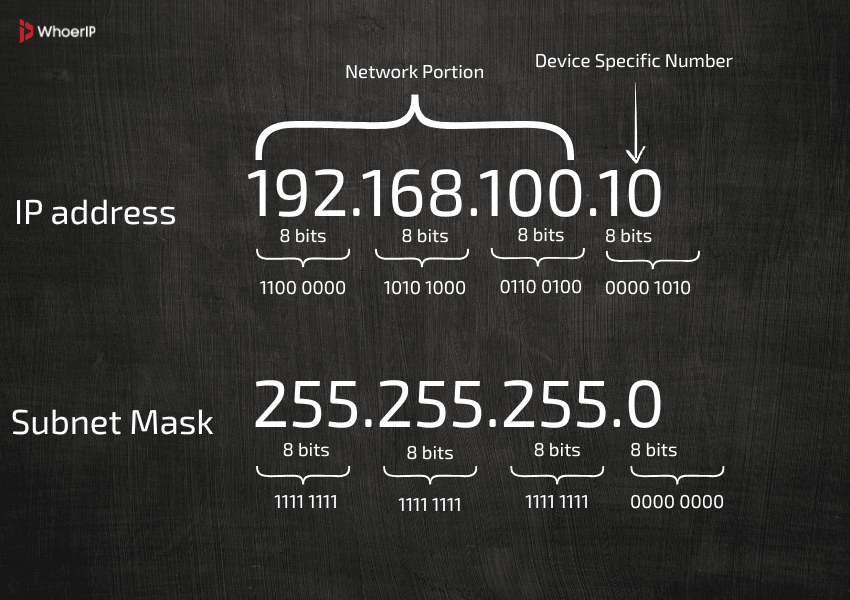
A common subnet mask like 255.255.255.0 tells the network that the first three parts of the IP (e.g., 192.168.1) define the network, and the last part (.15, for instance) is the individual device.
Why It Matters:
Subnetting improves speed and security. It keeps local traffic contained and reduces congestion, much like having neighborhood streets that feed into a main road.
Types of IP Addresses
Every IP address falls into one of two groups:
Public IP Address
This is what the internet sees. Your Internet Service Provider (ISP) gives you a public IP (also known as external IP), which websites use to communicate with you. It’s like your building’s main entrance.
External IPs can be dynamic (they change from time to time) or static (they always stay the same). Businesses often use static IPs for servers so that they are always reachable.
Private IP Address
Used inside your home or office. Your router assigns a unique private IP to each connected device (like your phone, smart TV, or laptop). It’s like apartment numbers inside the same building. Learn how to find it in our step-by-step guide: how to find your router’s IP address.
These IPs are usually dynamic, which means they can change over time — like when you restart your router.
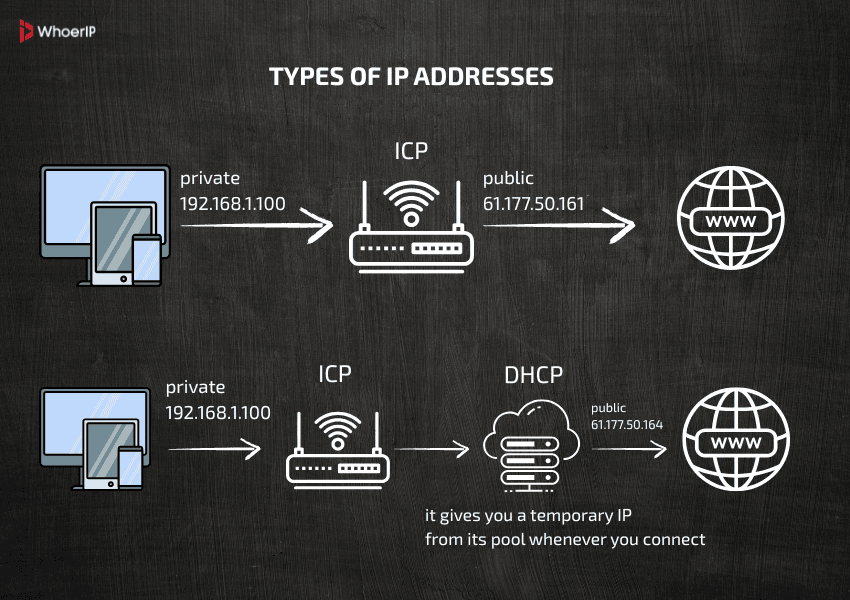
Thanks to NAT (Network Address Translation), all your home devices can share one public IP address when talking to the wider web — kind of like a receptionist redirecting external calls to the right room inside the office.
IP addresses come in two main types: dynamic and static. A dynamic IP address is automatically assigned by a DHCP (Dynamic Host Configuration Protocol) server and may change each time a device connects to the network. In contrast, a static IP address is manually configured and remains fixed, providing a consistent point of contact for devices like servers or network printers.
How to Find Your IP Address
Public IP (what the world sees):
- Google it: Type “what’s my IP address” in your browser.
- Online tools: Try whoerip.com or whatismyip.com are among the best.
These tools often show extra info, like your city, browser, and operating system.
Private IP (used inside your network):
- Windows: Open Command Prompt → type
ipconfig→ look for “IPv4 Address.” - macOS: Go to System Preferences → Network → choose your connection.
- Linux: Open Terminal → type
ip aorifconfig. - Android/iOS: Go to Wi-Fi settings → tap your network → see IP details.
If your public IP changes frequently, it means your ISP uses dynamic IP addresses. Learn more: How to Find Your IP Address
IP Address Security Risks
Although it seems like just a number, your IP address can open the door to several online risks.
1. DDoS Attacks (Flooding Your Connection)
Imagine trying to enter your house but thousands of people are blocking the door on purpose. A Distributed Denial of Service (DDoS) attack works the same way — overwhelming your IP address with traffic until your connection breaks.
2. Location Exposure
Your IP can give away your general location, such as city or ZIP code. Advertisers and scammers use this to tailor messages and phishing attempts.
3. Port Scanning (Looking for Unlocked Doors)
Devices have open ports (entry points). Hackers scan your IP for these, and if they find one — like an open garage — they might exploit it to access sensitive devices like printers or cameras.
4. IP Spoofing
Cybercriminals can impersonate your IP, making it look like you’re the one doing something malicious. This can be used to bypass firewalls or launch attacks under your name. If you’re worried about fake or hijacked IP addresses, check out the top signs of IP spoofing and how to stop it to stay one step ahead of cyber threats.
5. Social Engineering with a Twist
“Hello, this is tech support. We noticed activity from your IP in a suspicious region.” That level of detail makes scams more convincing.
6. Fake Security Warnings
Some websites use scare tactics, showing alerts like “Your IP is compromised. Click here to fix.” It’s usually a trap.
7. Online Tracking
Websites can use your IP to follow your behavior across pages and sessions, building a profile of who you are and what you like.
A rise in malicious use of the special IP 0.0.0.0 has been observed — it’s often used to bypass protections and access devices remotely. Chrome will start blocking access to 0.0.0.0 from version 128, with full rollout by version 133.
How to Protect Your IP Address
There’s no need to disappear from the internet, but here are practical ways to keep your IP address safer:
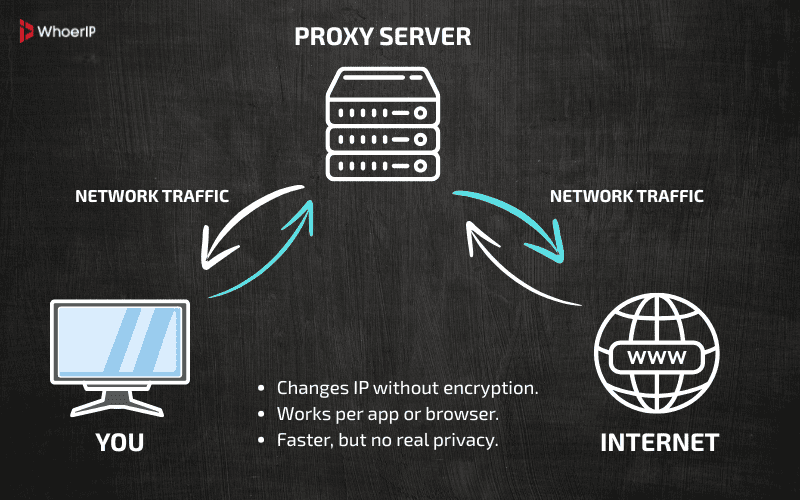
1. Use a Proxy Server
A proxy acts like a buffer between you and the internet. It makes requests for you and masks your real IP.
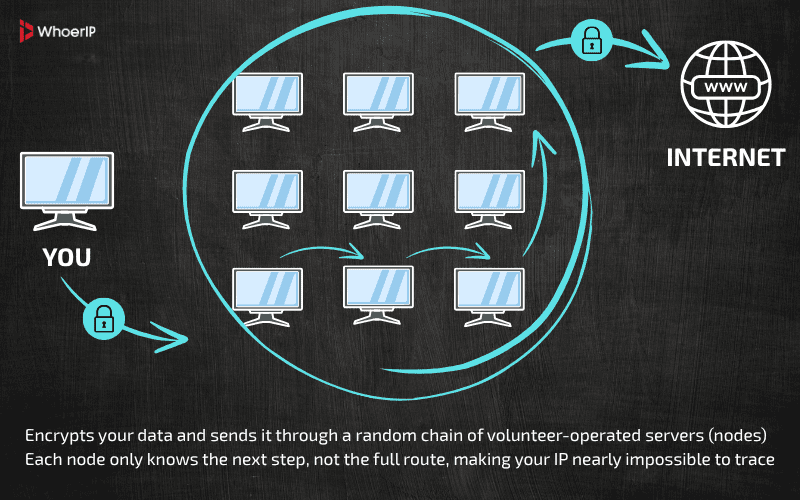
2. Browse with Tor
Tor routes your data through several volunteer-run servers across the globe. It’s like sending a message through a maze — very hard to trace.
3. Enable a Firewall
Firewalls filter traffic coming in and out of your device. Think of it as a bouncer, letting in only trusted guests.
4. Use NAT (Already in Most Routers)
NAT allows one public IP to serve multiple private IPs. This limits direct access from the internet to individual devices.
5. Choose a Dynamic IP Plan
Ask your ISP to provide a dynamic IP. These change regularly, making tracking more difficult.
6. Be Wary of Public Wi-Fi
Public Wi-Fi might seem harmless, but it’s one of the easiest ways for attackers to intercept your data. When you connect to an open network, your IP address becomes visible to everyone nearby — and that’s where the risk begins.
Always avoid accessing personal accounts or banking information on unsecured Wi-Fi, and if you must connect, use a VPN to encrypt your traffic and hide your real IP address. That’s why it’s important to understand what is an IP Address and how it works to stay safe online.
Using a VPN adds a layer of security by encrypting your internet traffic — making it unreadable to others, even on public Wi-Fi.
7. Secure Your Router
- Change default admin passwords.
- Enable WPA3 or WPA2 encryption.
- Turn off remote management.
- Keep firmware updated.
Pro Tip: Set up a guest network for visitors — it keeps your main devices more secure. Want to stay private online? Learn the best ways to protect your identity in our guide on How to Hide Your IP Address.
Understanding IP addresses is essential for anyone working with digital systems. It’s not just for network engineers — marketers, developers, and even remote workers benefit from knowing how their online presence works.”
Frequently Asked Questions
What does an IP address reveal about you?
Your city, country, ISP, and potentially your browsing patterns. You can check all this date on the whoerip.com main page.
Can someone hack you through your IP address?
Yes — if your device or router has open ports or weak security.
What’s the difference between static and dynamic IP addresses?
Static IPs stay the same; dynamic IPs rotate automatically.
How do I change my IP address safely?
Restart your modem, use a proxy, or request a new IP from your provider.
Do VPNs completely hide your IP address?
They mask it from websites, but not entirely from your ISP.
Is it legal to hide your IP address?
Yes, in most regions it’s perfectly legal for privacy reasons.
Can websites block your IP address?
Yes — for violating rules, sending spam, or accessing restricted content.
What is the purpose of an IP address
The purpose of an IP address is to uniquely identify a device on a network and enable communication between devices by assigning a logical address that can be used to route data to the correct destination.
What is an IP address used for?
An IP address is used to identify devices on a local or global network and to facilitate the transfer of data between them. It allows routers and other network hardware to determine where data packets should be sent and where they originate from.
What is each section of an IP address called?
In an IPv4 address, each of the four sections separated by dots is called an octet. Each octet represents 8 bits of data, and the full address is 32 bits. In an IPv6 address, the sections are called hextets, and each represents 16 bits, for a total of 128 bits.
What is the primary function of an IP address?
The primary function of an IP address is to provide a unique identifier and location for a device on a network, enabling data to be delivered correctly from source to destination using routing protocols.
What is an IP address and why is it important?
An IP address is a numerical label assigned to each device connected to a network. It’s important because it enables devices to communicate over the internet or local networks. Without IP addresses, data could not be reliably delivered, and devices wouldn't be able to find each other.
What is an IP address and what does it do?
An IP address is a unique identifier for a device on a network. It allows that device to send and receive information across a network, including the internet. It acts like a postal address for digital communication — ensuring data gets to the correct destination.