

To explain what is DNS leak, let’s start with a simple metaphor. Imagine that you are sending a letter in an envelope. The letter itself is sealed — no one will read its contents. But there is always the recipient’s address on the envelope, and the postman sees where you are sending the letter. On the Internet, DNS queries play the role of the “address on the envelope”.
DNS leak is a situation where these requests don’t go where you expect. For example, you have connected to a VPN and think that all traffic is encrypted and hidden. But DNS queries that show which sites you are accessing can continue to go directly through the provider. In other words, your route across the network becomes visible to third parties, even if the pages themselves are transmitted over HTTPS or through a VPN tunnel.
Where the leak occurs most often:
- when using free or poorly configured VPNs;
- in public Wi-Fi, where providers slip their DNS servers;
- on systems that initially do not route DNS queries through a secure channel.
That is why the question of what is DNS leak is important for everyone who cares about privacy.: this is a weak link that can negate all security measures. The majority of problems come from using VPN service, so you can investigate whether you need VPN or not.
How DNS Normally Works
To understand why a DNS leak is so dangerous, you need to remember how the system itself works. DNS is a kind of internet phone book. Instead of memorizing long numeric IP addresses, we use convenient names: google.com , wikipedia.org , netflix.com .
The request path looks like this:
- You type the website address in the browser.
- The browser sends a request to the operating system: “Where can I find this domain?”
- The OS forwards the question to the DNS server, which is most often your provider’s server.
- The DNS server responds with an IP address, and the browser connects to the site.
All this takes a fraction of a second, but it is important to note that each such request is recorded. Providers and DNS servers can see which sites you visit, even if the traffic itself is encrypted. This is where the answer to the question of what is DNS leak lies: this is a situation where your DNS queries become visible to outsiders, even though you think you are working “under protection”.
What is DNS Leak Historical Background
The DNS system appeared in the 1980s, when the Internet was just gaining momentum. Back then, no one really thought about privacy. The task was simple: we needed a quick way to translate the site name into an IP address. DNS has become a solution, a kind of “directory” for the network.
For the first decades, DNS worked without encryption, and no one bothered. Privacy was perceived as a secondary factor: the main thing was for websites to open.
The situation changed in the 2010s. Massive VPN services have appeared, and with them the growing interest in anonymity on the web. Users began to wonder: if my traffic is encrypted by a VPN, does that mean no one sees what I’m doing? In practice, it turned out that this is not the case: DNS queries often bypass the tunnel. So for the first time, the world massively wondered what is DNS leak and how dangerous it is.
The first public services appeared like dnsleaktest.com which allowed you to check who is actually processing your DNS queries. And VPN providers have started to implement “DNS leak protection” features.
Today, awareness of DNS leak has become part of basic digital hygiene, along with using passwords or HTTPS.
Causes of a DNS Leak
Why does a DNS leak occur? Most often, not one reason is to blame, but a whole chain of system settings and features.
- Errors in VPN settings. Some VPNs redirect only the main traffic, but “forget” about DNS queries. As a result, the sites see your real DNS server from the provider, and not the one that goes through the VPN.
- Features of operating systems. Windows, Android, and even macOS sometimes send DNS queries directly to speed up or “optimize” the connection. In practice, this means that some of your requests bypass the secure tunnel.
- WebRTC requests in browsers. WebRTC is a technology for video calls and data exchange right in the browser. The problem is that it can directly expose your real IP and DNS server, even if you have a VPN enabled.
- Split-tunneling and public Wi-Fi. In split-tunneling, some of the traffic goes through a VPN, and some goes directly. If DNS queries fall into the “direct” part, a leak occurs. And in public Wi-Fi, administrators often impose their DNS servers, completely ignoring the user’s settings.
| Cause | Description | Example Scenario |
|---|---|---|
| Misconfigured VPN | VPN does not route DNS queries through the tunnel | Free VPN fails to redirect DNS traffic |
| OS Behavior (Windows/Android) | Operating systems send DNS outside the VPN for “optimization” | Windows using default ISP DNS despite VPN active |
| WebRTC in Browsers | Browser leaks DNS requests during peer-to-peer connections | Video call reveals real IP and DNS |
| Split-Tunneling & Public Wi-Fi | Traffic partly bypasses VPN, DNS routed to ISP or hotspot | Hotel Wi-Fi forcing its own DNS servers |
Types of DNS Leaks
There are several types of DNS leaks, and each of them works in its own way.
- ISP-based leaks. The classic case is that DNS requests continue to go through the ISP, even if the VPN is enabled. As a result, the ISP sees which sites you visit.
- WebRTC leaks. The most insidious leak: the browser directly exposes your IP and DNS via WebRTC. It can be caught even on secure connections.
- VPN bypass / split tunneling. When some of the traffic bypasses the VPN, DNS queries often turn out to be unprotected. This is especially noticeable in corporate networks or when using hybrid settings.
- Local network leaks. Sometimes a leak occurs even before going online. Routers or corporate networks can intercept DNS requests and forward them to their local DNS servers.
Risks and Consequences of a DNS Leak
It may seem that DNS leak is just a “technical detail”. But the consequences are much more serious.
- Loss of anonymity. Your site list becomes available to the provider or third parties. Even if the content of the pages is encrypted, the fact of the visit is already visible.
- Activity tracking. Using DNS queries, you can build an almost complete picture of your life: when you wake up, what news you read, and what services you use.
- Censorship and regional blocking. In countries with Internet filtering, DNS queries are most often used to block websites. If they leave directly, a VPN does not save.
- Reputational and legal consequences. For a business, DNS leak can mean the disclosure of internal resources or work tools. And for the average user, it means falling under censorship laws or suspicion of circumventing the rules.
How to Test for a DNS Leak
It takes just a couple of minutes to figure out if you have a DNS leak. You don’t need any special skills to do this, just a couple of simple tools.
- Online services. The most popular method is sites like dnsleaktest.com or browserleaks.com . They show which DNS servers are actually processing your requests. If you see your provider’s DNS instead of a VPN server, it means that there is a leak.
- nslookup and dig utilities. On Windows, you can use nslookup, and on macOS or Linux, you can use dig. These tools allow you to manually check which servers the domain request is going through.
- IP comparison. Another way to test what is DNS leak in practice is to compare your public IP (via a service like whatismyip.com ) and the IP that appears in DNS queries. If they differ, the DNS goes “around” the VPN.
How to Prevent DNS Leaks with VPN
Most users will find out what a DNS leak is exactly when their VPN is not working as expected. But a good VPN knows how to deal with this by default.
- DNS leak protection function. Modern VPN clients include built-in protection that forces all DNS requests to be sent only through an encrypted tunnel.
- Using your own DNS servers. Some VPN providers offer their own private DNS servers. This ensures that requests do not reach your provider or third-party services.
- Choosing a reliable VPN provider. Not all VPNs are the same: free services often don’t take care of DNS protection. If privacy is critical to you, it is important to choose a provider with a transparent security policy and DNS leak protection.
Alternative Protection Methods
A VPN is not the only way to deal with the DNS leak issue. There are other methods that work at the protocol and network settings level.
- DNS over HTTPS (DoH). In this case, all DNS queries are encrypted in the same way as regular web pages. Even if they go directly, the interceptor will only see the “porridge”, not the list of sites.
- DNS over TLS (DoT). A similar principle, but using a separate encrypted channel on top of TLS.
- Firewall configuration. A competent firewall can block any DNS requests that go past the VPN tunnel, and thus eliminate leaks at the root.
- Regular monitoring. Even if everything is set up perfectly, it is worth checking periodically to see if there is a new leak. Technologies are changing, browsers and operating systems are being updated, and the new version may again “forward” DNS past the VPN.
| Method | How It Works | Benefit |
|---|---|---|
| VPN with DNS Leak Protection | Forces all DNS queries through the encrypted VPN tunnel | Prevents ISP from seeing your requests |
| Private DNS Servers | VPN or user-defined DNS resolvers instead of ISP’s defaults | More control and privacy |
| DNS over HTTPS (DoH) | Encrypts DNS queries inside HTTPS traffic | Harder for third parties to intercept |
| DNS over TLS (DoT) | Uses TLS channel to encrypt DNS requests | Protects against ISP monitoring |
| Firewall Rules | Blocks any DNS requests outside VPN tunnel | Eliminates accidental leaks |
| Regular Testing | Using tools like dnsleaktest.com or browserleaks.com | Detects new leaks after system/browser updates |
What is DNS Leak Protection — why it is needed and how it works
Imagine: you turned on the VPN, the traffic was encrypted, the IP was changed — beauty. But the browser still “whispers” to the provider from time to time which sites you are opening, because DNS requests go past the tunnel. It is from this “chatteriness” that DNS leak protection saves. Simply put, what is dns leak protection is a set of techniques in a VPN client/OS/network that force all DNS requests to go through an encrypted channel to a trusted resolver and block any workarounds.
DNS is the “address on the envelope”: even if the contents of the email (HTTP/HTTPS traffic) are closed, the address is visible. Without leak protection (and this is the answer to “what is dns leak protection” in one sentence), the provider, Wi-Fi owner, or network administrator sees which domains you are requesting, and sites and services can “glue” activity based on IP/DNS inconsistencies.
How it works under the hood
A good DNS leak protection implementation usually combines several mechanics:
- Forced DNS routing via the VPN interface. The VPN “replaces” the system DNS with its own and declares itself the only route for ports 53/853/DoH.
- Blocking the external DNS. Firewall rules prohibit any DNS requests outside the tunnel (UDP/TCP 53, and if desired, DoH/DoT, so that there are no “unauthorized” resolvers).
- Own VPN resolvers. Requests are processed on the servers of the VPN provider (or on a private DNS set by you), and not at your ISP.
- IPv6 accounting. IPv6 DNS interception and tunneling (or disabling it if the VPN provider does not support IPv6).
- Kill-switch. If the tunnel breaks, all traffic (including DNS) is blocked so that the data does not go to the “naked” Internet.
It is important to understand that what is dns leak protection is not a “single check mark”, but a bundle of routes, DNS push, firewall, and proper operation with IPv6/WebRTC.
Where protection helps and where it doesn’t
Helps against:
- router/DNS provider substitution (in hotels, cafes, guest networks);
- “smart” OS functions (Windows/Android) that try to resolve “bypass” to “speed up”;
- split tunnel, when part of the traffic goes past the VPN.
Does not close automatically:
- WebRTC-IP leaks (this is not DNS, we need separate WebRTC monitoring in the browser/VPN);
- domain disclosure via SNI/ECH at the TLS level (partially solved by new technologies, but this is another topic).
How to enable and configure (practice by platform)
- In the VPN client: look for options like DNS leak protection, Block outside DNS, Use VPN DNS servers only, Kill switch, Tunnel IPv6. Turn it all on.
- Windows: turn off the split tunnel for critical applications; if possible, disable the “Smart Multi-Homed Name Resolution” (policies/registry) or entrust it to the VPN client; make sure that the active adapter is VPN, not Wi-Fi/Ethernet for DNS.
- macOS: in the VPN settings, enable “Send all traffic via VPN”; check DNS priorities (VPN should be on top).
- Android: when the VPN is active, avoid the enabled “Private DNS” on public resolvers — it can bypass the tunnel. Use Private DNS only if it goes through a VPN or it is the DNS of a VPN provider.
- iOS/iPadOS: enable Connect On Demand for stability; there should be no configuration profiles with “foreign” DNS.
- Browser: if desired, disable WebRTC (or limit it to local interfaces), use DoH for public resolvers consciously — it encrypts DNS, but it can bypass DNS VPN, creating inconsistency.
Typical symptoms of incorrect configuration
- On tests, you can see the ISP’s DNS servers, although the VPN is enabled.
- Different results in normal and incognito mode (the extension/browser sets its own DoH).
- On Wi-Fi in the hotel/office, the test shows the router’s local resolver — the network is forcing its DNS.
How to check that the protection is working
- Connect VPN → open dnsleaktest.com (Extended test) and browserleaks.com/dns .
- Make sure that the visible resolvers are the VPN servers (or your private DNS), and not the ISP/router.
- Compare the public IP (whatismyip) and ASN in the DNS test — they should be “from the same world” (VPN/private DNS).
- Repeat the test in incognito and in another browser; check on both the mobile network and Wi-Fi.
- If necessary, check nslookup/dig and IPv6 (if enabled).
Common misconceptions
- “I have enabled DoH — there will be no leaks.” DoH encrypts the request, but it can get past the VPN, breaking consistency and firing patterns. It is better to DoH from the VPN itself or through a tunnel.
- “Any VPN protects against DNS leak.” No. Look for explicit DNS leak protection and block outside DNS + support to test.
- “I’ll disable IPv6, and that’s it.” Sometimes it helps, but it’s more correct to tunnel IPv6 into a VPN.
Short checklist
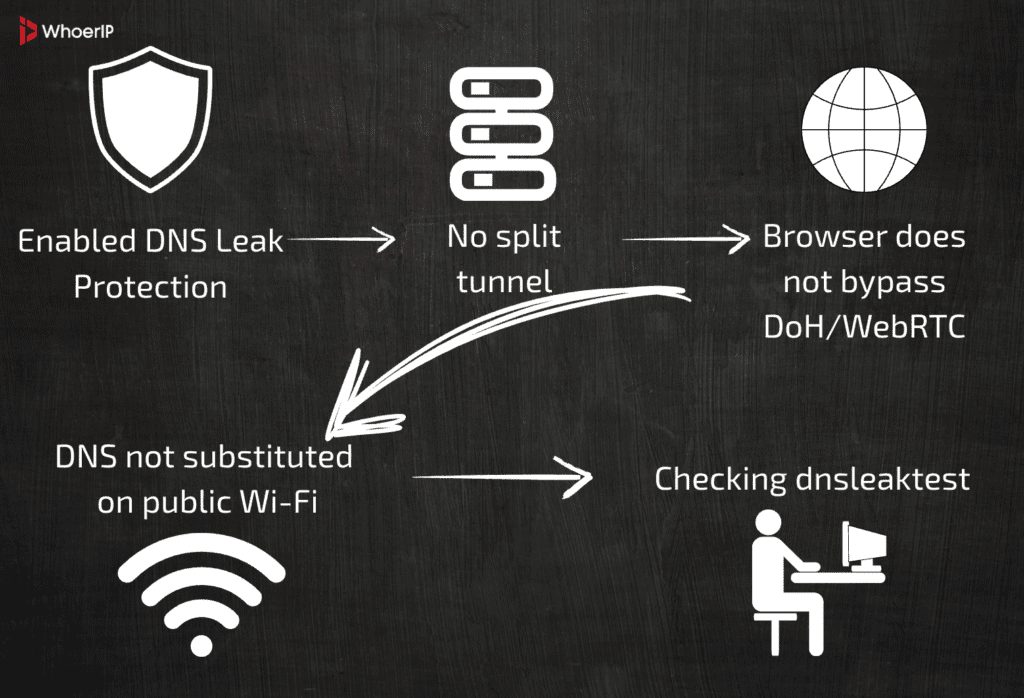
Total: what is dns leak protection is your “Swiss knife” against DNS leaks. It not only encrypts the path, but also disciplines applications and the OS so that no DNS gets past the tunnel. Turn on the necessary options, check the operation and repeat the test periodically — and your privacy will no longer depend on the mood of the public network or the tricks of the OS.
What is DNS Leak Conclusion
Understanding what is DNS leak is an element of basic digital hygiene along with strong passwords and two—factor authentication. Even if the traffic is encrypted with a VPN and the sites open over HTTPS, a DNS leak reveals the most valuable thing — where exactly you are going. Knowing what is DNS leak, you understand that the “address on the envelope” remains visible, and it is he who destroys the illusion of complete invisibility.
The benefits of knowing how DNS works are almost applied.: you see the chain “browser → OS → DNS server → website” and understand where the request may “go wrong”. This allows you to consciously choose the tools: VPN with DNS leak protection, proprietary or reliable resolvers, DoH/DoT protocols, as well as firewall rules prohibiting DNS bypass requests.
The leak breaks the sense of security by revealing the fact of visiting resources, the time of activity, and sometimes the real IP, even when the rest of the traffic is protected. Therefore, the question of what is DNS leak is not theoretical; it’s about real privacy today.
Practical minimum: test the connection regularly (dnsleaktest.com , browserleaks.com ), compare public IP and DNS resolvers, check WebRTC, keep the VPN client and OS up to date. If you understand what DNS leak is and check your settings at least once a month, you are already one step ahead of most — your network footprints are shorter and your privacy is higher. To choose the best VPN service you can check our VPN comparison article.
Frequently Asked Questions
What is a DNS leak?
A DNS leak happens when your DNS queries (the websites you visit) bypass your VPN and go directly to your ISP, exposing your activity.
What is DNS leak protection?
It’s a VPN feature that forces all DNS requests through the encrypted VPN tunnel, preventing your ISP or third parties from seeing them
How to check DNS leak?
Use online tools like dnsleaktest.com or browserleaks.com to see which DNS servers are handling your requests.
How to test DNS leak?
Compare your IP (from whatismyip.com) with the DNS servers shown in a leak test. If they belong to your ISP, you have a DNS leak.
How to prevent DNS leak?
Use a VPN with DNS leak protection, enable DoH/DoT, or configure your system to use secure DNS resolvers.
How to stop DNS leak?
Change VPN or OS settings to route DNS through the VPN only, block outside DNS via firewall rules, or use secure DNS protocols.