
A free VPN for Chrome can help you hide your IP, bypass simple restrictions, and add a layer of protection. But not every free VPN is safe, and many Chrome extensions collect more data than they protect.
This guide breaks down the best free VPNs for Chrome in 2026, using the same practical, privacy-first approach you’d expect from tools like WhoerIP. You’ll see which free VPNs are trustworthy, which ones have real technical limitations, and which extensions to avoid.
For a broader overview, check out our top 10 free VPN services or explore the best VPNs of all time if you’re considering premium options.
We tested the most popular free VPN extensions to see how they really perform. Here’s how they stack up on the metrics that matter most:
- Browsec
- Hide.me
- Windscribe
- Proton VPN
Now let’s break down each one in detail what they do well, where they fall short, and who should actually use them.
Why You Should Be Careful with Free VPNs on Chrome
A VPN extension only protects Chrome’s browser traffic not your whole device.
And in the Chrome Web Store, anyone can publish a “VPN” extension. Many:
- Track your browsing
- Record your real IP
- Inject JavaScript
- Sell data to advertising networks
- Leak WebRTC data (revealing your IP even when VPN is on)
A safe free VPN needs strong privacy controls, audited policies, leak protection, and transparent ownership.
The VPNs below meet the minimum safety threshold and offer realistic free plans.
How We Evaluated Chrome VPN Extensions
Before recommending any free VPN, I tested each one directly inside Chrome. The goal was simple: see how they behave in real browsing, handle leaks, permissions, and data protection, not just what they claim on their website.
Here’s what I checked:
- Privacy policy: does the “no-logs” policy actually say what they DO and DON’T log?
- Extension permissions: do they ask for things they don’t need to function?
- WebRTC and DNS leak protection: can you double-check your real IP never leaks while using the extension?
- Speed and data limits: how much you can really use on their free plan before it slows down.
- Available servers: are the free locations actually available or are they always over-loaded?
- Real-world performance: how fast sites load, open multiple tabs, unblock websites, etc.
This simple checklist helped filter out unsafe or useless extensions, leaving only the free VPNs that are suitable for Chrome users.
Best Free VPNs for Chrome (2026)
All listed services are reputable, tested, and safer than common free extensions.
1. Proton VPN Free: Best for Privacy and Unlimited Browsing
The only trusted free VPN offering unlimited data.
Proton VPN Free operates from Switzerland and delivers strong browser protection. For privacy-oriented Chrome users, this is the most secure free option available. Unlike many free Chrome extensions that act as simple proxies, Proton VPN uses real VPN infrastructure with encrypted tunnels, strong leak protection, and verified no-logs policies.

The Chrome experience is clean, stable, and doesn’t require invasive permissions, which reduces the risk of extension-based tracking.
| Pros | Cons |
|---|---|
| ✅ Unlimited data (rare among free VPNs) | ❌ Only a few free locations (US, NL, JP) |
| ✅ Excellent leak protection (DNS + WebRTC) | ❌ Speeds vary during peak hours |
| ✅ Strong encryption and Swiss privacy laws | ❌ No streaming support in the free tier |
| ✅ Fully transparent security audits | |
| ✅ Clean, lightweight Chrome experience |
Proton VPN is ideal for people who care more about staying anonymous than streaming or top speed. It’s a great fit if you want strong privacy, stable everyday browsing, and unlimited data without putting your personal information at risk.
2. Windscribe Free: Best All-Round Free VPN for Chrome
Windscribe has one of the most generous and user-friendly free plans out there. The company’s Chrome extension is solidly built and full of features that you don’t normally see in a free VPN, such as ad blocking, tracker protection, and adjustable privacy controls.
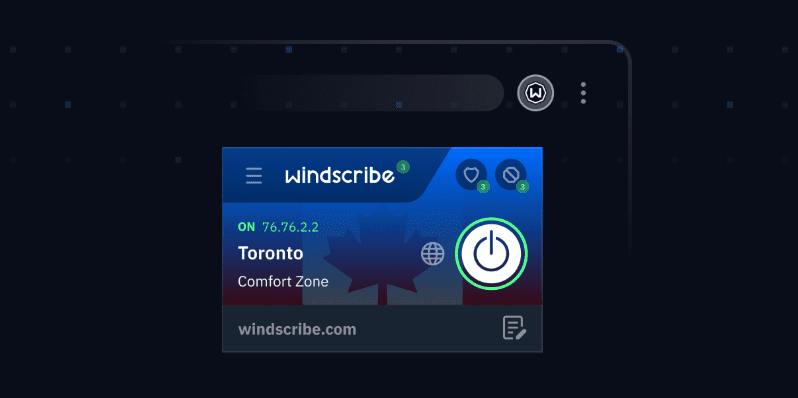
Unlike many free VPNs offering you a basic IP change, Windscribe actually lets you customize how your browser connects to the web and what data websites can see. It really feels more like a streamlined privacy suite than a bare-bones VPN add-on, which is why it’s so popular with regular Chrome users.
| Pros | Cons |
|---|---|
| ✅ Up to 10GB/month free | ❌ Data cap limits heavy use |
| ✅ Good speeds and stable performance | ❌ Some free servers get crowded |
| ✅ Advanced tools like double-hop routing | ❌ Advanced servers locked behind paid plans |
| ✅ Built-in ad/tracker blocking | |
| ✅ Unlimited devices on free plan | |
| ✅ Strong leak protection |
Windscribe is best for everyday Chrome users who want a reliable, easy-to-use VPN extension with extra built-in privacy and security tools.
3. Hide.me Free: Best “No Account Needed” Free VPN
Hide.me gives you a free plan with no account required and no ads, which is rare for a free VPN. It starts working immediately, making it a great choice for users who want fast, anonymous Chrome protection without handing over personal details.
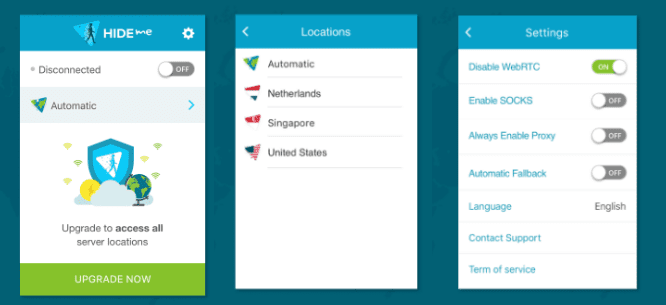
The extension focuses on privacy rather than extra features, and its clean, minimal design makes it easy to use even if you’re new to VPNs.
| ✅ Pros | ❌ Cons |
|---|---|
| ✅ No signup required | ❌ Speeds are limited (1–3 Mbps typical) |
| ✅ No ads | ❌ Only a few free servers |
| ✅ Excellent privacy reputation | ❌ Not designed for streaming |
| ✅ Independent audits | |
| ✅ Good DNS leak and WebRTC protection |
Best for: light browsing, privacy-first users, and people who want anonymity right away.
4. Browsec Free: Simple but Limited (Use With Caution)
Browsec is one of the most popular free VPN extensions for Chrome but popularity isn’t privacy. It’s okay for fast IP address changes or unencrypted, basic region-blocked pages. However, it doesn’t have the strong encryption, strict no-logs policies, or independent audits you should expect from a VPN that claims to be all about privacy.
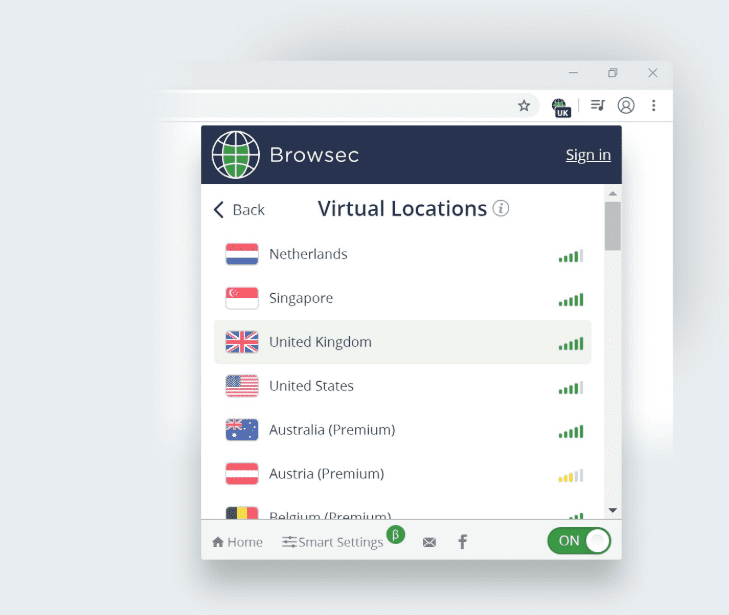
The extension is lightweight and user-friendly, but that comes at a cost: fewer server options, weaker leak protection, and far less transparency than with established VPN services.
| Pros | Cons |
|---|---|
| ✅ Very easy to install | ❌ Weak privacy transparency |
| ✅ Simple UI | ❌ No independent audits |
| ✅ Basic IP switching for casual use | ❌ Limited free server options |
| ❌ Not suitable for sensitive tasks | |
| ❌ Performance varies widely |
Browsec is good for casual, non-sensitive use only (e.g., reading news from abroad).
Free VPNs for Chrome: Comparison Table
| VPN | Free Data | Server Locations | Speed | Privacy Strength | Best For |
| Proton VPN | Unlimited | Limited | Medium | Excellent | Privacy + daily browsing |
| Windscribe | 10GB/mo | Medium | Good | High | Multi-device, general use |
| Hide.me | Limited | Few | Low | Excellent | Anonymous light browsing |
| Browsec | Unlimited | Very few | Low | Low-Medium | Casual IP change |
Risks of Using Free Chrome VPNs (What Most Users Don’t Realize)
Not all free VPN extensions in the Chrome Web Store are real VPNs. In fact, many of them are simple proxy scripts that hide your IP on the surface but quietly record your browsing activity in the background. Some extensions even inject tracking scripts or ask for permissions they absolutely don’t need.
Before you install any free VPN for Chrome, it’s worth understanding the real risks:
1. WebRTC leaks
Even with a VPN enabled, Chrome can expose your real IP through WebRTC. If the extension doesn’t block it, websites can still see where you are.
2. Browser fingerprint gaps
Some extensions mask your IP but ignore fingerprints (timezone, WebGL, fonts), making you easy to identify anyway.
3. DNS leaks
A DNS leak means your browser is still talking to your ISP, which reveals what sites you visit — even when the VPN is “on.”
4. Overreaching permissions
Extensions asking to “read and change all your data on all websites” can technically see everything you do. Reputable VPNs explain why they need these permissions; shady ones do not.
5. Data harvesting hidden in the fine print
Many free VPNs earn money by selling anonymized (or not-so-anonymized) data to advertisers.
6. Injected JavaScript tracking
Some bad extensions insert scripts into pages you visit, tracking clicks, behavior, and even form activity.
How to Spot a Free VPN You Shouldn’t Trust
When choosing a Chrome VPN extension, avoid any app that:
- Doesn’t clearly show the company behind it
- Hasn’t been updated in 6–12 months
- Requests broad permissions without explaining why
- Provides a vague or missing privacy policy
- Offers “unlimited free protection” with no revenue model
How to Use a Free VPN on Chrome Safely
If you are going to use a free VPN, it’s better to take some simple steps to ensure a safer and more dependable browsing experience.
Always install from trusted sources
Trustworthy VPN providers will have a recognisable publisher name and an update history and user review history on their extension’s download page. If the developer name is a unknown, or if the extension hasn’t been updated in several years, just move on.
Test for WebRTC Leaks
WebRTC is a feature in most modern browsers that can leak your real IP address, even when a VPN is supposed to be active. Visit sites like whoerip.com, BrowserLeaks, or ipleak.net to see if everything looks as it should.
Check Your DNS Routing
Many free VPNs will mask your IP address but not route DNS requests, which still go directly to your ISP. A quick DNS leak test can confirm this.
Review Extension Permissions
Chrome extensions can be restricted to access only certain sites. A reputable VPN should not need to “read and change all your data on the sites you visit.”
Verify Your IP Address Was Changed
Make sure you are protected by going to an IP checker page and confirming the VPN is on before browsing. It’s more common than you think for free extensions to silently stop working without your knowledge.
Avoid Sensitive Activities
A free VPN is not a good idea for banking, company accounts, or anything else that involves personal data.
Conclusion
A free VPN for Chrome can provide basic privacy and quick access to restricted content — but only if you choose a reputable provider. In 2025, the safest and most capable free VPNs for Chrome are:
- Proton VPN Free — best unlimited privacy
- Windscribe Free — best all-round free extension
- Hide.me Free — best no-signup anonymous option
- Browsec Free — simple IP switching (not privacy-grade)
Always remember: Chrome VPN extensions are lightweight tools. They hide your IP but don’t replace full system protection. Use them wisely, test for leaks, and avoid unknown extensions that could compromise your data.
Frequently Asked Questions
Is there a 100% free VPN?
Yes, there are VPNs that are free to use with no time limits. Proton VPN is the best-known example, because its free plan doesn’t cap your data or force ads on you. Just keep in mind that “free” often means fewer locations, slower performance, or fewer features compared to the paid version.
How do I add a free VPN to Chrome?
Adding a VPN to Chrome is simple. Go to the Chrome Web Store, search for the VPN you want, and click “Add to Chrome.” Once the extension installs, open it from the toolbar, sign in if needed, and connect to a server. After that, your browser traffic will go through the VPN.
Is Proton VPN 100% free?
Proton VPN does offer a completely free plan. You can use it without paying, and it doesn’t limit how much data you use. The trade-off is that the free tier only includes a few server locations, and you won’t get the speed or streaming support offered in the paid plans.
Do free Chrome VPNs protect my whole device?
No. A Chrome VPN extension only works for traffic within Chrome. Email apps, torrenting tools and other software outside Chrome are not protected. You need the VPN provider's desktop VPN app for complete protection.
Can I watch Netflix with a free Chrome VPN?
Usually not. Most free VPNs are blocked by streaming platforms, and free servers don’t have the resources to bypass streaming restrictions. If streaming is important to you, you’ll need a paid VPN plan.
Are free VPNs slow?
They can be. Free servers have higher traffic, less bandwidth, resulting in slower speeds and ping. Some free VPNs throttle speeds on purpose. Providers such as Windscribe have more consistent performance than random extensions.
Are free VPNs safe to use on Chrome?
Some are safe, but many aren’t. The Chrome Web Store contains extensions that track user data, inject scripts, or claim to be VPNs when they’re just basic proxies. Stick with reputable providers, check the extension’s permissions, and test for WebRTC or DNS leaks.