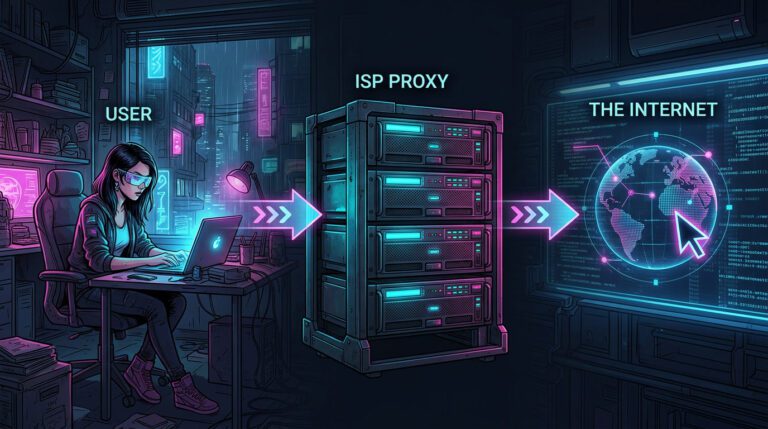

For privacy, security, site scraping, SEO monitoring, ad verification, and geo-restricted content access, using a proxy server has grown in popularity. But utilizing a proxy alone is insufficient; you also need to make sure the proxy is functioning properly, maintaining its anonymity, and matching your intended location on a frequent basis.
This post will give you information on how to check proxy, what to look for, which tools to use, and how to solve typical proxy problems. This post has all the information you require, regardless of your level of experience.
What Is a Proxy Server?
A proxy server helps control the sending and receiving of your online requests by acting as a go-between for your device and the internet. Your traffic first passes through the proxy server, which then relays the request on your behalf, rather than connecting directly to a website.
This procedure makes it look as though the request is originating from a different location or network by hiding your actual IP address and replacing it with the IP of the proxy. Proxy servers are frequently used to regulate internet usage, access location-restricted information, enhance privacy, and carry out operations like web scraping and SEO monitoring.
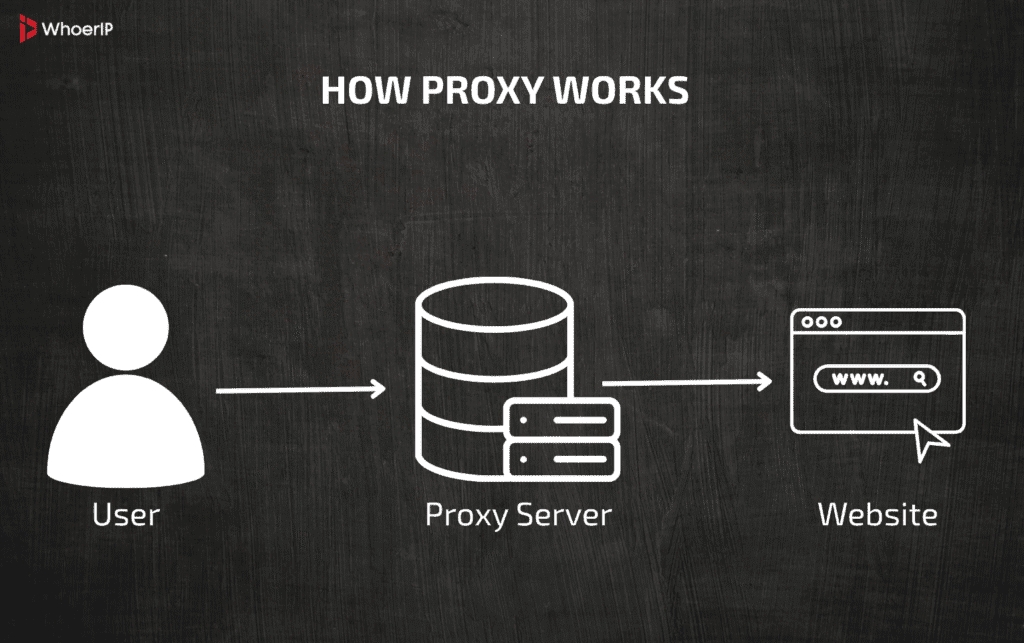
While they don’t automatically make you anonymous, proxies give users more control over how their internet connection appears to websites and online services.
A proxy server acts as an intermediary between your device and the internet. Instead of connecting directly to a website, your traffic is routed through the proxy, which masks your real IP address.
Common reasons people use proxies include:
- Improving online privacy
- Hiding their real IP address
- Accessing region-locked content
- Web scraping and automation
- SEO rank tracking
- Ad verification
- Bypassing IP bans or rate limits
Because proxies can fail, leak data, or expose your real IP, checking your proxy regularly is essential.
Keep in mind that not all proxies offer the same level of anonymity — datacenter proxies are faster but easier to detect, while residential and mobile proxies are more trusted. Regularly checking your proxy helps avoid connection issues, account bans, and unexpected access problems.
Why You Should Check Your Proxy
Before diving into how to check a proxy, let’s talk about why it matters.
1. Verify Your IP Address
You need to confirm that the proxy is actually changing your IP address and that your real IP is fully hidden. A proper proxy should replace your original IP with a new one every time you connect or rotate. Checking this also helps ensure there are no IP leaks caused by incorrect configuration, browser settings, or background connections that bypass the proxy entirely.
2. Check Anonymity Level
Not all proxies provide the same level of anonymity. Some proxies expose HTTP headers such as X-Forwarded-For or Via, which can reveal that a proxy is being used or even disclose your real IP address. High-anonymity or elite proxies should remove or mask these headers so websites cannot detect proxy usage or trace the request back to you.
3. Confirm Location Accuracy
If you are using a country-specific or city-targeted proxy, it is important to verify that the IP truly resolves to the intended location. Many services rely on IP geolocation to determine content access, pricing, or account eligibility, so even a small mismatch can cause blocks or incorrect results. Checking the timezone, ISP, and ASN alongside the country helps confirm the proxy’s authenticity.
4. Detect Proxy or VPN Flags
Many websites actively identify and block proxy and VPN traffic to prevent abuse or automation. Checking whether your IP is flagged as a proxy, VPN, or high-risk address allows you to avoid CAPTCHAs, login challenges, or outright bans. This step is especially important for sensitive activities like ad verification, account management, scraping, or automation, where detection can quickly disrupt your workflow.
How to Check Your Proxy: Step-by-Step Methods
Fortunately, there are plenty of ways to check if your proxy is safe. All of them are very easy, you might pick any of your liking. Here they are:
Online Proxy Checkers
Online proxy checkers are widely used because they are extremely easy to access and require no setup, technical knowledge, or payment — users simply connect to a proxy and visit a website to instantly see their IP address, location, and basic proxy or VPN detection status.
This simplicity makes these tools ideal for beginners, casual users, or quick checks to confirm that a proxy is active and masking the real IP.
When you use WhoerIP, for instanse, you learn all the info you might find helpful: if you are anonymous or not, if your VPN ore proxy detected, location e.t.c..
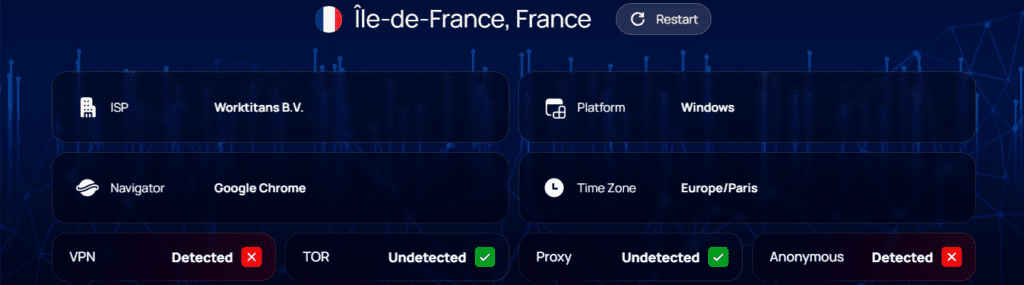
FYI: There are many checkers on the internet. They often provide not only proxy checks, but also VPN and IP checks. For example, Pixelscan.
Check Proxy Using Your Browser
You can manually test a proxy by configuring it in your browser.
Steps:
- Add the proxy to your browser or system settings.
- Visit a proxy checker website.
- Confirm the displayed IP differs from your real IP.
- Verify location and ISP.
- Check for proxy detection warnings.
This method is useful for quick validation but doesn’t always reveal deeper issues like fingerprinting.
Check Proxy via Command Line
For advanced users, proxies can be tested using terminal commands.
Using cURL
curl --proxy http://user:password@123.456.7.8.9:3128 http://example.com
This allows you to:
- Confirm connectivity
- Check IP response
- Test proxy authentication
What to Look for When Checking a Proxy
1. IP Address Change
If the IP doesn’t change, the proxy isn’t working. Remember, that proxies have to mask your IP for maximum safety.
2. Correct Location
Country, city, and timezone should match what you purchased. If it is not, you’ve probably purchased something malicious or your proxydoesn’t work properly.
3. Proxy Detection Status
Some checkers label IPs as:
- “Proxy detected”
- “VPN detected”
- “High risk”
- “Datacenter”
For sensitive use cases, you want low-risk or residential/mobile labels.
4. DNS Leaks
If DNS requests bypass the proxy, your real location may be exposed. This is very dangerous for anyone, who bypass geo-locational restrictions using proxies.
5. WebRTC Leaks
WebRTC can leak your real IP unless disabled or routed through the proxy.
Final Thoughts
Knowing how to check your proxy is just as important as choosing the right proxy provider. A bad or leaking proxy can expose your real IP, get accounts banned, or break your workflows.
By using trusted proxy checkers like WhoerIP, Pixelscan, IPinfo, and BrowserLeaks, and by understanding what to look for — IP, location, detection status, and leaks — you can ensure your proxy setup is reliable, anonymous, and effective.
If you rely on proxies for privacy, SEO, scraping, or automation, make proxy checking a regular habit — your security and success depend on it.
Frequently Asked Questions
How to check if there is a proxy?
Check your system or browser network settings for a configured proxy server. If traffic is routed through a proxy, it will usually list an IP address and port.
How do I find my proxy?
Open your device’s network or proxy settings and look for a “Proxy” or “Manual proxy setup” section. Any active proxy address and port will be shown there.
How to check for proxies?
Compare your public IP (from an IP-check website) with your local network IP. If they differ in a way your ISP wouldn’t cause, a proxy or VPN may be in use.
How do I test my proxies?
Use an online proxy checker or IP-check site while the proxy is enabled. If the site shows the proxy’s IP instead of your real one, it’s working.
How do I know my signal proxy address?
Check the app or service you’re using (like a browser, VPN, or proxy app) under connection or network settings. The proxy address is usually listed as an IP and port.
How to check proxy in Chrome?
Go to Chrome → Settings → System → Open your computer’s proxy settings. Chrome uses the system proxy, so any active proxy will appear there.
Am I using a VPN or proxy?
Check if a VPN app is connected or look for a proxy set in your network settings. You can also check your IP—VPNs often show different locations, proxies usually don’t encrypt traffic.
How to check proxy IP?
Visit an IP-check website while the proxy is enabled. The displayed IP address is the proxy’s IP.