

Ever noticed how your favorite websites load instantly, even during peak traffic? Or how they protect your data while keeping everything running smoothly? That’s probably due to reverse proxy. Let’s dive in and explore what makes reverse proxies so essential and what are the best reverse proxy tools in 2026.
What Is a Reverse Proxy?
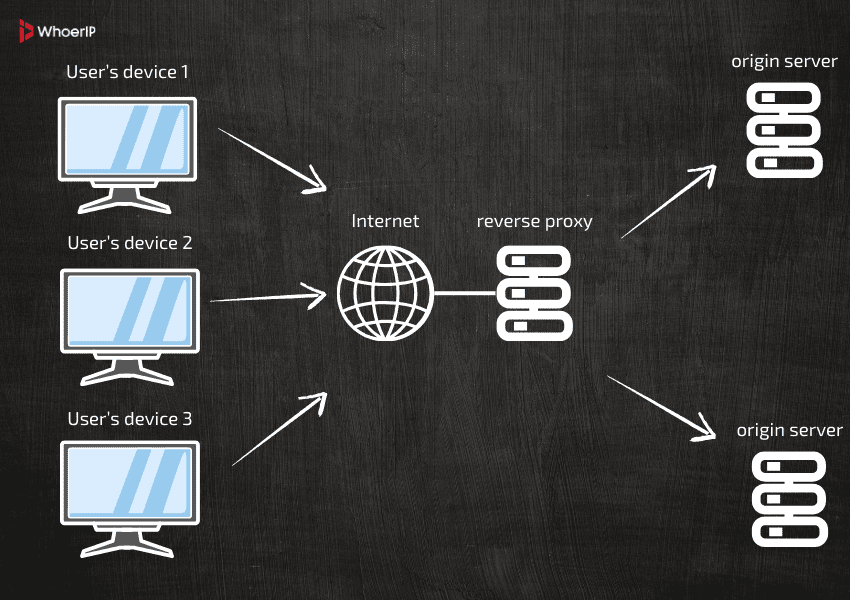
A reverse proxy is a server that sits between users and web servers. When a user makes a request the request goes to the reverse proxy first. The reverse proxy then forwards the request to one of your web servers, gets the response, and sends it back to the user.
You can learn more about the way it works here, but to put it simply, the reverse proxy optimizes how traffic flows to your backend servers, reducing load and improving response times. It also adds a layer of security by shielding servers from direct exposure to the internet.
Reverse Proxy vs. Forward Proxy: What’s the Difference?
Both types of proxies act as intermediaries, their roles are very different.
| Feature | Reverse Proxy | Forward Proxy |
|---|---|---|
| Who It Protects | Servers | Clients |
| Where It Sits | In front of servers | In front of clients |
| Primary Use | Load balancing, caching, security | Privacy, bypassing restrictions |
5 Key Benefits of Reverse Proxies
- Faster Load Times and Caching. Reverse proxies store copies of frequently accessed contents, directly on the proxy server. When a user requests this content, the proxy delivers it instantly, so it doesn’t have to request content from backend server every time. This reduces server load and speeds up page load times.
- Handling Traffic Spikes with Load Balancing. During high-traffic events like flash sales, product launches, or viral campaigns, websites often struggle to keep up. A reverse proxy acts as a traffic manager, distributing incoming requests evenly across multiple servers. In that case, if one server becomes overwhelmed, the proxy automatically reroutes traffic to less busy servers.
- Stronger Security. Reverse proxy helps preventing DDoS attacks from ever reaching your servers. At the same time, it takes the heavy lifting off your servers by managing SSL/TLS encryption, so your site stays fast and secure. It also keeps your server addresses under wraps, making it nearly impossible for attackers to pinpoint and target your infrastructure.
- Bandwidth Savings with Compression. Reverse proxies can compress data before sending it to users. This reduces the amount of data transferred, which is particularly beneficial for mobile users or regions with limited bandwidth.
Best Reverse Proxy Tools in 2026

Nginx‘s non-blocking I/O design prioritizes performance for static assets and reverse proxying, often requiring external handlers like PHP-FPM for dynamic content. Supports reverse proxying.
| Pros | Cons |
|---|---|
| High Performance: Handles thousands of concurrent connections efficiently, making it ideal for high-traffic websites. | Complex Configuration: Requires technical expertise to configure advanced features. |
| Scalability: Lightweight and resource-efficient, allowing it to scale easily with growing traffic. | Limited Dynamic Content Handling: Primarily optimized for static content; dynamic content may require additional modules or integration with other tools. |
| Reverse Proxy & Load Balancing: Distributes traffic across multiple servers, improving reliability and performance. | No Built-in Application Server: Unlike some competitors, NGINX does not natively support application-level processing (e.g., PHP, Python). |
| Caching: Reduces server load and speeds up content delivery by caching static and dynamic content. | Learning Curve: Beginners may find it challenging to set up and optimize. |
| Open Source & Free: The core version is free and open-source, with enterprise support available for a fee. | Enterprise Features Cost Extra: Advanced features and commercial support require a paid subscription. |
| Security: Offers robust security features, including DDoS protection, SSL/TLS termination, and rate limiting. | Module Dependency: Some advanced functionalities rely on third-party modules, which may not always be up-to-date or well-supported. |

Cloudflare is a global cloud services provider that specializes in improving the performance, security, and reliability of websites and web applications. At its core, Cloudflare operates as a Content Delivery Network (CDN), distributing web content across a vast network of servers worldwide.
| Pros | Cons |
|---|---|
| Global CDN Network: Accelerates content delivery by caching and serving content from servers closest to users, reducing latency and improving load times. | Complexity for Beginners: Some advanced features and configurations may require technical expertise. |
| Enhanced Security: Provides robust protection against DDoS attacks, malicious bots, and other cyber threats, ensuring website and application security. | Potential Outages: As a centralized service, any downtime or issues on Cloudflare’s network can impact all sites relying on it, as seen in past global outages. |
| Free Tier Available: Offers a free plan with essential features, making it accessible for small businesses, blogs, and personal projects. | Limited Customization: Some users may find the free tier restrictive, requiring upgrades for advanced features or customization. |
| Zero Trust Security Model: Helps organizations implement a Zero Trust approach, verifying every request for identity and context before granting access. | Privacy Concerns: Cloudflare’s role as a middleman in web traffic has raised privacy questions, though the company emphasizes user privacy and data protection. |
| Developer-Friendly: Offers a serverless platform, APIs, and tools for developers to build and deploy applications without managing infrastructure. | Cost for Advanced Features: Enterprise-level features and support come at a premium, which may not be feasible for all budgets. |
| Improved Reliability: Distributes traffic and absorbs spikes, reducing the risk of downtime and improving uptime for websites and applications. | Content Neutrality Policy: Cloudflare’s stance on not policing content unless legally required has drawn criticism, as it may inadvertently support harmful or illegal websites. |

The Apache Apache is HTTP Server, launched in 1995, processes requests using a modular architecture with Multi-Processing Modules (MPMs) that create threads or processes per connection, supporting dynamic content like PHP natively via modules such as mod_php. Supports reverse proxying.
| Pros | Cons |
|---|---|
| High Performance: Optimized for speed and efficiency, capable of handling millions of requests per second and supporting high-traffic sites with minimal resource usage. | Learning Curve: Beginners may find it challenging to set up and troubleshoot, especially for complex use cases. |
| Reliability: Known for its stability and robustness, often running for years without crashes or downtime. | Learning Curve: Beginners may find it challenging to set up and troubleshoot, especially for complex use cases. |
| Open Source and Free: The core version is free and open-source, with enterprise support and additional features available for a fee. | Limited GUI: Lacks a built-in graphical user interface, relying mostly on configuration files and command-line tools. |
| Advanced Load Balancing: Supports a wide range of load balancing algorithms, health checks, and dynamic server management, ensuring optimal traffic distribution. | Module Dependency: Some advanced features may require third-party modules or custom builds, which can complicate maintenance. |
| Security Features: Offers robust security options, including TLS termination, DDoS protection, and strict access controls. | Documentation Depth: While comprehensive, the documentation can be overwhelming for new users due to its technical depth. |
| Scalability: Easily scales with traffic growth, supporting multi-threading, CPU affinity, and efficient resource management. | Enterprise Features Cost: Advanced features and commercial support require a paid subscription, which may not be feasible for all budgets. |
| Modern Protocol Support: Compatible with HTTP/2, HTTP/3 (QUIC), and TLS 1.3, ensuring up-to-date performance and security. | Maintenance Overhead: Regular updates and monitoring are necessary to ensure optimal performance and security, which can be resource-intensive. |
| Active Community and Support: Backed by a strong community and professional support options, making it easier to find help and resources. | Limited Built-in Caching: While it supports caching, it is not as feature-rich as dedicated caching solutions, requiring additional configuration or integration. |

HAProxy is a free, open-source TCP/HTTP load balancer and reverse proxy. It is widely recognized for its reliability, speed, and efficiency, making it a popular choice for high-traffic websites and critical applications.
| Pros | Cons |
|---|---|
| Open Source and Free: Apache is open-source and free to use, making it accessible for individuals, businesses, and developers. | Performance Under Heavy Load: While efficient, Apache can consume more system resources compared to some alternatives (like NGINX) when handling a very large number of concurrent connections. |
| Highly Customizable: Supports a wide range of modules and configurations, allowing users to tailor the server to their specific needs. | Complex Configuration: Setting up and optimizing Apache for advanced use cases can be complex and may require technical expertise. |
| Cross-Platform Support: Runs on various operating systems, including UNIX, Linux, and Windows, ensuring broad compatibility. | Security Maintenance: Users must stay vigilant about updates and security patches, especially for older versions, to avoid vulnerabilities. |
| Strong Community and Documentation: Backed by a large, active community and extensive documentation, making troubleshooting and support easier. | Slower for Static Content: Compared to some modern web servers, Apache may be slower at serving static content without additional optimization. |
| Mature and Stable: With decades of development, Apache is a proven, stable solution for hosting websites and web applications. | Legacy Codebase: Some parts of Apache’s architecture are older, which can make it less efficient for certain modern workloads compared to newer alternatives. |
| Supports Latest Web Standards: Compatible with modern protocols like HTTP/2 and TLS 1.3, ensuring up-to-date security and performance. | Module Dependencies: Relying on third-party modules for extended functionality can sometimes lead to compatibility or maintenance issues. |

Traefik is an open-source cloud-native application proxy, API gateway, and ingress controller. It is designed to simplify the deployment and management of services and APIs.
| Pros | Cons |
|---|---|
| Automatic Service Discovery: Automatically detects and configures services, reducing manual setup and maintenance. | Learning Curve: Although user-friendly, may require time and technical expertise. |
| Cloud-Native & Container-Friendly: Easily integrates with Docker, Kubernetes, and other orchestration tools, making it ideal for modern, dynamic environments. | Performance Overhead: Traefik may introduce slight latency compared to highly optimized, low-level load balancers. |
| Dynamic Configuration: Supports hot reloading and real-time updates without downtime, ensuring continuous availability. | Limited Enterprise Features in Open Source: Some advanced features, such as certain API management and governance tools, are only available in the paid Traefik Enterprise version. |
| Rich Middleware Ecosystem: Offers a variety of middleware for load balancing, authentication, rate limiting, circuit breaking, and more, enabling customizable traffic management. | Documentation Depth: While comprehensive, the documentation can be overwhelming for beginners due to the breadth of features and integrations. |
| GitOps and DevOps Integration: Supports configuration-as-code, enabling version control, collaboration, and automated deployments. | Dependency on Orchestration Tools: Best suited for environments with existing orchestration (e.g., Kubernetes, Docker Swarm), which may not be ideal for all use cases. |
| Open Source and Free: The core version is open-source and free, with enterprise support and additional features available for a fee. | Limited Built-in Caching: While it supports caching, it is not as feature-rich as dedicated caching solutions, requiring additional configuration or integration. |
| User-Friendly Dashboard: Provides an intuitive web dashboard for monitoring and managing traffic, routers, and services. | Community Support Variability: While the community is active, response times and solutions may vary compared to commercial support options. |
| Protocol Support: Compatible with HTTP/1.1, HTTP/2, HTTP/3 (QUIC), WebSocket, TCP, and UDP, ensuring broad applicability. | Resource Usage: In large-scale deployments, Traefik may consume significant resources, especially when using many middleware or complex routing rules. |
Final Thoughts
A reverse proxy is a must-have for modern websites and applications. It boosts performance with caching and load balancing, strengthens security by shielding servers from threats, and simplifies scaling as your business grows. Whether you’re running a small site or a global platform, a reverse proxy ensures faster, safer, and more reliable online experiences. Don’t overlook this powerful tool—integrate it today for a stronger, more resilient digital presence.
Frequently Asked Questions
What's the point of a reverse proxy?
Reverse proxies are used to increase security by hiding server details, improve performance through load balancing and caching, and provide centralized access control for web applications.
What is the difference between proxy and reverse proxy?
A proxy server (or forward proxy) acts on behalf of clients to access the internet, while a reverse proxy acts on behalf of servers to handle inbound traffic from clients
What is an example of a reverse proxy?
A common reverse proxy server example happens when a company has a large e-commerce website. It can't handle its incoming traffic with just one server, so it uses a reverse proxy server to direct requests from its users to an available server within the pool.
Do I need a reverse proxy if I have a VPN?
VPNs might slow down internet speed because data has to travel through an extra server. Reverse proxies can improve performance by caching content, compressing data, and balancing server loads.
What are the disadvantages of reverse proxy?
While reverse proxies offer many benefits, there are also some potential drawbacks to consider: Single Point of Failure: If a reverse proxy encounters a failure, anything behind it can become inaccessible or compromised.