

Over the past two years, large language models (LLMs) like ChatGPT, Claude, and Google Gemini have turned into constant readers of the web. Their bots scan billions of pages to feed AI training and power assistants.
For a single site, this can mean dozens — sometimes hundreds — of hits each day, not from people but from machines. Over time, this creates visible strain: slower loading, wasted bandwidth, and higher server load.
Which leads to the key question: who is crawling my site, and how can I Block AI Crawlers or even Block LLM Website Crawlers before they cause damage?
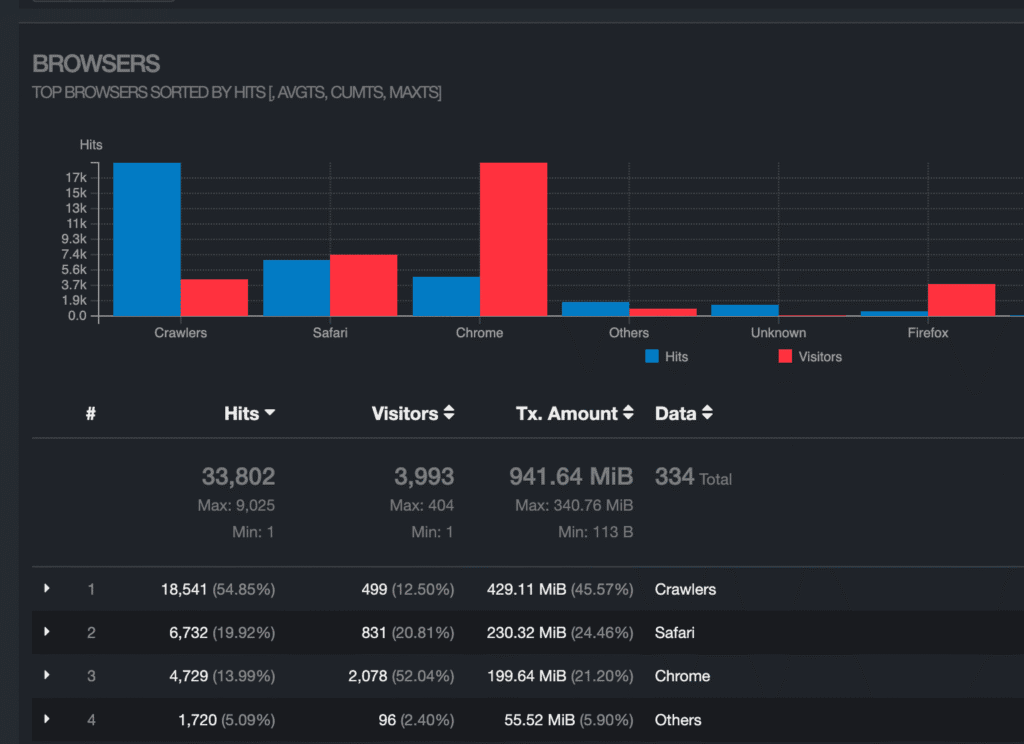
When was the last time you checked your server logs? Statistics show that nearly 50% of traffic comes from LLM crawling and other bots, proving how automated access rivals real user visits.
Major Networks Behind LLM Crawling
Currently, most of the large AI companies operate their own dedicated crawlers. The most active include:
- OpenAI – GPTBot: collects text data for models like ChatGPT.
- Anthropic – ClaudeBot: similar purpose, gathering content for the Claude assistant.
- Google – Google-Extended (Gemini data crawler): used to improve Google Bard/Gemini.
- Perplexity – PerplexityBot: powers the Perplexity AI search engine.
- Common Crawl: while not a company-owned LLM, it supplies datasets widely used by AI labs.
- Others: Meta, Apple, Mistral, and smaller research labs increasingly run their own.
These bots present themselves with different user agents, and sometimes rotate IPs through cloud providers like AWS, GCP, or Azure.
LLM Crawlers and Their User Agents You’ll See in Logs
Understanding how these crawlers enter your site and how they identify themselves is essential. When LLM crawlers visit your website, they announce themselves through their LLM User-Agent strings. With that technical insight, you can build a smarter blocking strategy.
OpenAI Crawlers
GPTBot is the official crawler used by OpenAI to fetch and index publicly available web pages for use in training or providing references in ChatGPT and related systems. It tends to respect robots.txt directives
Mozilla/5.0 AppleWebKit/537.36 (KHTML, like Gecko); compatible; OAI-SearchBot/1.0; +https://openai.com/searchbot Mozilla/5.0 AppleWebKit/537.36 (KHTML, like Gecko); compatible; ChatGPT-User/1.0; +https://openai.com/bot Mozilla/5.0 AppleWebKit/537.36 (KHTML, like Gecko); compatible; GPTBot/1.1; +https://openai.com/gptbot` Mozilla/5.0 AppleWebKit/537.36 (KHTML, like Gecko); compatible; GPTBot/1.2; +https://openai.com/gptbot)Deepseek crawlers
Deepseek is an AI that can fetch web content and index pages for its search / knowledge tasks. In documentation from xseek, it is described as using specific user agents when accessing content.
Mozilla/5.0 AppleWebKit/537.36 (KHTML, like Gecko; compatible; Deepseek/1.0; +https://www.deepseek.com) xSeek Mozilla/5.0 (compatible; DeepseekBot/1.0; +https://www.deepseek.com/bot)CCBot (Common Crawl)
CCBot is the web crawler operated by Common Crawl, a non-profit organization that produces open crawl data sets of the web. It is part of efforts to archive large portions of the public web, making the data freely available for research, machine learning, and AI training.
Mozilla/5.0 (compatible; CCbot/2.0; +http://commoncrawl.org/faq/)Grok (xAI by Elon Musk)
Part of xAI, linked to X (Twitter). Grok is a conversational AI that also pulls external content.
Mozilla/5.0 (compatible; xAI-Grok/1.0; +https://x.ai/)Anthropic (Claude) Crawlers
Anthropic, an AI company founded by ex-OpenAI researchers, headquartered in San Francisco. Claude is an LLM (like ChatGPT) trained on large web data. Anthropic uses its own crawler to fetch pages for model training and fine-tuning.
Mozilla/5.0 AppleWebKit/537.36 (KHTML, like Gecko); compatible; ClaudeBot/1.0;Perplexity
Perplexity AI, a U.S. startup founded in 2022, backed by investors like Nvidia and Jeff Bezos. It crawls the web (like a search engine) and uses LLMs to generate direct answers with sources.
Mozilla/5.0 AppleWebKit/537.36 (KHTML, like Gecko); compatible; PerplexityBot/1.0; +https://www.perplexity.ai/botGoogle AI Crawlers
Google now runs several AI-related crawlers in addition to its classic Googlebot. These are the most important ones in 2025 that relate specifically to AI and training.
GoogleOther-Image/1.0 GoogleOther-Video/1.0 Google-Extended/1.0FYI: Google-Extended is the main AI crawler flag: it tells Google whether your site can be used for AI model training (e.g., Gemini).
Meta AI Crawlers
These crawlers are owned by Meta Platforms, Inc. (formerly Facebook). Their purpose is primarily to fetch web content for social features (link previews, metadata) and increasingly to support Meta’s AI / language model training and retrieval functions.
Mozilla/5.0 (compatible; meta-externalagent/1.1 (+https://developers.facebook.com/docs/sharing/webmasters/crawler)) Mozilla/5.0 (compatible; FacebookBot/1.0; +http://www.facebook.com/bot.html)MistralBot / Mistral AI
It fetches pages when needed (on-demand), rather than continuously crawling all sites. It also publishes a list of IP addresses used by MistralAI-User so that site owners can block or allow them explicitly
Mozilla/5.0 AppleWebKit/537.36 (KHTML, like Gecko; compatible; MistralAI-User/1.0; +https://docs.mistral.ai/robots)Stability AI Scraper
Best known for Stable Diffusion, but Stability AI also collects text/web data for training LLMs.
Mozilla/5.0 (compatible; StabilityAI/1.0; +https://stability.ai/)YouBot (You.com)
YouBot is the crawler behind You.com’s AI / search features. It indexes web content so that You.com can use those pages in its answers
Mozilla/5.0 (compatible; YouBot (+http://www.you.com))Other Notable LLM Crawlers
Mozilla/5.0 (compatible; SerpApiBot/1.0; +https://serpapi.com/bot) Mozilla/5.0 (compatible; KagiBot/1.0; +https://kagi.com/) Mozilla/5.0 (compatible; StabilityAI/1.0; +https://stability.ai/) Mozilla/5.0 (compatible; DuckAssistBot/1.0; +http://www.duckduckgo.com/bot.html) Mozilla/5.0 (Windows; U; Windows NT 5.1; en-US; rv:1.9.1.2) Gecko/20090729 Firefox/3.5.2 (.NET CLR 3.5.30729; Diffbot/0.1; +http://www.diffbot.com) Diffbot/1.0 (+http://www.diffbot.com/bot) Diffbot/5.0 (diffbot.com) Mozilla/5.0 (compatible; SerpApiBot/1.0; +https://serpapi.com/bot) Mozilla/5.0 (compatible; StabilityAI/1.0; +https://stability.ai/) Mozilla/5.0 (compatible; omgili/1.0; +http://www.omgili.com/bot.html) Mozilla/5.0 (compatible; cohere-ai/1.0; +http://www.cohere.ai/bot.html) Mozilla/5.0 pineapple (compatible; Onespot-ScraperBot/1.0; +https://www.onespot.com/identifying-traffic.html) ImagesiftBot/1.0 (+http://imagesift.com/bot) DataForSeoBot/1.0 (+https://dataforseo.com/dataforseo-bot)FYI: Some of these change names or rotate between “stealth” user agents. That’s why regularly analyzing your access logs is critical.
Should You Block All AI/LLM Crawlers?
The question doesn’t have a simple yes or no. AI crawlers are a new reality on the web, and each webmaster has to weigh the trade-offs.
Arguments For Blocking
- Content protection – prevents your text, images, and data from being harvested for AI training without consent
- Bandwidth conservation – reduces server strain and keeps resources available for real users
- Competitive advantage – stops proprietary information from flowing into rival AI models
- Copyright control – ensures you decide how and where your content is reused
Arguments Against Blocking
- Traffic source – AI platforms (ChatGPT, Perplexity, Gemini) can send new visitors your way
- Visibility in AI search – blocking could remove you from future AI-driven discovery channels
- SEO benefits – some AI crawlers may eventually influence ranking and indexing alongside Googlebot
- Future-proofing – if AI assistants become the main gateway to information, blocking now could leave your site invisible later
Block AI Crawlers: LLM Crawler Best Practices & Priorities
Instead of blocking everything or allowing all bots, the most practical strategy today is selective blocking. Treat each crawler by its purpose and impact on your site.
- Block training crawlers – shut down access for
GPTBot,CCBot,ClaudeBot, and other bots whose main purpose is to harvest data for AI training. - Allow search-facing crawlers selectively – keep bots like
PerplexityBotorOAI-SearchBotif you want visibility in AI search results and referral traffic. - Protect sensitive content – lock down premium areas, members-only sections, or proprietary material, while leaving marketing or public pages accessible.
- Use analytics & adjust – track bot activity, bandwidth usage, and incoming referrals to see which bots help and which only drain resources.
Methods to Block AI/LLM Crawlers
robots.txt Method
The simplest way to block LLM crawlers is by using the robots.txt file. This small text file, placed in the root of your site, tells crawlers which parts of your site they are allowed to access and which are off-limits. Most legitimate AI crawlers — like GPTBot, ClaudeBot, PerplexityBot, and CCBot — officially state that they respect robots.txt.
# Block OpenAI crawlers User-agent: GPTBot Disallow: / User-agent: OAI-SearchBot Disallow: / User-agent: ChatGPT-User Disallow: / # Anthropic (Claude) User-agent: ClaudeBot Disallow: / User-agent: Claude-Web Disallow: / User-agent: Claude-User Disallow: / User-agent: Claude-SearchBot Disallow: / User-agent: anthropic-ai Disallow: / # Perplexity User-agent: PerplexityBot Disallow: / User-agent: Perplexity-User Disallow: / # Common Crawl User-agent: CCBot Disallow: / # Google AI User-agent: Google-Extended Disallow: / User-agent: Google-CloudVertexBot Disallow: / User-agent: Google-Research Disallow: / # Meta (Facebook / Instagram) User-agent: Meta-ExternalAgent Disallow: / User-agent: Meta-ExternalFetcher Disallow: / User-agent: FacebookBot Disallow: / User-agent: facebookexternalhit/1.1 Disallow: / # Apple User-agent: Applebot-Extended Disallow: / # Other AI Crawlers User-agent: YouBot Disallow: / User-agent: Diffbot Disallow: / User-agent: ImagesiftBot Disallow: / User-agent: Omgilibot Disallow: / User-agent: Omgili Disallow: / User-agent: DataForSeoBot Disallow: / User-agent: cohere-ai Disallow: / User-agent: cohere-training-data-crawler Disallow: / User-agent: AlephAlphaBot Disallow: / User-agent: ArxivBot Disallow: / User-agent: DuckAssistBot Disallow: / User-agent: NeevaAI Disallow: / User-agent: AndiBot Disallow: / User-agent: MistralAI-User Disallow: / User-agent: StabilityAI Disallow: / # AI / Research Bots User-agent: Bytespider Disallow: / User-agent: TikTokSpider Disallow: / User-agent: Amazonbot Disallow: / User-agent: SemrushBot-OCOB Disallow: / User-agent: Petalbot Disallow: / User-agent: VelenPublicWebCrawler Disallow: / User-agent: TurnitinBot Disallow: / User-agent: Timpibot Disallow: / User-agent: ICC-Crawler Disallow: / User-agent: AI2Bot Disallow: / User-agent: AI2Bot-Dolma Disallow: / User-agent: AwarioBot Disallow: / User-agent: AwarioSmartBot Disallow: / User-agent: AwarioRssBot Disallow: / User-agent: PanguBot Disallow: / User-agent: KangarooBot Disallow: / User-agent: Sentibot Disallow: / User-agent: img2dataset Disallow: / User-agent: Meltwater Disallow: / User-agent: Seekr Disallow: / User-agent: peer39_crawler Disallow: / User-agent: Scrapy Disallow: / User-agent: Cotoyogi Disallow: / User-agent: aiHitBot Disallow: / User-agent: Factset_spyderbot Disallow: / User-agent: FirecrawlAgent Disallow: /Important: These directives will block indexing attempts from nearly all AI-related bots — and potentially from other crawlers that read this file. While this provides strong protection against unauthorized use of your content for AI training, it may also reduce visibility in certain search or discovery platforms.
In short: apply these rules selectively and at your own risk. Balance protection with discoverability.
Server-Level User Agent Blocking
Apache .htaccess:
Another effective way to stop LLM crawlers is by blocking them directly at the server level. In Apache, you can use your .htaccess file to detect requests by their User-Agent string and deny access instantly — before the page even loads.
# Block LLM crawlers by User-Agent RewriteEngine On # Block OpenAI RewriteCond %{HTTP_USER_AGENT} "GPTBot|OAI-SearchBot|ChatGPT-User" [NC] RewriteRule .* - [F,L] # Block Anthropic RewriteCond %{HTTP_USER_AGENT} "ClaudeBot|Claude-Web|anthropic-ai" [NC] RewriteRule .* - [F,L] # Block Perplexity RewriteCond %{HTTP_USER_AGENT} "PerplexityBot" [NC] RewriteRule .* - [F,L] # Block Common Crawl RewriteCond %{HTTP_USER_AGENT} "CCBot" [NC] RewriteRule .* - [F,L] # Block Google Extended RewriteCond %{HTTP_USER_AGENT} "Google-Extended" [NC] RewriteRule .* - [F,L] # Block Meta AI RewriteCond %{HTTP_USER_AGENT} "Meta-ExternalAgent|FacebookBot" [NC] RewriteRule .* - [F,L]Nginx Configuration
In Nginx, you can block unwanted LLM bots directly in your server configuration. This method inspects the User-Agent string and rejects matching requests before they hit your application.
# Block LLM crawlers if ($http_user_agent ~* "GPTBot|OAI-SearchBot|ChatGPT-User|ClaudeBot|Claude-Web|anthropic-ai|PerplexityBot|CCBot|Google-Extended|Meta-ExternalAgent|FacebookBot") { return 403; }This rule denies access with a 403 Forbidden response whenever the User-Agent contains the listed bot names. Lightweight, efficient, and stops requests early.
Nginx Rate Limiting
Not every crawler needs to be fully blocked. Sometimes it’s enough to slow them down so they don’t overload your server. Nginx has a built-in rate limiting module (limit_req) that controls how many requests per second a client can make.
# Define rate limiting zones limit_req_zone $binary_remote_addr zone=general:10m rate=10r/s; limit_req_zone $http_user_agent zone=bots:10m rate=1r/s; server { # Apply rate limits limit_req zone=general burst=20 nodelay; # Stricter limits for suspected bots if ($http_user_agent ~* "bot|crawler|spider|scraper") { set $bot_detected 1; } if ($bot_detected) { limit_req zone=bots burst=5 nodelay; } }Fail2ban Configuration
Fail2ban is a security tool that scans your server logs for suspicious patterns and then automatically bans IPs that break your rules. While it’s most often used against brute-force attacks, it can also be adapted to control aggressive AI crawlers.
[llm-crawlers] enabled = true port = http,https filter = llm-crawlers logpath = /var/log/nginx/access.log maxretry = 3 bantime = 86400 findtime = 300 action = iptables-multiport[name=llm-crawlers, port="http,https", protocol=tcp] # Filter file: /etc/fail2ban/filter.d/llm-crawlers.conf [Definition] failregex = ^<HOST>.*"(GPTBot|ClaudeBot|PerplexityBot|CCBot|OAI-SearchBot)".*$ ignoreregex =ProTip: The strongest strategy is a layered defense: start with
robots.txt, enforce rules with server-level blocking, add rate limiting to prevent overload, and let Fail2ban catch whatever slips through.
Conclusion
Not all bots are bad. It’s worth remembering that not every crawler is an enemy. Some bots genuinely help — they power search engines, generate previews when your links are shared, or even bring you new visitors through AI search platforms. Blocking them blindly could mean losing out on valuable exposure.
And if you do decide to restrict LLM crawlers, here’s the final set of recommendations to guide you.
- robots.txt – Your first line of defense; it clearly states your rules. Compliant AI crawlers (OpenAI, Anthropic, Perplexity, Google-Extended, etc.) will typically honor it.
- User-agent blocking – Filters out most bots that identify themselves honestly. Works well against crawlers like
GPTBot,ClaudeBot,PerplexityBot,CCBot. - Rate limiting – Protects server resources by slowing down crawlers that send too many requests in a short time.
- Monitoring & analytics – Tracks what gets through, which bots bring referrals, and which cause unnecessary load.
- Advanced methods (JavaScript / CAPTCHAs / Fail2ban) – Catch stealthy or persistent crawlers that try to evade detection.
What Each Method Catches
- robots.txt → Compliant crawlers (≈40–60% of AI bots).
- User-agent blocking → Honest but persistent crawlers (≈30–40%).
- Rate limiting → Aggressive crawlers hitting too often (≈10–15%).
- Advanced techniques → Sophisticated or stealth crawlers that spoof user-agents (≈5–10%).
Think of it as building a layered defense system: each method catches a different slice of unwanted traffic, and together they give you the best balance between protection and discoverability.
Frequently Asked Questions
How can I block AI crawlers from accessing my website?
You can block AI crawlers by combining methods: use robots.txt to disallow them, block their user agents in your server (Apache/Nginx), apply rate limiting, and ban persistent offenders with tools like Fail2ban.
What is the easiest way to stop bots from crawling my site?
The simplest method is adding rules to your robots.txt file. For example: User-agent: GPTBot Disallow: /
Do all LLM crawlers respect robots.txt rules?
No. Major crawlers like GPTBot, ClaudeBot, PerplexityBot, and Google-Extended claim to follow robots.txt. But many smaller or less transparent bots ignore it.
Is it legal to block AI crawlers?
Yes. Website owners control access to their servers. Blocking bots is legal and common practice. Just remember that blocking some crawlers (like search engines) can affect your visibility.
How do I turn off crawlers?
You can’t stop all crawlers globally, but you can block them on your site. Use robots.txt, block their user agents at the server level, or filter their IP ranges. Persistent crawlers may require advanced methods like Fail2ban.
How do I stop Googlebot?
Add this to your robots.txt: User-agent: Googlebot Disallow: /
Will blocking LLM crawlers affect my SEO rankings?
Blocking LLM crawlers (like GPTBot, CCBot, ClaudeBot) does not affect your Google SEO rankings. But if you block search crawlers (like Googlebot or Bingbot), your site will disappear from search results.
Are there good bots I shouldn’t block?
Yes. Search engine crawlers like Googlebot, Bingbot, DuckDuckBot, and social preview bots like facebookexternalhit or Twitterbot help users discover and share your content. Blocking them will reduce visibility.
How often should I update my crawler blocklist?
At least every few months. New AI crawlers appear constantly (DeepSeek, Grok, Manus, etc.). Review your server logs, track new user agents, and update your blocklist to stay ahead.