

Proxy Servers as Digital Disguises
A proxy is like a cape you put on before you enter a website. It’s not you personally who enters, but someone on your behalf. The website sees not you, but an intermediary. And if with ordinary proxies everything is clear – they are used by millions, they work quickly, but they are easily spilled – then with resident everything is thinner, more interesting and much more realistic.
What is a Residential Proxy? It is Like a Real Person
A resident proxy is an IP address issued to a regular ISP user. It belongs to a real house, a real device, a real geography. When you use such a proxy, websites perceive you as a real person sitting in an apartment in New York or Katowice, with a connection from a real provider. No servers. No suspicion whatsoever.
It’s as if you disguised yourself as a local and walked calmly past a security post where everyone is being checked. You look organic, don’t raise questions, and don’t leave any digital traces that would distinguish you from an ordinary user.
How do Residential Proxies Work?
- User devices are the foundation. resident IPs are taken from real devices: phones, computers, and routers. People voluntarily (or not so) install special software, and their IP goes to the pool.
- The provider is the middleman, services like Bright Data or Smartproxy rent these IPs from device owners and resell access to them to customers.
- The customer connects via API or panel and gets an IP that can be disguised as a regular user.
- The site thinks you are a real user, you can work, collect data, test, automate — and no one guesses.
Why It Works
Because a residential IP is not a server. This is not a data center. This is not a suspicious address that sends 100 requests per second. This is a live, “dirty,” real user address that has a history, cookies, and behavioral patterns. And websites, especially secure ones, trust these addresses.
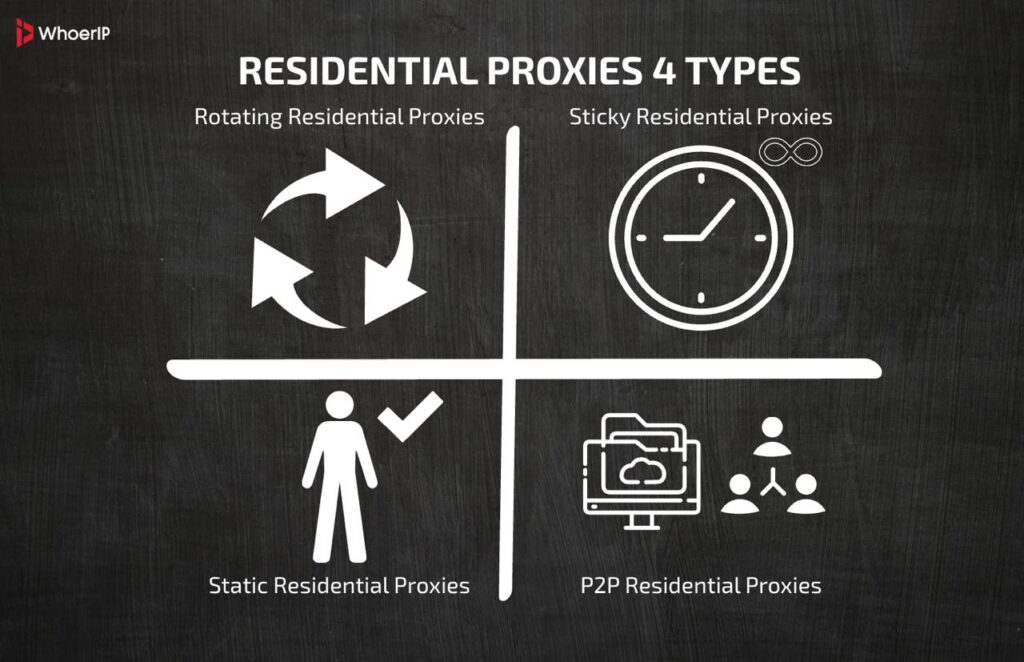
Main 4 Types of Residential Proxies
1. Rotating Residential Proxies (Rotating Residential Proxies)
Imagine: you change your clothes every 5 minutes, and each time you look like a completely different person. That’s what a rotating proxy does. It automatically changes your IP address for each request or at a specified time interval. One click and you’re a “Chicago user,” the next click and you’re a “Munich user.”
This is a game-changer for those who collect data in bulk, scrape websites, track prices, or conduct competitive analysis. Rotation reduces the chance of a ban, allows you to scale quickly and bypass the restrictions that sites put on the number of requests from one IP.
The downside? Sometimes you lose “context”: if the site expects the user to stay with one IP for at least 30 seconds, there may be problems. Therefore, rotating proxies are ideal for tasks where frequency is important, rather than session stability. The result is like being a perpetually new person at a party. No one recognizes you, but it’s difficult to make friends.
2. Sticky Residential Proxies
Sticky is like “staking out” a parking spot. You get one IP address and save it for a certain amount of time: from 1 to 30 minutes, and sometimes more. This allows you to look like the same person in the eyes of the site, which is critically important when working with authorization, shopping carts, logins, and even payments.
This type of proxy is ideal for automating actions on social media, managing sessions with multiple accounts, registering on websites, logging in, and testing functionality.
You’re not just looking alive – you’re living it! You have a single IP, a single “history,” and a single “digital footprint.” Yes, it’s slower than rotating proxies, and the IP may sometimes drop prematurely, but sticky proxies are unmatched in terms of stability and “humanity. If rotating is a ninja running on platforms, then sticky is a person who came to the office, sat at the desk, and works.
3. Static Residential Proxies (Static Residential Proxies)
Sounds like an oxymoron, right? “Residential” and “static” in one package. But it’s real. These proxies are residential IPs that don’t change, obtained from the provider and assigned to a specific user.
This is the best option for those who want all the benefits of a residential origin (anonymity, trust of websites), but still need a stable, predictable IP. It is suitable for long-term work with a single account, doing business on marketplaces, online banking, e-mail services, and advertising cabinets.
Yes, they are more expensive and not available from all providers, but the stability and “safe appearance” more than make up for the costs.
Bottom line: it’s like renting an apartment for a year. It’s cozy, reliable, and the concierge already recognizes you.
4. Peer-to-Peer Residential Proxies (P2P Residential Proxies)
This is a slightly different league. Here, you get IP addresses “borrowed” from real users who have agreed to share their traffic in exchange for bonuses or access to certain services. This can be a fair scheme (like Hola, Honeygain, and PacketStream), but it can also be less than honest.
Pros: such IPs are very live, often almost impossible to distinguish from real users. Cons – instability, because a person can turn off the Internet, a laptop or just pull the plug. These proxies are often used to bypass tough restrictions, launch aggressive campaigns and deep automation. But you need to make sure that the provider works transparently and ethically.
It’s like renting a car from an ordinary person through a P2P service – convenient, cheap, but sometimes you can stay with the keys from a car that has already left.
Where Residential Proxies are Used: 12 Real-Life Scenarios
When you hear “proxy”, it’s easy to imagine something murky, technical, and highly specialized. But residential proxies are not about hackers in the basement. They are about the tasks that marketers, analysts, developers, and even recruiters face every day. Let’s find out why they are even needed – and how they are used in real digital life.
- Data Parsing, when once Is not enough and You want to collect prices from online stores. Once is fine. But what if you need to do it every 30 seconds from 10 different sites? A regular IP will quickly get banned. A residential proxy allows you to look like “your own” – and collect data all day and night. No captchas, no blocks.
- Bypassing Antibots on the most difficult protection sites like Amazon, Booking, Avito don’t like bots. They use anti-bot systems that detect suspicious IPs in fractions of a second. But if you log in using a residential IP, you look like a regular person with a laptop and coffee. You can get in without any problems. This is especially important if you’re running automation or checking prices in real-time.
- SEO Analytics, It’s like you live in every city when you want to check how your website appears in Novosibirsk, Berlin, and Tokyo. But Google and Yandex show different results depending on the location. With a residential proxy, you can “teleport” to the desired region and check the search results from a local perspective. This is an indispensable tool for SEO professionals.
- Geo-Targeted advertising verification, you’ve launched an advertising campaign in Italy, but it’s not displaying. Why? No one knows. To check, you can log in from a resident Italian IP. You’ll notice that the banner isn’t loading. Without this “masking,” it’s impossible to verify. You’re only seeing what’s being displayed in your region. However, a proxy provides access to “other realities.”
- Multi-Accounting, one person with many lives, do you want to manage 50 accounts on TikTok, Wildberries, Amazon, or eBay? You can’t do that without a proxy. The websites will immediately suspect something wrong and block you. With residential IPs, each account appears to be managed by a different person from their own apartment. It works perfectly with Multilogin, OctoBrowser, or Incogniton.
- Comparing prices with competitors if you’re an online store owner, you’ll want to know how your competitors adjust their prices. But if you visit them often, they will see it and block you. With a residential proxy, you will look like a regular customer. You can monitor, collect, and analyze data every hour.
- Analysis of creatives and A/B tests if you are a marketer and are testing 5 different banners. One of them should be displayed in Germany, while the other should be displayed in the United States. How can you verify which banner is actually being displayed? The only way is through a residential IP. With it, you can see which creatives are being viewed in which country, through the eyes of your target audience.
- Automation on Instagram, TikTok, and YouTube, are you working on promotion? Do you need a tool that will like, comment, and subscribe? However, if you do this from a single IP, you will get banned. If each bot uses a residential proxy, it will appear as a real person. Websites will not recognize that it is automation.
- Cyber Intelligence (OSINT), Invisible Access to Doubtful Places. Security specialists study the dark web, phishing sites, and shady forums. Doing this from your own IP is risky. With a residential proxy, you become an invisible observer. You watch, collect, and analyze without leaving any traces or raising suspicion.
- Brand control find fake stores and plagiarism if you have a well-known brand, sooner or later someone will copy it. The only way to find fake products and websites is to use residential proxies to avoid suspicion. This is like conducting an undercover investigation.
- Reputation Monitoring, what people are saying about you in the region. Sometimes, a user from Moscow and a user from Yekaterinburg see completely different content. To understand how a brand is perceived in different locations, marketers use residential proxies. This helps you to build communication more accurately and respond to criticism in time.
- Bypassing geo-blockings and censorship, some sites are not available in Russia, China, Iran. And some on the contrary – only there. With residential proxy servers, you get access to closed segments of the Internet, which would not be available to you from a regular IP.
If you want to dive deeper into this topic, check out this detailed comparison of the best antidetect browsers. The article breaks down the top options on the market, comparing their features, pricing, and use cases — so you can choose the right tool for managing multiple accounts safely and efficiently.
Who Uses Them Every Day
- Marketers who promote products in different countries.
- Data scientists who collect data for analytics.
- SEO specialists who check the positions of websites in different regions.
- Freelancers and agencies who manage dozens of accounts.
- Pentesters who check security vulnerabilities.
- Financial platforms that work with multi-locations.
Advantages of Resident Proxies
- High level of trust from websites — you look like a regular person.
- Access to geo-specific content — you can “be” anywhere in the world.
- Scalability — thousands of real IPs in different countries.
- Bypassing anti-bot protection — works even where everything else “burns out”.
- Flexibility and adaptability — suitable for any task.
Disadvantages That You Should Also Understand
- Price — residential proxies are more expensive than regular ones. You have to pay for “naturalness”.
- Speed — it’s lower than that of data center IPs. After all, these are real devices.
- Ethics — some IPs are taken from users’ devices without their explicit consent.
- IP lifetime restrictions — today it’s there, but tomorrow it may leave the pool.
| Pros of Residential Proxies | Cons of Residential Proxies |
|---|---|
| High anonymity and trust | No encryption for data in transit |
| Bypasses geo-restrictions and anti-bot systems | Slower speeds due to routing |
| Less likely to be blacklisted | Higher cost |
| Realistic IPs from ISPs | Complex setup |
| Good for multi-accounting, scraping, and ad verification | Requires ongoing IP management |
| Appear as real users | Limited scalability, expensive at large scale |
| Effective for region-locked content | Some providers may use unethically sourced IPs |
| Provider reliability can vary |
Pros and Cons of Residential Proxies
How to Choose the Best Residential Proxy Provider? Top 7 Factors
1. IP Pool Purity: No “Dirt” or Strange Neighbors
The very first thing to look at is the reputation of the IP addresses themselves.
Imagine that you rent an apartment. You can live in the center, but if before you there were people who were constantly called by debt collectors – you will also be. With proxies, it’s the same: if the IP before you was used for spam or brute force, the sites will simply not let you in. A good provider keeps an eye on its pool: regularly cleans it, removes banned IPs, and does not allow questionable customers.
2. Wide Geography: You Can Be Anywhere
Do you want to access a website as if you were in Texas, and a minute later, in Lyon?
To do this, the provider needs to have a large and diverse geography: cities, countries, and regions. This is especially important if you’re working with geotargeting, advertising, or localized websites.
Hint: the best providers have tens of millions of IP addresses covering 100+ countries. Everything else is a compromise.
3. Speed and Stability: As If You Were Sitting in Wi-Fi Yourself
By definition, residential proxies are not the fastest (they’re through someone else’s device). But that doesn’t mean you have to wait forever. A good provider is one whose ping doesn’t fluctuate like in an elevator, the connection doesn’t drop, and the IP doesn’t disappear every 5 seconds.
The best thing is when you can set the session timeout yourself, disable “rotation,” or choose a proxy based on the connection type (Wi-Fi, 4G).
4. Honest IP Obtaining: No Dark Stories
You don’t want your proxy to be stolen, do you? Some cheap providers use devices without the owners’ consent: through viruses, apps with a trick, etc. This is not only unethical, but also unsafe.
A reliable service always tells you where its IPs come from, how it gets them, and whether it has user consent. Pay attention to the presence of a transparency policy, KYC, and official agreements with users. You can learn more about ethical sourcing and how to obtain a public IP address.
5. Flexible Settings: You Control Everything
IP rotation every request? Or every 10 minutes? Or maybe you need to “lock” a specific address for 3 hours? A good provider will give you a control panel where you can choose:
- geography,
- session duration,
- rotation,
- proxy type (HTTP(S), SOCKS5).
It’s like a good coffee shop: you can order an espresso, a flat white, or a filter, rather than just “black with milk.”
6. Support: Without Bots And 24 Hours Of Waiting
There will be problems. This is normal. The question is how they are solved. If the support responds with scripts after two days and doesn’t understand the terms, you’re in the wrong place.
A reliable provider is one who:
- has a live chat or Telegram,
- provides 24/7 support,
- speaks your language (or at least decent English),
- understands how your infrastructure works and can help you on the spot.
A bonus is having a customer success manager.
7. Transparent Pricing: No Surprises in the Bill
Sometimes you see: “from $0.0005 per IP” – and you think it’s profitable. But then it turns out that there are a bunch of “related” fees in the bill, a commission for geo, for API access, for speed.
A good provider gives a clear and honest tariff grid. You have:
- fixed price for traffic or session,
- clear restrictions,
- free test or demo access,
- clear information about what is included in the rate.
Like in a normal restaurant: you can see the price of a dish right away – and you know if tea is included.
Legality and Ethics: Where Does the Line Lie?
From a technical standpoint, it’s straightforward. However, from a legal and ethical perspective, it’s not always the case. Some residential proxies are created with users’ permission (for example, through rewards in the form of internet bonuses), while others are not. There are instances where devices become part of proxy networks without the owner’s knowledge. This is a gray market. Using such IPs can be unethical and even illegal.
What’s important:
- Work with trusted providers (Bright Data, Oxylabs, Smartproxy, etc.).
- Make sure the service has a KYC policy (know your customer) and works based on user consent.
- Avoid shady platforms with “magically cheap” proxies — they’re almost always stolen.
Scaling: How to Avoid Drowning in Thousands of IPs
One proxy is convenient. Ten is still manageable. But what about a hundred or a thousand? You’ll need a system for that. Common solutions include:
- Dashboards and control panels that allow you to sort IP addresses by country, speed, and lifespan.
- Integrations with Multilogin or OctoBrowser, where each browser profile has its own residential address.
- API access to dynamically change IP addresses on the fly for tasks such as parsing, scanning, and logging.
- IP rotation to avoid burning out a single address (especially important for frequent requests).
Problems You May Encounter
No tool is perfect. Residential proxies are powerful, but they also have their weaknesses:
- The IP can “go away” at any time, the device owner turned off their laptop, and the IP disappeared from the pool.
- Some IPs are already banned, especially if they have been involved in suspicious activities before.
- The speed fluctuates, it all depends on the user’s connection – sometimes the proxy literally “crawls”.
- Difficulties with large-scale automation, especially if you don’t have experience, it’s easy to break everything or get caught.
But these problems are solvable – especially when using advanced proxy platforms with smart rotation and clean pools.
Examples from Life
- An international shoe brand was able to detect hundreds of illegal copies of its website in the CIS, Asia, and Latin America using residential proxies, and block them through regulators.
- A marketing agency used residential proxies to monitor A/B tests of banners in different countries and discovered that one of the options in Italy was not loading.
- The SEO company used more than 5,000 residential IPs to track the client’s search engine rankings in dozens of US cities, resulting in a 17% increase in CTR.
What is a Residential Proxy Conclusion
Resident proxies are about believability. About being inconspicuous in a world where every digital detail is tracked. It’s not just a tool, but a key to a secure, large-scale, efficient interaction with the internet.
They are not about hacking or bypassing for the sake of bypassing. They are about control, realism, and a deep understanding of how the internet works today. When you know how filters, anti-bots, and geo-blocking work, you can avoid fighting them and bypass them in a smart, elegant, and discreet way.
This is how marketers, security professionals, researchers, and HR specialists work today. Instead of looking for a loophole, they use resident proxies as a tool for observation, analysis, and precise action.
You don’t play by someone else’s rules – you just don’t get on the radar. This is the power of resident proxies: they don’t look like proxies. They look like you. Or like any other user. And that’s why they work.
Frequently Asked Questions
What Is a Residential Proxy?
A residential proxy is an IP address assigned to a real device by an internet service provider (ISP). It lets you browse the web as if you’re an ordinary user sitting at home — not a bot or a data scraper.
How To Make A Residential Proxy?
You can’t really “make” one from scratch unless you have access to a large number of real devices with ISP-assigned IPs. Most people rent them from trusted proxy providers like NodeMaven.
How Do Residential Proxies Work?
They route your internet traffic through real devices, so websites see your activity as coming from a genuine user, not a data center or bot. That helps avoid blocks, captchas, and bans.
Can You Use Residential Proxies Anywhere?
Yes, they work worldwide. Good providers offer IPs from dozens or even hundreds of countries — so you can “appear” to be browsing from almost anywhere.
Are Residential Proxies Legal?
Yes — if used ethically. They’re legal tools. Problems arise only if you use them for illegal activities like fraud, hacking, or impersonation.
How To Use Residential Proxies?
You just plug the proxy credentials (IP, port, username/password) into your browser, app, bot, or automation tool — and off you go. Some tools (like Multilogin or OctoBrowser) make it even easier.
How To Get Free Residential Proxies?
Free options exist, but most are unreliable, slow, or sketchy. Use with caution — or better, try free trials from trusted providers instead.
How To Set Up Residential Proxy?
Most providers give you a dashboard where you choose country, session type, and protocol (HTTP/SOCKS5). They give you IP + login — you enter that in your browser or tool. Done!