
Ever wondered whether you should be using a VPN or a proxy? You’re not alone. A lot of folks get stuck here because both tools hide your IP address — but that’s about where the similarities end.
If you’ve been asking yourself “Proxy or VPN – what’s the difference?”, this guide is about to make that crystal clear. No jargon, no tech nonsense — just real talk.
Proxy or VPN: The Key Differences
Here’s the quick version:
- A Proxy hides your IP address for one app or browser.
- A VPN hides your IP for your entire device and encrypts all your traffic.
Put it this way — a proxy is like wearing sunglasses to hide your identity in one store. A VPN is like driving an armored car with tinted windows everywhere you go.
VPNs lock down your data with encryption. Doesn’t matter if you’re browsing, sending emails, or using apps — everything travels through a secure, encrypted tunnel. No one can peek in, not your ISP, not hackers, nobody.
Another thing you’ll notice quickly — free proxy servers are often painfully slow. They’re overloaded with users, unstable, and not designed for speed or reliability. VPNs, by comparison, are usually paid services. You’re paying for stability, speed, encryption, and server maintenance — and frankly, it’s worth it.
What is a Proxy?
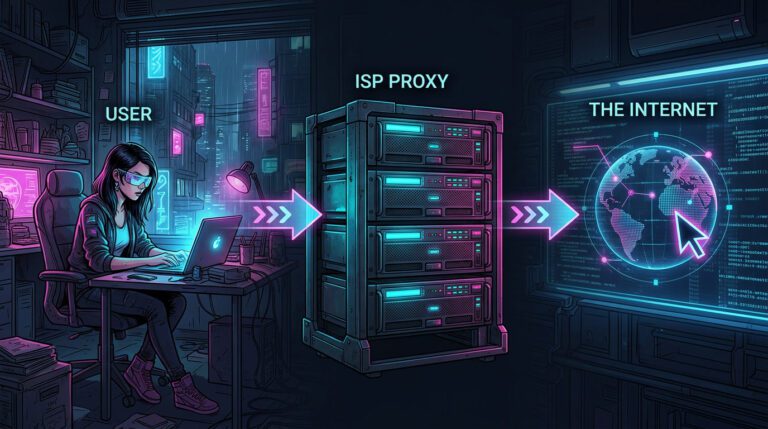
A proxy server is your middleman for the internet. It takes your request — like visiting a website — and sends it on your behalf using its own IP address. The site never sees you, only the proxy.
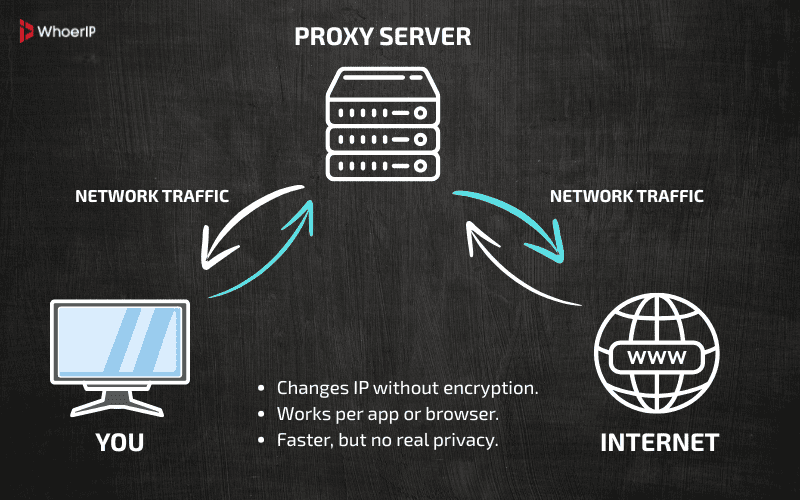
But — and it’s a big but — proxies don’t encrypt your traffic. Your ISP, anyone spying on the network, or the proxy owner can still see what you’re doing.
Proxy Types (Explained Like Real Talk)
Why so many proxy types? Easy. Different tasks need different tools.
Some are built for speed, like datacenter proxies — fast but easy to spot. Others, like residential proxies, focus on looking real, blending in as if you’re browsing from someone’s home. And then there are control proxies — like the ones schools or offices use to block sites or track activity.
Where do proxies live? Some run on big servers, others on home connections, or inside company networks. It all depends on what job they’re meant to do — speed, privacy, or control.
SOCKS Proxy
A SOCKS proxy isn’t just for browsing. It handles pretty much any kind of traffic — think games, torrents, FTP, or chat apps.
It doesn’t mess with your data or encrypt it. It just sends your connection through a different IP, letting you look like you’re somewhere else.
Where people use it:
- Grabbing torrents without showing your real IP.
- Connecting to game servers in other countries.
- Moving files through FTP safely.
- Opening chat apps or calls in places where they’re blocked.
HTTP Proxy
HTTP Proxy handles only web traffic — things like websites, images, videos, anything over HTTP or HTTPS.
It’s useful for changing your IP while browsing, bypassing website blocks, or saving bandwidth with cached content. Companies and schools often use it to block sites like social media.
Unlike SOCKS, it won’t work for torrents, games, or apps — just websites. It’s older tech, less private, and that’s why it wasn’t a focus earlier. Want me to add it to the main article?
Transparent Proxy
Set by schools, workplaces, or cafes to block sites or monitor activity. You often don’t even know it’s there. It doesn’t hide your IP.
Forward Proxy
The standard type. Your requests go through it before reaching websites. The website sees the proxy’s IP, not yours.
Anonymous Proxy
Hides your real IP but tells the website it’s a proxy. Good for basic privacy, but not stealthy.
Distorting Proxy
Same as anonymous but throws in a fake IP for extra trickery. It admits it’s a proxy but pretends to be somewhere else.
Datacenter Proxy
Super fast and cheap. These aren’t tied to physical homes, so sites spot them more easily. Great for tasks where speed matters more than stealth.
Residential Proxy
Looks like traffic from a real home. Harder to detect, more reliable for things like scraping data or bypassing geo-blocks.
But these IPs aren’t just floating around for free. They usually come from real users — sometimes willingly, through apps that trade bandwidth for rewards, or sometimes not-so-willingly through shady software that quietly turns devices into proxy nodes.
If your goal is to stay under the radar and look legit, residential proxies are what you want. They cost more, sure, but that’s because they actually get the job done without drama.
Public Proxy
Free, open to everyone. Also slow, overloaded, and risky. Best avoided for anything important.
Public proxy IPs come from all over the place. Sometimes it’s a server someone accidentally left open. Other times, it’s a poorly secured router or device that’s quietly turned into a proxy without the owner ever knowing.
Why are there so many? Because nobody’s really managing them. They pop up, go offline, and new ones appear. They’re free simply because they’re unstable, unreliable, and often risky. You’re basically using someone else’s leftover internet connection — whether they know it or not.
Shared Proxy
Multiple users, one IP. Cheap but risky — if someone else misbehaves, you might get blocked too.
SSL Proxy
Encrypts your connection to specific websites (HTTPS). Safer than regular proxies but still doesn’t protect everything like a VPN.
What Is A VPN?
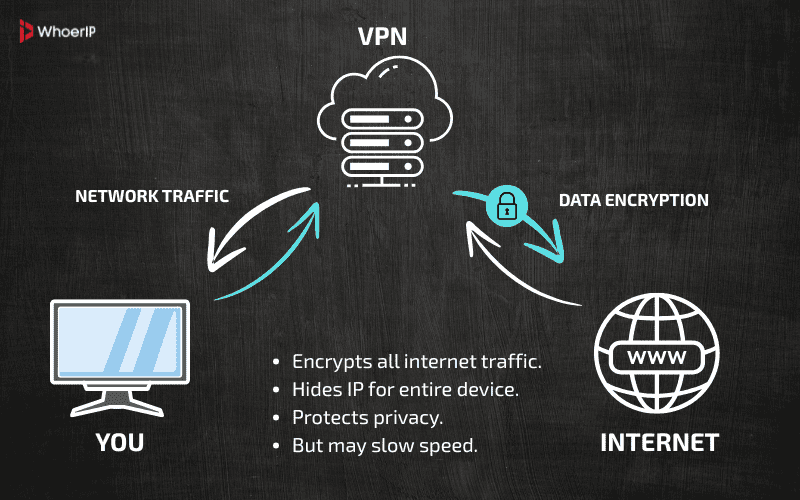
A VPN (Virtual Private Network) is like a secure tunnel for your entire internet connection. Not only does it hide your IP, but it also encrypts everything you do online. No one — not your ISP, hackers, or advertisers — can snoop on your activity.
VPN Types (Explained Like We’re Chatting Over Coffee)
Remote Access VPN
Working from a hotel? Public Wi-Fi sketchy? A Remote Access VPN connects your laptop to your office (or home) network privately and securely — like mailing a locked box, not a postcard.
Site-to-Site VPN
Big companies use this to link offices worldwide. Think of it like a private internet cable from New York to Tokyo. Perfect for sharing files securely between locations.
Mobile VPN
Keeps your VPN connection alive even when switching between Wi-Fi, mobile data, or public hotspots. Ideal for folks constantly on the move.
Personal VPN
Personal VPN (also called Consumer VPN) is the type regular users install on their devices to stay private and safe online.
When you open the app and hit “Connect,” it encrypts everything — your browsing, apps, downloads — and swaps your real IP for one from a different location.
Where people use it:
- Staying safe on public Wi-Fi at cafes, airports, or hotels.
- Watching streaming services from other countries.
- Hiding activity from ISPs and trackers.
- Shopping or banking securely from anywhere.
It’s the go-to choice for anyone who wants simple, all-around online privacy without technical hassle.
Staying anonymous online feels impossible these days, right? Not really. Read How To Remain Anonymous On The Internet and learn how to disappear from trackers and snoops.
VPN Protocols
Aside from VPN types, there are also different protocols — the rules that handle how your secure connection starts and stays stable. Some of the most common are:
OpenVPN
The reliable workhorse. Open-source, rock-solid security, and runs on nearly anything — laptops, phones, routers. Great for everyday privacy, safe browsing, and getting past censorship. Not the fastest, but always dependable.
What Is OpenVPN over Cloak?
OpenVPN over Cloak is a stealth setup where Cloak acts as an obfuscation layer for OpenVPN traffic. Cloak disguises VPN data as normal HTTPS traffic, making it look like you’re just browsing a regular website.
Used for: Circumventing aggressive censorship, like in China or Iran.
How it works: Cloak acts as a proxy relay; OpenVPN traffic passes through it, wrapped in a TLS-like layer. To the observer, it looks like a harmless HTTPS request.
What Is OpenVPN over Shadowsocks (SS)?
OpenVPN over SS is a similar concept. Instead of using Cloak, OpenVPN traffic is routed through a Shadowsocks proxy, which encrypts and disguises it.
Used for: Beating DPI and firewall blocks while keeping OpenVPN’s robust encryption.
How it works: OpenVPN establishes its encrypted tunnel, but instead of connecting directly to a VPN server, it routes through Shadowsocks, which hides it within SOCKS5-like traffic.
WireGuard
The speed king. Lightweight, super-fast, and modern. Perfect for streaming, gaming, or using a VPN on your phone without killing the battery. Less code, fewer bugs, stronger encryption.
IPse
The foundation behind several VPN types. Built for securing connections at the network level. You’ll mostly see it paired with other protocols — strong but usually runs behind the scenes.
L2TP/IPsec
Old-school but reliable. Double-wrapped encryption thanks to pairing L2TP with IPsec. Slower than WireGuard, but works well when nothing else does — especially on stubborn networks.
IKEv2/IPsec
A mobile user’s best friend. Fast, stable, and doesn’t freak out if you switch from Wi-Fi to mobile data mid-call. Great choice for phones and tablets that are always on the move.
PPTP
The dinosaur. Super fast but weak on security — basically obsolete for anything private. Only makes sense if you’re just bypassing a geo-block on a trusted network.
What is Xray?
Xray is a modern Proxy and VPN platform designed to bypass censorship and deep packet inspection (DPI). It’s an evolution of V2Ray, offering more flexibility and better performance. Xray supports multiple protocols like VLESS, VMess, Trojan, and Shadowsocks, often combined with TLS encryption and domain fronting to make VPN traffic look like regular HTTPS — nearly impossible for ISPs or governments to detect or block.
It’s widely used in heavily restricted regions where simple VPNs often fail.
Tired of that “this content isn’t available in your region” message? There’s a fix. Our guide 5 Easy Ways to Bypass Geo-Restricted Content shows how to unlock anything, anywhere.
VPN Protocols Comparison Table
| Protocol | Speed | Security | Stability | Bypass Capability | Best For | Mobile Friendly | Complexity |
|---|---|---|---|---|---|---|---|
| WireGuard | Very Fast | Strong | Stable | Low | Fast streaming, gaming | Yes | Simple |
| OpenVPN | Moderate | Excellent | Stable | Moderate | General privacy, safe browsing | Yes | Medium |
| OpenVPN + Cloak | Slow | Excellent | Moderate | Excellent (Best) | Heavy censorship (China, Iran) | Yes | High |
| OpenVPN + Shadowsocks | Moderate | Strong | Stable | Very High | Censorship bypass with OpenVPN stability | Yes | Medium |
| IKEv2/IPsec | Fast | Strong | Very Stable | Low | Mobile users, fast switching | Excellent | Simple |
| L2TP/IPsec | Slow | Medium | Moderate | Low | Older devices, fallback | Good | Simple |
| PPTP | Fast | Very Weak | Moderate | Very Low | Speed over security (not recommended) | Yes | Very Simple |
| XRAY (VLESS, VMess, Trojan) | Fast | Strong | Stable | Excellent (Best) | Ultimate censorship resistance | Yes | Complex |
VPN Protocols summary Insights
- WireGuard → Fastest, modern, great for speed and simplicity.
- OpenVPN → Stable, very secure, but slower.
- OpenVPN + Cloak/SS → When you need stealth.
- XRAY protocols → King of censorship evasion. Highly flexible but complex.
- IKEv2/IPsec → Best for mobile and fast network switching.
- PPTP/L2TP → Legacy, use only if nothing else works.
Proxy and VPN: Head-to-Head Comparison
| Feature | VPN | Proxy |
|---|---|---|
| Encryption | Yes — full data encryption | No — only hides your IP |
| Coverage | Entire device | One app or browser |
| Privacy Level | High | Low |
| Speed | Slightly slower (due to encryption) | Faster (no encryption) |
| Cost | Usually paid | Free or cheaper |
| Use Cases | Privacy, streaming, secure work | Streaming, bypass geo-blocks |
FYI: VPN = privacy + encryption. Proxy = faster + simple IP change.
If your goal is privacy — VPN all day. If it’s just streaming a show from another country, proxy might do the trick.
Pro Tip: Never use a public proxy for anything sensitive. Seriously. It’s like leaving your wallet on a park bench.
Conclusion: Proxy or VPN — What Should You Use?
If you care about privacy, security, and protecting everything you do online, a VPN is your answer. Full stop.
If you just want to watch videos not available in your country or check a website from another location, a proxy gets the job done faster and with less fuss.
Still not sure which is better — proxy or VPN? You’re not alone. Dive into What Is Better Proxy or VPN? Find Out Here for a clear breakdown that makes the choice simple.
Both tools have a place. It’s all about what you need.
Frequently Asked Questions
Which is better VPN or proxy?
A VPN is generally better for privacy and security. A proxy only forwards traffic, while a VPN encrypts it, protecting you from tracking and eavesdropping.
Should I use proxy and VPN together?
Using a proxy and a VPN together can provide extra layers of anonymity, but it’s not usually necessary. A VPN offers strong encryption and protects all your traffic, while a proxy can be used for specific tasks like web scraping or accessing geo-restricted content. If you need high security, using only a VPN may be sufficient. However, for more specialized tasks, combining both might offer enhanced privacy or help bypass detection by certain websites.
Is it good to use VPN all the time?
Using a VPN all the time is generally a good idea if privacy and security are your top priorities. It encrypts all your internet traffic, offering protection from hackers, ISPs, and even websites. However, there are a few things to consider: 1. Speed: A VPN might slightly slow down your internet connection because it routes your data through an encrypted server. 2. Compatibility: Some websites or services may detect VPN traffic and restrict access, though this is becoming less common with high-quality VPN providers. 3. Battery Life (Mobile Devices): On mobile devices, using a VPN continuously may drain battery life a bit faster. If you're okay with a minor reduction in speed and battery life, keeping the VPN on all the time is a great way to ensure ongoing security and privacy.
Does a proxy hide your IP?
Yes, a proxy hides your IP address by acting as an intermediary between you and the server you’re trying to access. Your traffic is routed through the proxy server, so the server only sees the proxy’s IP address, not yours.
Can I use my VPN as a proxy?
No, not directly. A VPN and a proxy are different technologies. Some VPN providers offer proxy services, but a VPN client itself is not a proxy.
Do hackers use proxy or VPN?
Yes, attackers may use both to hide their identity. However, legitimate users also use them for privacy.
Is a proxy server illegal?
No, proxies themselves are legal. They can be used for caching, filtering, or accessing geo-restricted content. What may be illegal is how you use them.
Can you use both proxy and VPN?
Yes, but it’s rarely necessary. Usually, a VPN alone is enough. Using both may slow down your connection.
How do VPN users get caught?
They can be caught if: The VPN provider keeps logs and shares them, Malware leaks their real IP, They log in to accounts that reveal identity.
Can I be hacked if I use VPN?
A VPN reduces risk but doesn’t make you immune. You can still be hacked via phishing, malware, or weak passwords.
What are the disadvantages of a proxy?
No encryption (weaker privacy), Can be slow or unreliable, Many free proxies inject ads or log activity.
Is a free VPN better than a free proxy?
Generally yes, because free VPNs usually encrypt traffic. But free VPNs may still log data, show ads, or limit bandwidth. Paid solutions are much safer.
Does a VPN hide your IP address?
Yes. A VPN masks your real IP and replaces it with the VPN server’s IP while encrypting your traffic.