

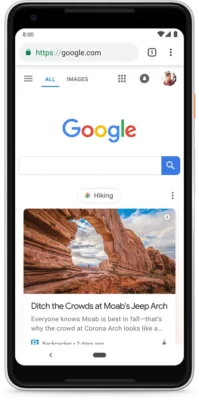
Figuring out how to appear in Google Discover has gotten noticeably more complicated this year — and for good reason. In February 2026, Google did something it had never done before: released a core update targeting Discover specifically, separate from regular search.
TL;DR: Google’s February 2026 Discover core update completed its 22-day rollout on February 27. It was the first time Google publicly labeled a core update as a Discover core update (Search Engine Journal). The update focuses on three things: local relevance, less clickbait, and more original depth from sites with real topical expertise. To appear in Discover, your content must be indexed, follow content policies, use large images, and demonstrate consistent authority in a defined niche. Track your results in Search Console under the Discover performance tab.
What the February 2026 Discover Update Actually Changed
Before February 2026, Discover traffic was just a side effect of regular search. No more.
This was Google’s first-ever Discover-only core update. Search rankings and Discover now run on separate signals — your organic traffic can be fine while Discover traffic drops 50%. Or the opposite.
What Google changed, in plain terms:
- More local content — users see publishers from their own country
- Less clickbait — sensational headlines got penalized hard
- More depth — sites with real topical expertise won
Sites chasing viral headlines lost 30–60% of Discover traffic. Sites with consistent niche coverage gained.
Currently live for English-language users in the US. Global rollout confirmed, timeline unknown.
FYI: Google added that many sites demonstrate deep knowledge across a wide range of subjects, and its systems are built to identify expertise on a topic-by-topic basis. As a result, any site can appear in Discover, whether it covers multiple areas or focuses deeply on a single topic. A local news site with a dedicated gardening section could have established expertise in gardening, even though it covers other topics. In contrast, a movie review site that wrote a single article about gardening would likely not.
A Quick Checklist Before You Publish
Run through this before hitting publish on anything you want Discover to pick up:
- Page is indexed and not blocked by noindex or robots.txt
- Featured image is at least 1200px wide, relevant to the article, no watermarks
max-image-preview:largemeta tag is in the<head>- Headline accurately reflects the article — no bait
- Author is named, with a bio page that demonstrates relevant expertise
- The article covers something that aligns with a recurring or trending audience interest
- Content goes deeper than what already ranks on the topic
- Page loads fast on mobile — check LCP in Search Console
- RSS feed is active and not blocked
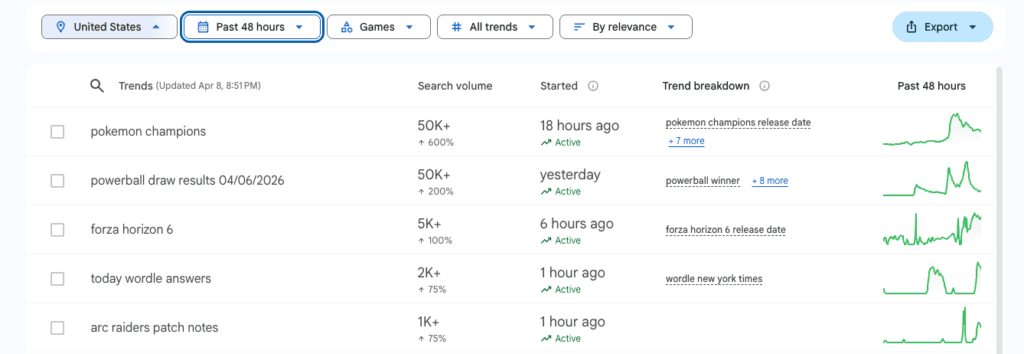
Pro tip: Use Google Trends (trends.google.com) to find what’s spiking in your niche right now and write about that. Trending topic from your own industry — Discover picks it up fast, and your topical authority stays intact.
The Baseline: What Google Actually Requires
Content is automatically eligible to appear in Discover if it is indexed by Google and meets Discover’s content policies. No special tags or structured data are required. Note that being eligible to appear in Discover is not a guarantee of appearing.
That is both reassuring and frustrating. There is no submission process, no checklist to tick off for guaranteed inclusion. Eligibility is the floor. Actual visibility is earned.
As part of Google Search, Discover makes use of many of the same signals and systems used by Search to determine what is helpful, people-first content. So if your SEO fundamentals are weak, Discover will reflect that.
Proven Recommendations for Getting Into Discover
These are based on Google’s official guidance combined with what has held up across site types after the February update.
Content quality first. Provide content that’s timely for current interests, tells a story well, or provides unique insights. Generic summaries and recycled takes are exactly what the 2026 update was designed to filter out.
Headlines that reflect the article. Use page titles and headlines that capture the essence of the content. Avoid clickbait and similar tactics to artificially inflate engagement by using misleading or exaggerated details in preview content. A title like “How Google Discover Works in 2026” will outperform “The Google Feature That’s Changing Everything” under the new algorithm.
Images — this one is non-negotiable. Discover feeds are highly visual, and listings must include large, compelling images to be eligible for visibility and to increase click-through rates. Google recommends images at least 1200px wide and the use of the max-image-preview:large setting. Without this, your content may only get a small thumbnail — which significantly reduces CTR.
Add this tag in your page’s <head> section:
<meta name="robots" content="max-image-preview:large">Build topical authority, not random coverage. Topic authority is the new ranking signal. Consistent publishing in your niche builds Discover visibility over time — sporadic coverage of trending topics no longer earns sustained Discover traffic. Five strong articles in one area now outweigh twenty thin posts scattered across unrelated topics.
E-E-A-T signals matter. Experience, Expertise, Authoritativeness, and Trustworthiness are no longer just YMYL concerns. After 2026, Google applies these standards across all content types in Discover. Author bios with real credentials, verifiable experience, and named contributors help. Anonymous “editorial team” bylines do not.
RSS feed — still relevant. Google allows users to Follow websites directly within the Google App. When a user follows a site, Google may use that site’s RSS or Atom feed to surface new content from that publisher within the user’s Discover feed. A clean, accessible RSS feed makes it easier for Google to identify new content from your site promptly.
Mobile performance. Core Web Vitals are evaluated site-wide now. Largest Contentful Paint should be under 2.5 seconds. Cumulative Layout Shift should be maintained below 0.1. Discover is a mobile-first surface, and slow pages reduce how reliably your content surfaces.
Pro tip: After the February 2026 update, recovery for affected sites typically takes 2 to 4 weeks of consistent quality publishing in your niche — not one-time fixes, but sustained output. Each quality article reinforces your site’s topical authority signal for Discover.
What Discover Avoids — Equally Important
Knowing what gets filtered out is as useful as knowing what gets rewarded.
Advertising and other paid promotional material on your pages should not exceed your content. Google does not allow content that conceals or misrepresents sponsored content as independent, editorial content.
Sensationalism, morbid curiosity hooks, outrage bait — all of these are named in Google’s content policies as grounds for exclusion. So is misleading preview content. If your headline promises something the article does not deliver, that is a policy violation, not just a style choice.
Syndicated and duplicate content. If the article was published elsewhere first, Discover will likely ignore your version. Syndicated content, particularly on Google Discover, saw major losses — Yahoo dropped 47% in Discover traffic. Republishing industry news word-for-word, running a content feed from a wire service, aggregating posts without adding original commentary — all of this falls into the syndicated content trap.
How To Check Your Discover Performance in Search Console
Results are visible, trackable, and separated from organic search — which is the correct way to measure this.
Go to https://search.google.com/search-console/performance/discover
Or navigate manually: Search Console → Discover tab.
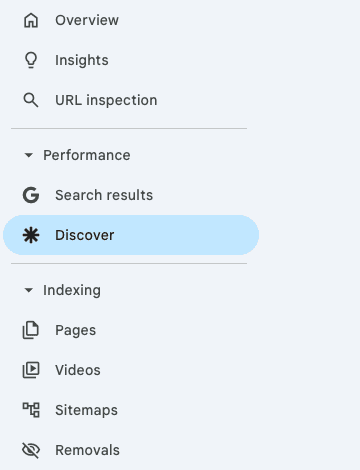
This report shows impressions, clicks, and CTR for any of your content that has appeared on Discover in the last 16 months, as long as your data reaches a minimum threshold of impressions. The Discover performance report includes traffic from Chrome, and fully tracks a site’s Discover traffic across all surfaces where users interact with Discover.
FYI: If both Discover traffic and Search traffic changed during this period, the cause for each change may be different. Accurate attribution — using Search Console to isolate which performance changes occurred in Discover versus organic Search — is essential before deciding what to change.
Can a New Domain Appear in Google Discover?
This is one of the most debated questions in SEO communities. The short answer: technically yes, but practically unlikely until your site builds enough trust signals.
Your site has to be seen as a trusted source with low spam, evaluated by a variety of proxies like site, author, and trust scores, in order to be eligible. A brand-new domain has none of these signals built up yet.
What actually happens: new sites that publish consistently, earn some organic traffic, build a few quality backlinks, and establish topical focus can start appearing in Discover within a few months — sometimes weeks if a piece hits a trending topic at the right moment.
But there is no reliable fast path. Sites that saw early Discover wins on new domains almost always had one thing in common: one strong, timely piece that caught genuine user interest, which then signaled the algorithm to look more at that site’s output.
Conclusions
Appearing in Google Discover in 2026 is less about tricks and more about sustained publishing discipline. The February update made the clearest statement yet: Google now evaluates Discover independently from search, using its own quality layer that specifically punishes clickbait and rewards genuine expertise.
Your path in runs through three things — original content that earns real engagement, images that meet the technical minimum, and a site identity Google can confidently associate with a defined topic area. Check your results regularly in Search Console’s Discover tab, and treat each content piece as a long-term trust signal rather than a traffic gamble.
Understanding how your content is seen online goes beyond just Discover. Your browser fingerprint, IP reputation, and overall online privacy setup all affect how you interact with platforms like Google — worth understanding alongside your content strategy.