

What is Multilogin? Multilogin is a multi-accounting platform, and that one-line answer is where this Multilogin review begins.
TL;DR
It lets you run many online accounts at once. Each one gets its own browser profile (a unique fingerprint plus its own proxy) or its own real Android cloud phone. So every account looks like a separate person on a separate device.
Wondering which tools or apps are best for managing multiple social media accounts across platforms? Multilogin is one of the strongest answers going. It covers both the web side and native mobile apps from a single dashboard, where most rivals handle only one.
Good news if you haven’t tried it yet: as of July 2026, Multilogin now offers a free plan with no time limit, so you can test it right now without entering a credit card. The free plan includes cloud phone access, browser profiles, and a limited amount of proxy traffic and mobile minutes, enough to properly try out the platform before deciding on a paid plan.
Multilogin pairs a strong multiaccounting browser with real Android cloud phones in one desktop dashboard, built for anyone juggling many accounts that each must look like a separate device.
👉 You can skip straight to the pros and cons for the quick verdict,
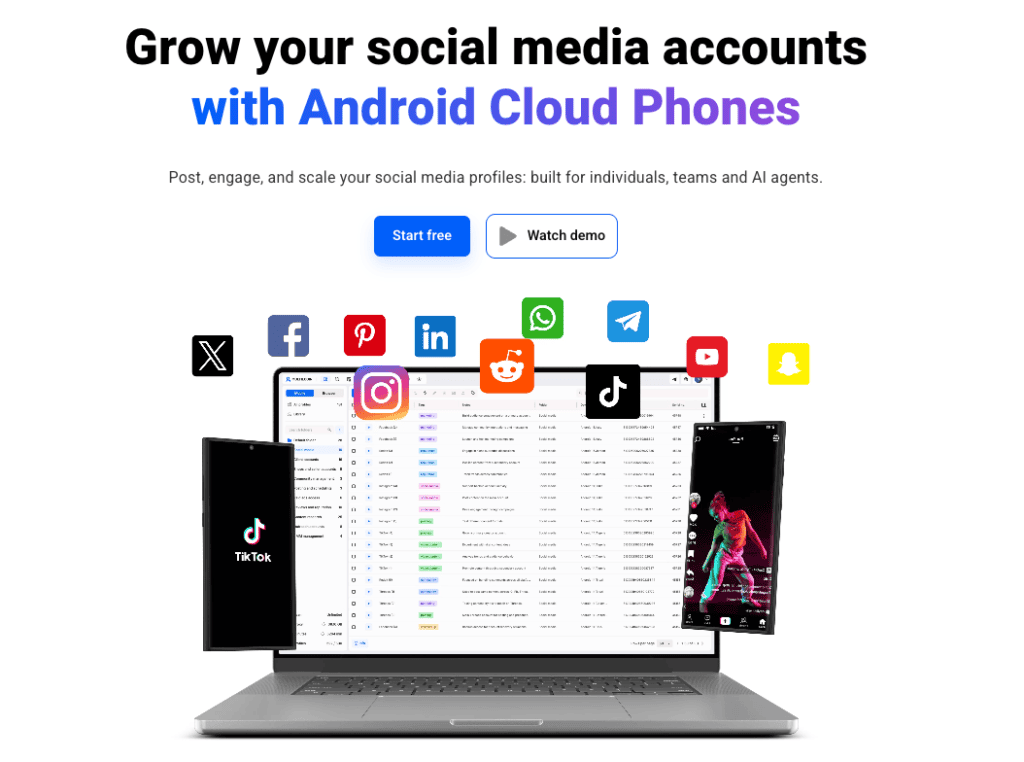
Landed here weighing one stubborn question? Whether a single tool can really run dozens of accounts without them linking together and getting you flagged.
Short answer: yes. And it pulls it off more convincingly than most of the field.
Multilogin has been around the multi-accounting world a long time, which matters. This is not a weekend project with a slick landing page.
FYI: Want the wider lay of the land before you commit to anything? Two deep-dives worth bookmarking: Best Antidetect Browsers in 2026: Full Comparison Guide and Android Emulators vs. Cloud Phones. They give you the context this review builds on.
What is Multilogin used for?
Multilogin is used to create and manage many online accounts at once without those accounts being linked back to you or to each other. That is the job. Everything else is detail.
Picture the problem it solves. Platforms like Instagram, TikTok, Facebook and Reddit are very good at spotting when ten “different” accounts share the same fingerprint, the same IP, the same device quirks.
Trip those wires and you get shadowbans, suspensions, the works.
Multilogin hands each account its own sealed environment. To the platform, they look like ten strangers on ten different devices.
The use cases stack up fast: social media managers running client rosters, affiliate marketers spreading ad accounts, e-commerce sellers, crypto airdrop hunters spinning up wallets, market researchers, and anyone who got burned once by a mass ban and swore “never again.”
Who is Multilogin best for?
Multilogin is best for professionals and teams who manage accounts at scale and cannot afford to lose them. If you run one Instagram for fun, it is overkill. If you run forty for clients, it is a lifesaver.
Here is the honest cut of who gets the most out of it:
- Agencies and freelancers handling many client accounts across platforms, who need clean separation and team permissions.
- Affiliate and traffic-arbitrage marketers running parallel ad accounts that absolutely must not be linked.
- Social media managers posting natively from mobile apps, not just scheduling from the web.
- Crypto and Web3 users working multiple wallets and campaigns from isolated environments.
- Researchers and scrapers who need consistent, controllable browser identities.
Each account gets its own device identity, IP, and history, so platforms treat them as separate people, not copies of one.
Multilogin is an excellent fit when you care about any of these:
- Free plan with no time limit try Multilogin risk-free, no credit card required, with cloud phones, browser profiles, and enough proxy traffic and mobile minutes to properly test the platform.
- Best value for money thanks to accessible pricing, with paid plans starting from $7.08/month (billed annually) and unlocking advanced features as you scale
- Beginner-friendly setup that walks you through your first profile.
- Strong browser fingerprinting that Multilogin handles in full, keeping profiles consistent and believable.
- Media buying across parallel ad accounts that stay unlinked.
- Mobile fingerprinting (cloud phones feature) for native app accounts.
- Lightweight day-to-day use, since you only pay and run what you need.
Multilogin at a glance
Multilogin runs both as a web version in your browser and as a desktop app for Windows, macOS and Linux, synced in real time. It combines multi-account browser profiles, real Android cloud phones, and built-in residential proxies. No fragile hacks, no phone farm humming in a closet.
Quick facts before we go deeper:
| Area | What you get |
|---|---|
| Platforms | Web version (in-browser) plus desktop apps for Windows, macOS and Linux, synced in real time |
| Cloud phones | Real Android devices, versions 10 to 15 (~30 device types across 12 brands) |
| Browser | Mimic (Chromium-based) with isolated, unique identities |
| Proxies | Built-in residential proxies; traffic is included in every plan (the amount depends on your tier), and you can top up more anytime |
| Automation | REST API, CLI, Postman, Selenium, Puppeteer, Playwright, headless and Docker |
| Team | Unlimited seats with granular permissions on business plans |
| Free plan | Free forever, no credit card required, try it before you commit |
| Support | 24/7 in 5 languages, GDPR compliant, 2FA available |
Notice the spread. Most rivals are good at the browser side or experimenting with the phone side. Multilogin tries to nail both and hand you a single control panel for the lot. To see how the mobile half fits a real workflow, why you need cloud phones is a useful primer.
Cloud phones: the headline feature
Multilogin’s cloud phones are real cloud-hosted Android devices, not emulators, and that distinction is the heart of why people pick it. Emulators get sniffed out. Real hardware identities, much less so.
Each phone carries its own genuine fingerprint: a unique IMEI, Android ID, and MAC address. GPS and SIM parameters auto-match the proxy you assign.
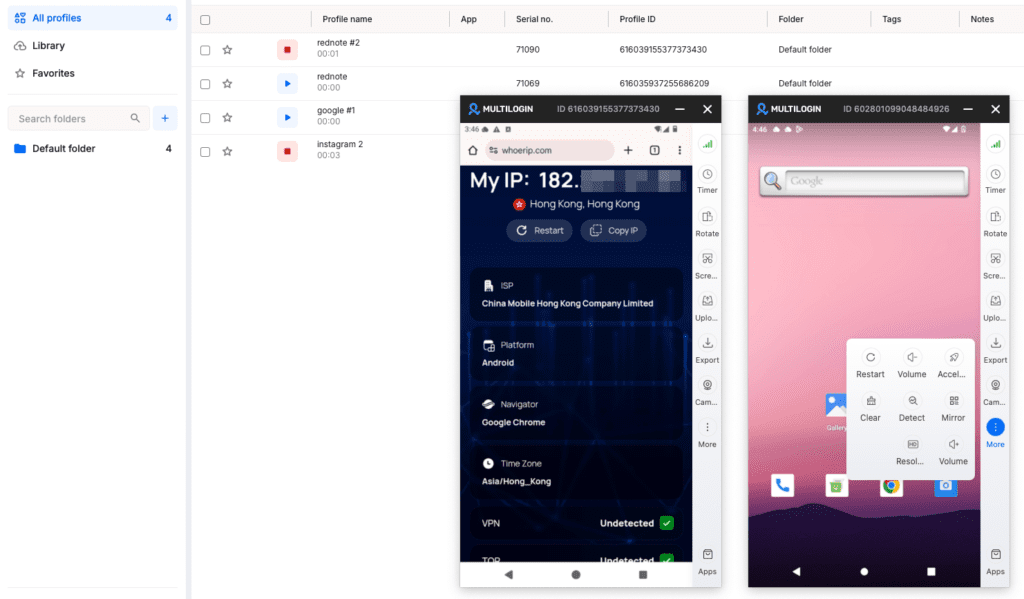
So a phone “located” in Berlin actually carries Berlin-ish network signals, not a Frankfurt server pretending.
App data, logins and cache persist between sessions too. An account you warmed up last week still feels lived-in when you come back. That continuity is the quiet detail platforms reward.
| Cloud phone spec | Detail |
|---|---|
| Device type | Real Android hardware, not emulators |
| Android versions | 10, 11, 12, 13, 14, 15, 16 |
| Device variety | ~30 device types across 12 brands (Samsung, Google, Xiaomi, others) |
| Identity | Unique IMEI, Android ID, MAC per phone |
| Location logic | GPS and SIM matched to the assigned proxy |
| Persistence | App data, sessions and logins carry over between visits |
Pro tip: Warming up matters more than people admit. Do not log into a fresh cloud phone and immediately blast ten posts. Browse, scroll, like, behave like a bored human for a few days. The persistent-session feature exists precisely so that history sticks and the account ages naturally.
Creating a mobile profile
Creating a mobile profile in Multilogin feels just like making a regular browser profile, quick and painless.
You name it, pick a use case (Snapchat, TikTok, whatever you need), and assign a proxy: the built-in Multilogin one, your own, or a saved template. Then set the device info, Android version, brand and model, left on Random if you like.
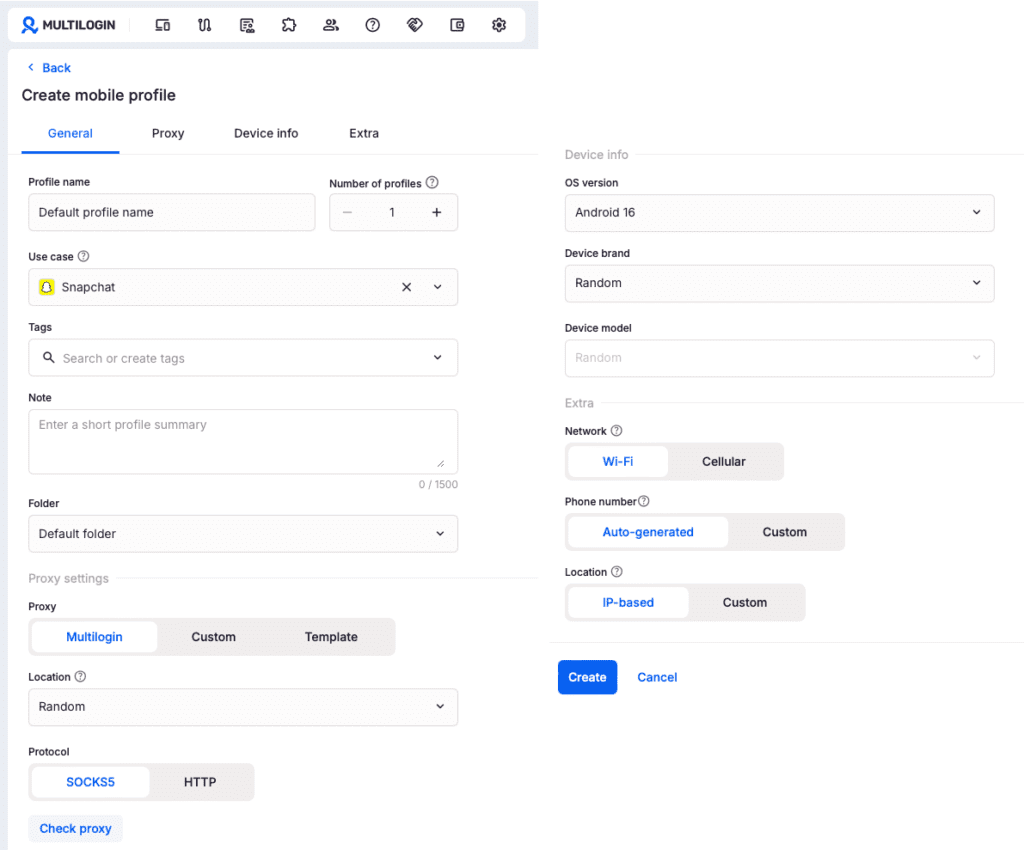
A couple of extras, network type, phone number, location, and you hit Create.
Need several at once? Just set the number of profiles and spin up a batch. Same logic as the browser side, same comfortable flow.
Instagram-heavy work? The platform plays well there in particular, and cloud phones for Instagram digs into the specifics.
The multi-account browser, in plain terms
Multilogin’s browser creates isolated Chromium-based profiles, each wearing a distinct digital fingerprint so websites see separate devices. This is the web counterpart to the cloud phones.
What does “fingerprint” even mean here? It is the bundle of small signals a site reads about you: canvas and WebGL data, fonts, timezone, screen size, language, hardware hints.
Multilogin lets each profile carry a believable, internally consistent set of those signals, then locks a proxy to it. Profile A in Spain speaks Spanish, sits in a Madrid timezone, and routes through a Spanish IP. No mismatches screaming “automation.”
Browser profiles or cloud phones? Depends on the platform. The simple split:
| Question | Browser profiles | Cloud phones |
|---|---|---|
| Best for | Web-based accounts, scheduling, analytics | Native mobile apps (TikTok, IG posting) |
| Looks like | A separate desktop browser | A separate physical Android phone |
| Strength | Fast, cheap, bulk-friendly | Highest realism for mobile-first apps |
| Trade-off | Less convincing for mobile-only apps | Costs scale with minutes used |
Most serious users run both. Web profiles for the bulk grunt work, cloud phones for the platforms that really care whether you are on a “real” handset.
Built-in proxies, and why that is a bigger deal than it sounds
Multilogin includes residential proxy traffic free in every plan, with the option to plug in your own external proxies if you prefer. That is rarer than it should be.
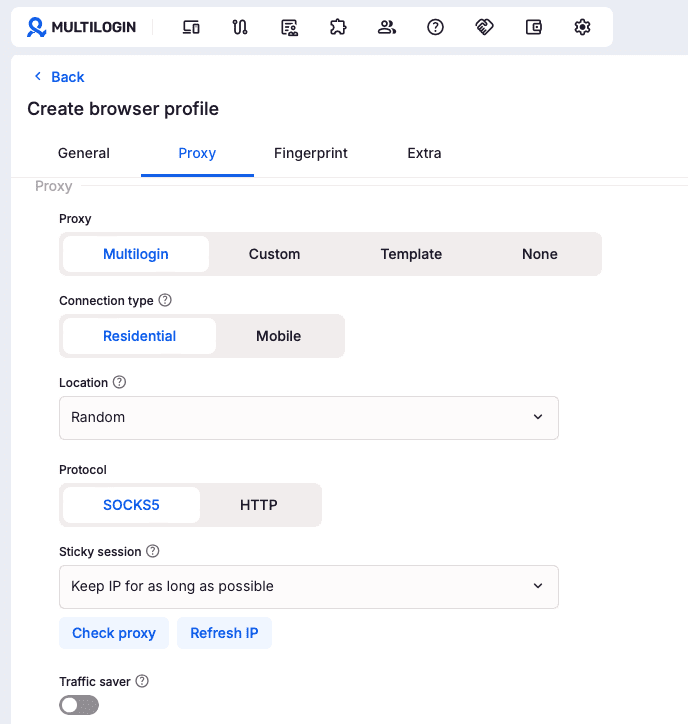
Bundling residential proxies (and matching them to the device’s GPS and SIM on cloud phones) closes that gap inside the same dashboard. Fewer moving parts, fewer ways to mess it up.
To be clear about the money side, since this trips people up: the proxy traffic is not free.
Your plan includes a set monthly amount (1 GB on Pro 10, more on higher tiers). Once you burn through it, you top up at roughly $3.50 per GB. The decent part is that unused traffic rolls over, so a quiet week does not cost you.
Interface and ease of use
The Multilogin interface is clean, fast, and built so non-technical users can run a profile in minutes without touching a config file.
This is genuinely one of its strongest cards, and the part most people end up praising.
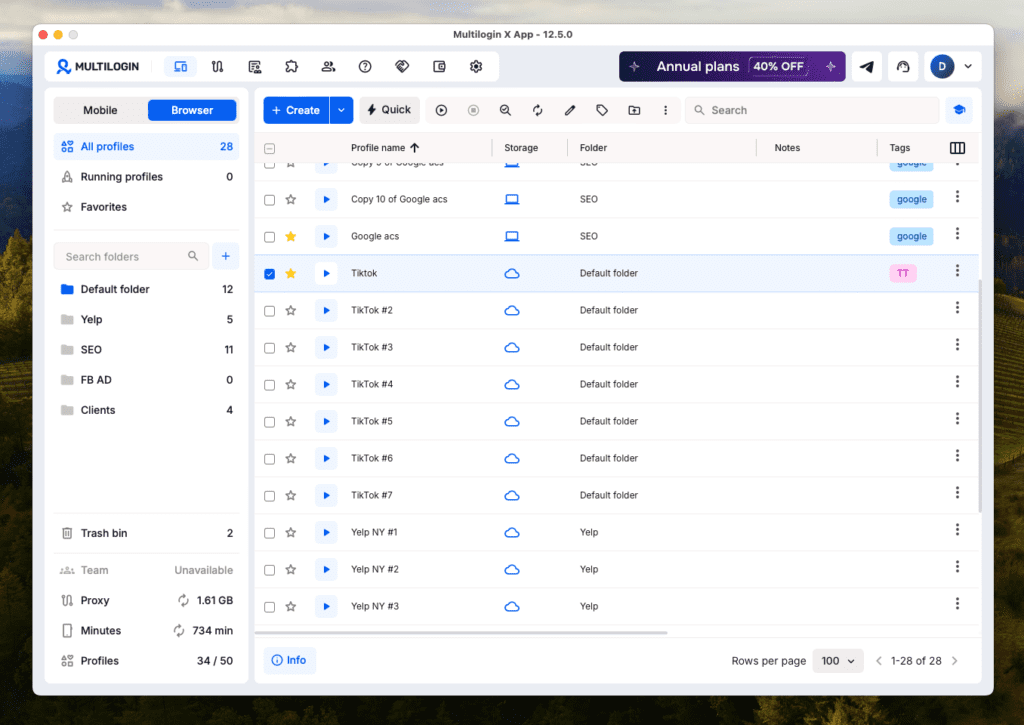
Open the dashboard and the logic just clicks. Folders live on the left, profiles sit in a tidy table with Storage, Folder, Notes and Tags columns, and a Mobile/Browser toggle flips you between cloud phones and browser profiles up top. Status, sessions, team access, proxy and minute balances, all of it sits exactly where your hand expects.
What makes Multilogin pleasant to actually live in, day after day:
Organize at scale: group profiles into folders, tag them, star favorites, drop your own Notes on each one, and sort by any column. Even at 1,000 profiles the place stays navigable, which is the real test.
Bulk operations: select a whole batch and move, import, export, delete or launch them together. Nobody wants to click 200 profiles one at a time.
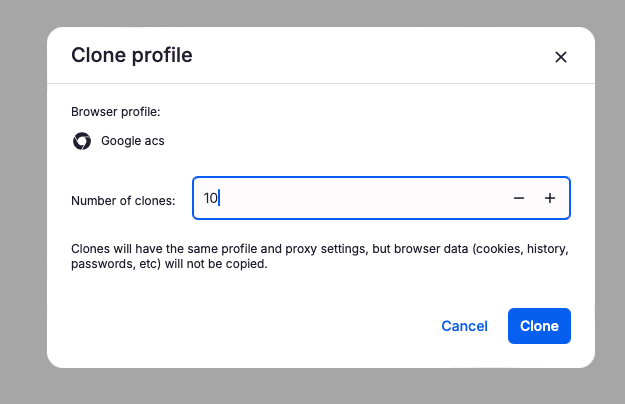
Clone in seconds: duplicate a profile (proxy settings and all) up to dozens of copies in one shot, perfect when you need ten near-identical accounts fast. Browser data is left out on purpose, so each clone starts clean.
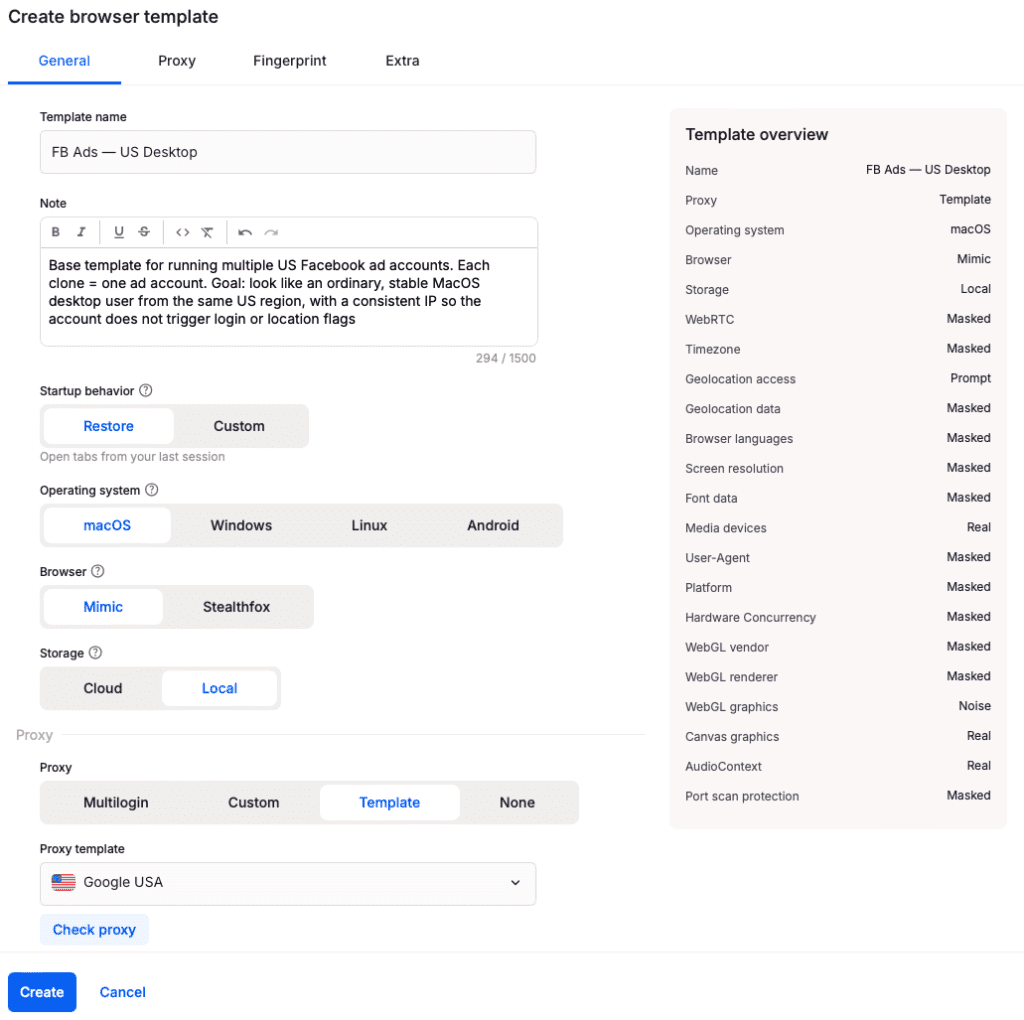
Profile templates: save a setup as a reusable template (Facebook AD, Google, take your pick) and spin fresh profiles from it without rebuilding anything.
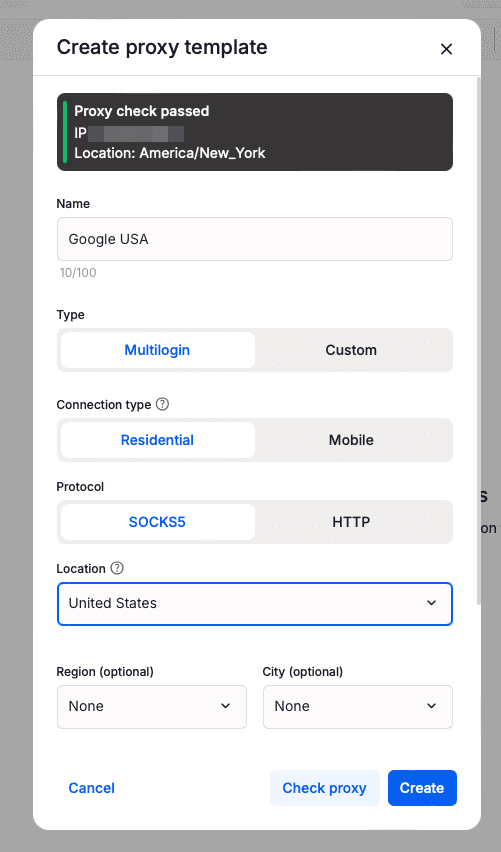
Proxy templates: store proxy configs as templates too, so you are not re-typing the same residential or mobile settings every single time. Pick Multilogin proxy, Custom, Template or None, set location and protocol, done.
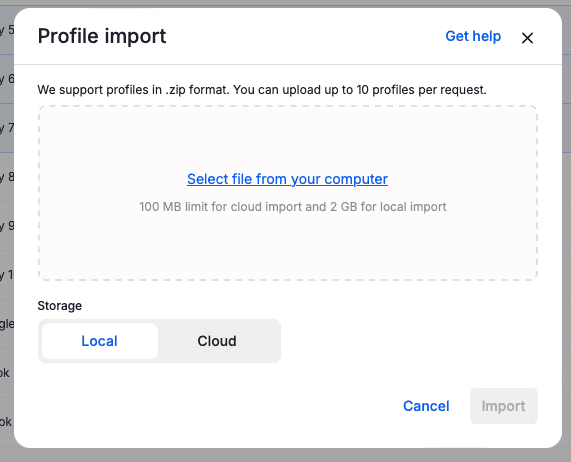
Import and export: pull profiles in or out, export a profile or just its cookies, copy a profile ID, all sitting in one right-click menu.
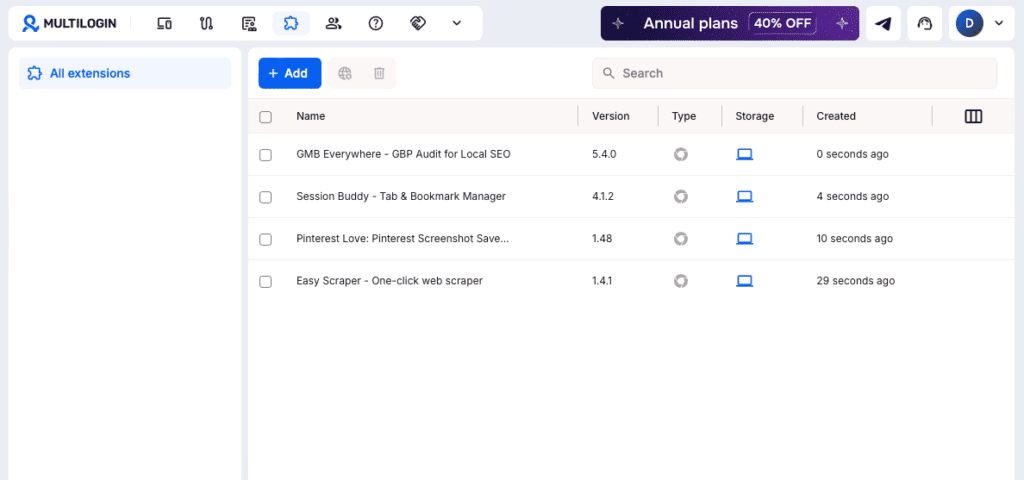
Extension library: add browser extensions once, keep them in a single place, and reuse them across profiles like a template set of their own.
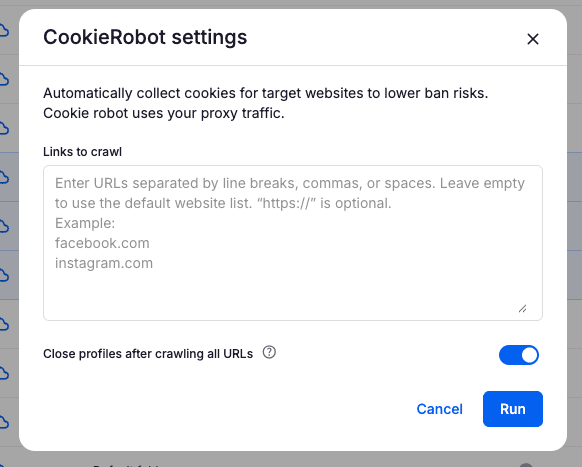
CookieRobot. It automatically visits the websites you choose and collects cookies for your profile to lower ban risk, running on your own proxy traffic. In plain terms, it warms an account up with a believable browsing history before you ever log in.
Well-designed software disappears, and Multilogin mostly does. You think about your accounts, not about the tool managing them.
Is it flawless? No. New users still face a learning curve around the concepts themselves (fingerprints, proxies, warming up), and that curve is on the topic, not really the buttons. But the app does about as much hand-holding as you can fairly ask. For a category that historically looked like hacker dashboards from 2012, that is a real win.
Multilogin automation and team features
Multilogin supports full automation through a complete REST API, the Selenium, Puppeteer and Playwright WebDriver frameworks, a ready-made Postman collection for low-code setups, and command-line (CLI) control, plus team seats with granular permissions on business plans.
The API runs on token-based auth: you generate automation tokens, pull your profile, folder and workspace IDs, then drive the whole thing programmatically.
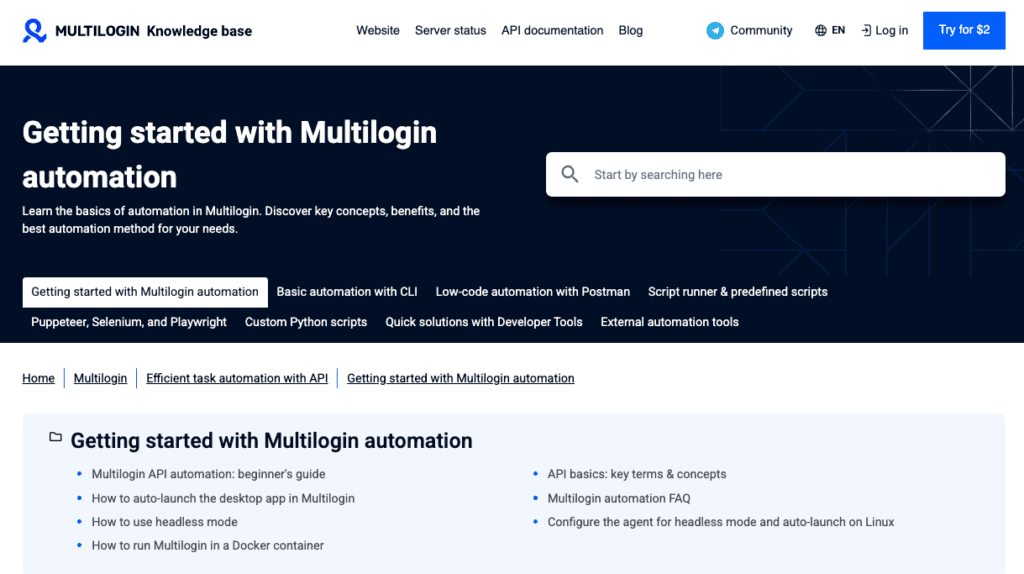
Not a coder? The Postman collection lets you create, start, stop, update and clone profiles, export cookies, even install browser extensions, all by firing prepared requests. And the CLI is the quiet workhorse, spinning up profiles, launching or stopping cloud phones, enabling 2FA, running jobs as a team member, straight from the terminal or a CI pipeline.
A few specifics worth knowing if automation is your reason for being here:
- Headless mode and Docker: run profiles with no visible window, on a server, inside a container. Built for Linux boxes and scheduled jobs.
- Cloud-phone scripting: create, launch and stop Android cloud phones via CLI, not only browser profiles. The mobile side automates too, which is rarer than it sounds.
- CookieRobot and Script runner: warm up cookies and fire predefined scripts without building every routine from scratch.
- Custom Python: log in, retrieve API tokens, import or export proxy lists, build preset profile templates, then scrape with Selenium.
- External plug-ins: wire in CAPTCHA solvers and SMS pools so verification keeps flowing when you operate at volume.
On the team side, business plans bring unlimited seats with permission controls, which is the difference between trusting a junior with everything and trusting them with exactly what they need. Stack 2FA and GDPR compliance on top, and the security posture holds up fine for client work.
How much does Multilogin cost?
Multilogin also offers a free plan with no credit card required, so you can test the platform before committing to anything paid.
On the free plan, you get:
- Up to 5 profiles total (browser and mobile combined), including a maximum of 1 mobile profile — the rest can be browser profiles, in any combination you like.
- Cloud storage only for all profile data — local storage isn’t available on this plan.
- 30 minutes of mobile usage, given as a one-time allocation. This can’t be topped up or renewed on the free plan.
- 200 MB of proxy traffic, also a one-time allocation with no top-ups on the free plan.
- If your account sits inactive for 7 days, all profiles are automatically deleted, so keep at least one profile active if you want to hold onto your setup.
If you delete a profile yourself while your account stays active, that slot opens up and you can create a new one. But if your profiles are wiped due to inactivity, your profile count resets to zero.
Once you’re ready to scale up, paid plans start at $11/month for the Pro 10 plan, or $7.08/month if billed annually ($85/year). Proxy traffic and cloud-phone minutes on paid plans are billed pay-as-you-go on top of your base subscription.
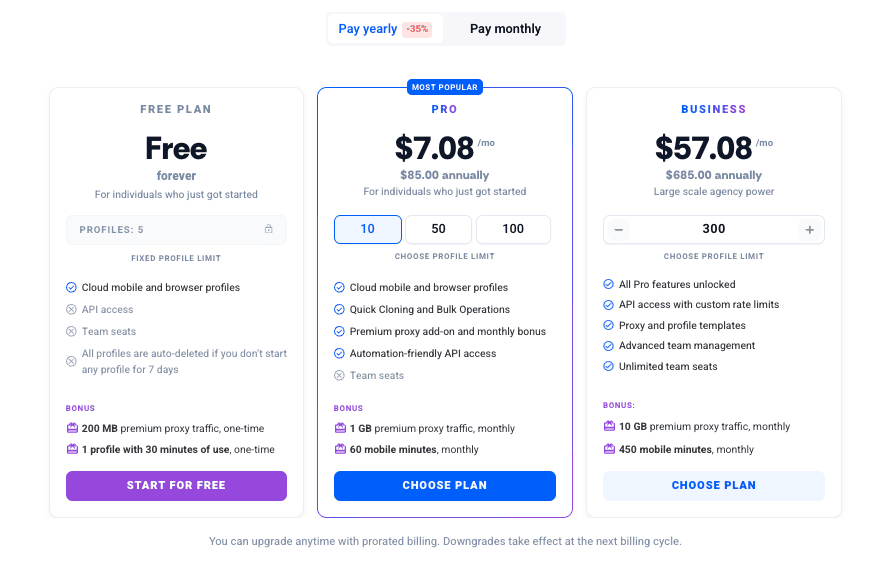
The structure is part subscription, part usage. You pay for your plan tier (which sets how many profiles you get), then you pay for what you actually consume: proxy traffic and cloud-phone minutes.
| Item | Price | Notes |
|---|---|---|
| Free plan | $0, forever | 5 profiles max (up to 1 mobile, rest browser). Cloud storage only. 200 MB proxy traffic (one-time). 30 mobile minutes (one-time). All profiles auto-delete after 7 days of inactivity. No API access, no team seats |
| Pro 10 (monthly) | $11 / month | 10 browser profiles, built-in proxy traffic |
| Pro 10 (annual) | $7.08 / month ($85 / year) | Roughly a third cheaper than monthly |
| Proxy traffic | $3.50 / GB | Residential, pay-as-you-go, rolls over with active subscription |
| Cloud phone usage | From $0.0073/min (larger packages) to $0.009/min (smaller packages) | Pay only for used time, unused minutes roll over |
Pro tip: Watch the minutes, not the subscription. The plan fee is predictable; the cloud-phone time is what sneaks up if you leave phones running idle. The fact that unused minutes roll over (while your subscription is active) is generous, so batch your mobile work instead of trickling it across the day.
Want the live numbers and the full tier ladder? They sit on the official pricing page, since these things do shift.
The new Multilogin referral program
Multilogin recently launched a referral program that pays 15% recurring commission for as long as the people you refer stay subscribed. Not a one-time kickback. Recurring. That word is the whole story.
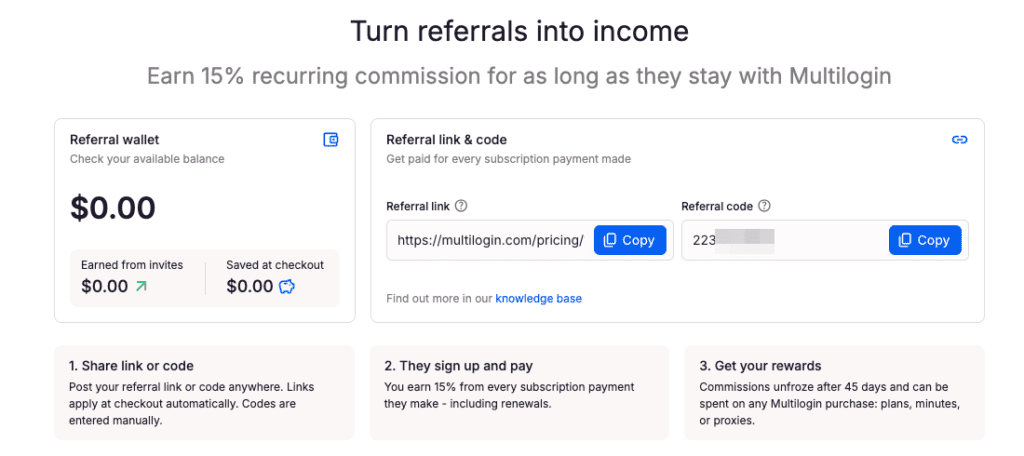
Here is how it works, and it is about as simple as these things get. You grab a referral link and a personal code from your dashboard, share them wherever you like, and when someone signs up and pays, you earn 15% of every payment they make, renewals included.
Honestly, if you already use the tool and know a few people who juggle accounts, this is close to free money. We would recommend giving it a try. Worst case, you fund a few months of proxy traffic on someone else’s subscription.
Recurring 15% that you can spend back on plans, minutes, or proxies turns a referral link into ongoing credit, not a one-off tip.
Multilogin pros and cons
Multilogin’s biggest strength is combining real Android cloud phones, a strong multi-account browser, and built-in proxies in one clean dashboard. Its drawbacks are mild: there is no fully free trial, and the cloud-phone side still has a few rough edges.
| Pros | Cons |
|---|---|
| Real Android cloud phones, not emulators, with genuine IMEI, Android ID and MAC | A learning curve for total beginners (fingerprints, proxies, warming up) |
| Stealth browser and cloud phones run from one single dashboard | Cloud phones are a newer feature and still feel a little raw in places |
| Built-in residential proxies in every plan, auto-matched to device location, with bandwidth rollover | Frequent updates occasionally introduce small bugs, though they get patched fast |
| Persistent sessions plus unique fingerprints keep accounts believable | Usage-based proxy and minute costs can add up at high volume |
| Deep automation: REST API, CLI, Postman, Selenium, Puppeteer, Playwright, headless and Docker | |
| Beginner-friendly interface that still organizes 1,000+ profiles (bulk actions, cloning, templates) | |
| CookieRobot warms cookies automatically to lower ban risk | |
| Reusable profile and proxy templates | |
| Team-ready: unlimited seats and granular permissions on business plans | |
| Cross-platform desktop (Windows, macOS, Linux), 24/7 multilingual support, 2FA, GDPR | |
| New 15% recurring referral program, spendable on plans, minutes, or proxies |
Six pros, six cons. Notice the cons are mostly “this is a power tool, treat it like one” rather than “this is broken.” That tells you something.
Is Multilogin worth it?
Yes, Multilogin is worth it, and for most people it is an easy yes. It is accessible, it is affordable, and it fits beginners and pros alike.
Wrapping up this Multilogin review, the verdict is simple.
Running a serious setup with dozens or hundreds of profiles, heavy automation, and a full team? Multilogin is one of the strongest options on the market. Its fingerprinting, automation ecosystem and team features set the bar that others chase.
Solo marketer, freelancer, or a small team? This is where Multilogin shines now more than ever. It has become genuinely accessible, the plans are easy on the wallet, and you still get the full toolkit.
So why settle for a cheaper tool that only does most of the job? Multilogin gives you all of it, at a price that finally makes sense for individuals too.
Bottom line: Multilogin is not just still excellent, it is the obvious default again, from solo users right up to enterprises. And the price is easy to justify, because it lands on the affordable side now.
Frequently Asked Questions
How much does Multilogin cost?
Multilogin has a free plan with no time limit and no credit card needed, it includes 1 cloud phone profile, browser profiles, and 200Mb proxy traffic and 30 mobile minutes so you can try the platform. Once you use up that free traffic or minutes, you can upgrade or top up. If you need more, you pay only for the extra: additional proxy traffic starts at $3.50 per GB, and additional cloud-phone minutes run from $0.0073 per minute on larger packages to $0.009 per minute on smaller ones. Unused minutes and proxy traffic roll over while your subscription stays active.
Does Multilogin include proxies, or do I need my own?
Every Multilogin plan comes with built-in residential proxies and a monthly traffic allowance (1 GB on Pro 10, more on higher tiers). On cloud phones that proxy is matched to the device location automatically. The traffic is not unlimited or free, though: once you use up your allowance, extra gigabytes cost around $3.50 each, and unused traffic rolls over. You can also bring your own external proxies.
Is Multilogin safe to use?
Multilogin is built around keeping your accounts isolated and your real identity hidden, with 2FA, GDPR compliance and encrypted, separated profiles. Whether your activity is "allowed" depends entirely on the platforms you use it with and their own rules. The tool is safe; how you use it is on you.
How do I run multiple Instagram accounts without getting banned?
Run each Instagram account on its own Multilogin cloud phone with a matched residential or mobile IP, and warm it up slowly before pushing volume. Instagram links accounts by fingerprint, IP overlap and behavior, so keep every account on a separate device with a persistent session and human-paced activity. Cloud phones are the safer route here, since Instagram is mobile-first and a Multilogin native app session looks far more genuine than a browser pretending to be a phone.
What is the safest way to run several Reddit accounts without a ban?
Give every Reddit account a unique IP and a fully isolated Multilogin profile, then age and use them like a normal person rather than a bot farm. Reddit hunts for shared IPs, repeated fingerprints and coordinated voting, so assign each one its own residential proxy or Multilogin cloud phone, keep sessions persistent, and never cross-vote between your accounts. Build a little karma first: slow, separate and consistent beats fast and linked.
What's the best tool for managing multiple social media accounts, and how do you keep them separate at scale?
For scheduling and analytics across a few accounts, Buffer, Later, or Hootsuite do the job well. But scheduling dashboards don't keep accounts truly separate, and they max out around 120 accounts. Once you run many social profiles that must stay isolated, especially on mobile-first apps like TikTok, Instagram, and Facebook, you need real device isolation, not just a posting queue. Multilogin gives each social profile its own real Android cloud phone, or its own isolated browser profile for web platforms like Reddit and YouTube, with built-in proxies matched to each profile's location. Every account builds its own history, and nothing crosses over. That makes Multilogin the best tool for managing multiple social media accounts.
How can you manage multiple Instagram accounts safely without getting them suspended?
Instagram is a mobile-first app, so it reads signals only real phones produce, like tap timing and sensor data. Browser setups can't fake those, which is why web-only tools fail on native apps. Multilogin fixes this by giving each social profile its own real Android cloud phone with built-in proxies matched to its location. Every account keeps its own app data and login history, and nothing crosses over. You run it all from one dashboard, for people and AI agents.
Is there a free version of Multilogin?
Yes, as of July 2026, Multilogin offers a free plan with no time limit and no credit card required. It includes cloud phones and browser profiles, with up to 5 profiles total (max 1 mobile, the rest browser). It also comes with a one-time bonus of 200 MB of proxy traffic and 30 minutes of mobile usage. If the account sits inactive for 7 days, all profiles are automatically deleted.