The best cloud phones for messengers run the official WhatsApp, Telegram, Signal, Viber, LINE or Messenger app on a real Android device in the cloud, one device per account.
TL;DR:
We compared five services. Multilogin ranks first because one plan covers cloud phones, browser profiles, residential proxies and mobile minutes.
Multilogin fits almost every messenger setup: any app, 1 to 1,000+ accounts, a budget under $10 a month, and automation. The one exception is a phone that must stay online 24/7. For that job, a flat monthly device rental from GeeLark, DuoPlus or VMOS Cloud is the better match.
Key takeaways
- WhatsApp leads with about 3 billion monthly users, but Telegram, WeChat, LINE, KakaoTalk, Zalo and Viber lead in their own regions.
- Every major messenger has an Android app, so one cloud Android phone can run any of them.
- One account per cloud phone keeps app data, IP and location separate.
- Cloud phones cannot receive SMS or calls. Each account still needs a phone number you control.
- Compare what a subscription includes, not only the device price: proxies, runtime and browser profiles often cost extra.
The world’s most popular messengers in 2026
WhatsApp is the global leader with about 3 billion monthly active users, but no single app wins everywhere. If your accounts serve several markets, you will likely run more than one messenger.
| Messenger | Monthly active users | Where it leads |
|---|---|---|
| ~3 billion (Meta, Q1 2025) | Most of Latin America, Europe, Africa, India, Indonesia, the Middle East | |
| 1.41 billion (Tencent, June 2025) | China and Chinese-speaking users abroad | |
| Facebook Messenger | 1 billion+ (Meta, 2025) | USA, Canada, Australia, the Philippines, Nordic countries |
| Telegram | 1 billion (Pavel Durov, March 2025) | Russia, Finland; strong in India and Eastern Europe |
| Snapchat | 932 million (Snap, Q2 2025) | Younger users in the US and Europe |
| Viber | 200 million+ (Rakuten, last official figure) | Eastern Europe, Greece, the Philippines |
| LINE | 194 million (LY Corp, March 2025) | Japan, Taiwan, Thailand |
| Signal | 40 to 100 million (2025 estimates) | Privacy-focused users worldwide |
| KakaoTalk | 54 million (Kakao, Dec 2024) | South Korea |
Source: Sinch, The most popular messaging apps by country, which compiles company reports and GWI survey data.
Regional leaders at a glance
In a GWI survey of 41 countries, WhatsApp was the top messenger in 26 of them. Messenger led in 8 countries, Telegram in 2, and LINE, WeChat, KakaoTalk and Zalo in one each.
- Americas: WhatsApp in Brazil, Mexico, Argentina and Colombia; Messenger in the USA and Canada.
- Europe: WhatsApp in Germany, France, the UK, Spain and Italy; Telegram in Russia and Finland; Viber in parts of Eastern Europe.
- Asia-Pacific: LINE in Japan, KakaoTalk in South Korea, Zalo in Vietnam, WeChat in China, Messenger in the Philippines and Australia.
- Middle East and Africa: WhatsApp in the UAE, Turkey, Nigeria, Kenya and South Africa.
Instagram Direct also matters for business. Meta does not publish its user count, but says Instagram now handles about as many daily messages as Messenger.
What this means for you: an agency serving Brazil, Germany and Japan needs WhatsApp, WhatsApp and LINE. A team selling in Eastern Europe may need Telegram and Viber. Your cloud phone must run all of them.
From a regular phone to a cloud phone: why messengers need one device per account
Every messenger in the table above is built for a phone. On an ordinary Android handset you install them from Google Play, from another app store, or from an APK file. Nothing special is needed.
The problem starts when you need more accounts than one phone can hold.
What one physical phone can and cannot do
| Option on one phone | Accounts | Limit |
|---|---|---|
| Built-in second account (WhatsApp) | 2 per app | Needs a second SIM or eSIM |
| WhatsApp plus WhatsApp Business | 1 per app | Each app needs its own number |
| Dual apps or app cloners | Depends on the phone brand | Everything shares one device, IP and location |
| Linked devices (WhatsApp Web, Telegram Desktop) | 1 account on several screens | Mirrors an account; adds no new accounts |
All these options share one device, one connection and one location. That works for a personal and a work account. It does not work for 20 client numbers in five countries.
The next step: a shelf of phones, or a phone in the cloud
Teams used to solve this with physical phone farms: one handset and SIM per account. It works, but you buy, charge, update and replace every device, and a remote team cannot easily reach them.
A cloud phone is an Android phone that runs in a data centre instead of in your pocket. You open it from a desktop app, see its screen and use your messengers as you would on a handset.
- Same apps: install the official app from the built-in store or upload an APK, just like on a regular phone.
- One device per account: each account keeps its own app data, location and IP.
- Persistent state: chats, media and logins stay on the device between sessions.
- Remote access: you and your team reach every device from one dashboard.
What a cloud phone does not solve
Be clear about the limits before you choose a provider:
- SMS and calls: most cloud phones, including Multilogin’s, cannot receive SMS or calls. You still need a number for each account.
- Behaviour: a new account that suddenly sends hundreds of messages looks unnatural on any device. Build activity gradually.
- Content: sending the same message to people who never asked for it can get a number limited, whatever device it runs on.
How we picked the best cloud phones for messengers
We checked each provider’s own website and pricing page in October 2026. The ranking reflects published features, prices and documented limits, not paid load tests.
Each service was scored on five questions:
- Does it run any messenger? WhatsApp, WhatsApp Business, Telegram, Signal, Viber, LINE and Messenger should run as official Android apps.
- What does one plan cover? Device runtime, proxies, and browser profiles for web-based tasks.
- Can each device match its number’s country? Proxy and location control per device.
- Can a team and a script work in it? Shared access, permissions, API and ADB.
- How does billing fit your usage? Pay-as-you-use runtime versus an always-on monthly device.
The 5 best cloud phones for messengers at a glance
The table shows what each platform gives a messenger team: price, proxies and an always-on option. All five run official Android apps natively, so WhatsApp, Telegram or Signal install the same way as on a handset.
The real difference is how many install routes you get and whether one app can reach many phones at once. Here is how each platform handles it:
The real difference is how many install routes you get and whether one app can reach many phones at once.
| Provider | App installation options | Best for | Proxies in plan |
|---|---|---|---|
| Multilogin | Built-in Apps list (no proxy traffic used), Google Play after Google sign-in, APK or XAPK upload from your computer | Teams running many messenger accounts across markets, mobile and web | Yes, built-in residential and mobile proxies |
| GeeLark | APKs stored in a cloud repository and pushed to many devices at once; APK download from a URL | Automation and AI content teams | No, bring your own |
| MoreLogin | Batch install, launch or removal with the Synchronizer; install through the Cloud Phone API and ADB | Browser-first teams adding a few cloud phones | No, sold separately |
| DuoPlus | App Manager, Google Play, Uptodown store, APK upload, APK download in Chrome | Mobile-only teams that want a built-in SMS number service | No, sold separately |
| VMOS Cloud | In-app application market, pre-installed apps, Cloud Drive transfer to one phone | Cheap always-on devices | No, OwlProxy at extra cost |
Multilogin is the only platform here that pairs a built-in app list, Google Play and APK upload with residential proxies included in every plan.
1. Multilogin
Multilogin is a cloud Android phone platform for multi-account management. Each messenger account runs on its own Multilogin cloud phone: a real Android device in the cloud with its own app data, location and IP.
Browser profiles for web-based accounts sit in the same dashboard. One plan covers both, plus residential proxies and mobile minutes.
- Messengers: install WhatsApp, WhatsApp Business, Telegram, Signal, Viber, LINE, Messenger or any other Android app from the built-in store, or upload an APK. One cloud phone per account.
- Price: free plan with 5 profiles, 200 MB of proxy traffic and 30 mobile minutes (one-time). Pro 10 costs $7.08/mo with 10 profiles, 1 GB of traffic and 60 minutes a month.
- Proxies: built-in residential proxies in every plan. Pick a country per profile, or bring your own HTTP, HTTPS, ISP or SOCKS5 proxies.
- Phone numbers: enter the account’s real number in the profile settings. The code arrives on your own phone or in your SMS provider’s dashboard.
- Teams: team seats and permissions to share and assign profiles; unlimited seats on Business plans.
- Automation: API from Pro 10, full ADB access, Selenium, Puppeteer, Playwright, Postman, and AI agents through the OpenClaw skill.
| Pros | Cons |
|---|---|
| Cloud phones, browser profiles, residential proxies and mobile minutes in every plan | Cloud phones cannot receive SMS or calls |
| Runs any Android messenger, from WhatsApp to LINE and Signal | Minutes count while a phone runs, so it is not built for 24/7 always-on devices |
| No limit on concurrent cloud phones | Needs a reliable internet connection |
| Unused proxy traffic and minutes roll over with an active subscription | Free plan resources do not renew, and free profiles are deleted after 7 days of inactivity |
| Free plan with no time limit and no credit card needed |
Best for: agencies, support desks and sellers who run many messenger accounts across several countries. Each account gets its own cloud phone with a proxy in its number’s country, and teammates open the profiles they are assigned from one dashboard.
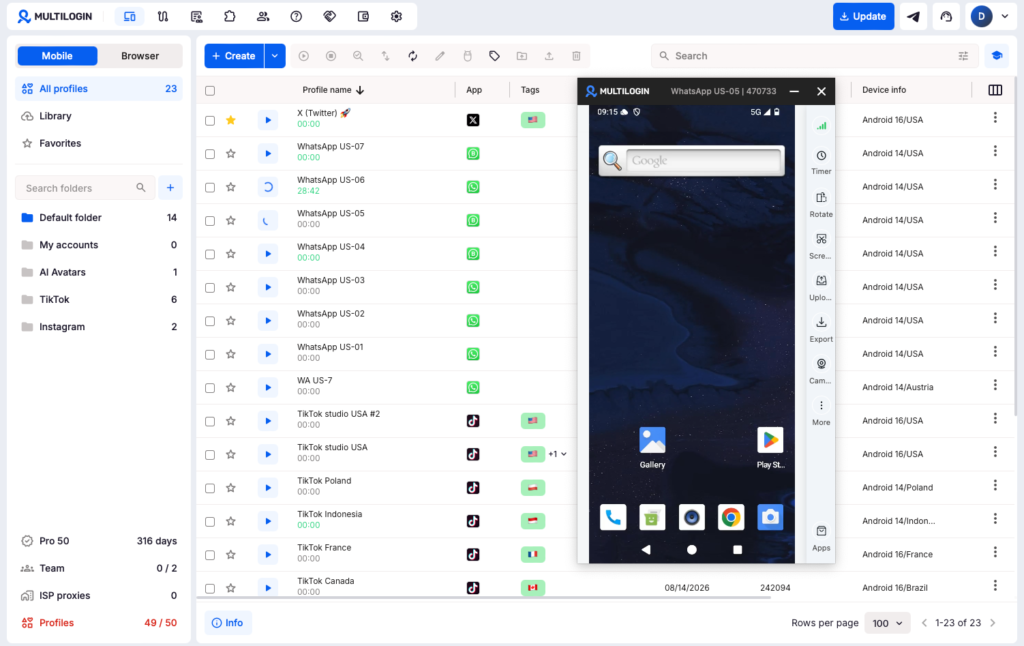
Why it ranks first: Multilogin is the easiest way to run many messenger accounts. You install WhatsApp, Telegram, Signal or any other messenger natively, from the built-in Apps list, Google Play or an APK, and give every account its own cloud phone.
Setup is quick: in our WhatsApp test, going from a new cloud phone to the verification screen took about 2 minutes. Residential proxies are built into every plan, so each account gets an IP in its number’s country without a second vendor.
Running more than a couple of WhatsApp numbers? See how teams create and manage multiple WhatsApp accounts on Multilogin, or follow the step-by-step setup in our review of the best cloud phones for WhatsApp Business.
2. GeeLark
GeeLark positions itself as an AI copilot for social media marketing, with cloud phones and browser profiles underneath. It runs Android 9 to 15 and installs apps from its own app section.
- Price: free plan with 2 profiles and 30 bonus minutes. Paid plans add profiles and bonus minutes; cloud phone use then costs $0.007 per minute, capped at $1.20 per device per day.
- Always-on: monthly device rental at $29.90 per device with unlimited minutes, or Parallels at $39.90 per slot per month.
- Proxies: not included. You connect your own.
- Automation: RPA templates, API and ADB from the Base plan, synchronizer on Pro, plus a CLI and MCP server.
| Pros | Cons |
|---|---|
| Strong automation and AI content tools | Proxies sit outside the subscription |
| Browser profiles included | Runtime billed per minute on top of the plan |
| Monthly rental for devices that must stay online | An always-on device costs $29.90/mo, before proxies |
| Monthly total varies with usage |
Best for: automation-heavy teams that already have a proxy supplier, or that need a few always-on devices.
3. MoreLogin
MoreLogin is a browser profile product with a cloud phone module added alongside it. Its cloud phones run Android 12 to 15 and support a camera, audio and file uploads.
- Price: free plan with 2 profiles and 100 cloud phone minutes at sign-up. Pro costs $5.40/mo (discounted from $9) for 10 profiles.
- Cloud phones: $0.006 per minute capped at $1.50 a day, or $23 to $25 per device per 30 days.
- Proxies: sold separately through its proxy resource center.
- Automation: synchronizer, no-code RPA, local API, Selenium and Puppeteer for browser profiles.
| Pros | Cons |
|---|---|
| Low entry price for browser profiles | Cloud phones billed outside the plan |
| Daily spending cap of $1.50 per device | Proxies are a separate purchase |
| Monthly device option for always-on use | Browser-first, with mobile added later |
| No messenger-specific guidance on its pricing page |
Best for: teams whose accounts are mostly web-based, with occasional messenger work on mobile.
4. DuoPlus
DuoPlus is a mobile-only platform built on cloud-hosted ARM devices. It has dedicated pages for WhatsApp, Telegram, LINE and Zalo, and sells a Cloud Number service for receiving SMS codes inside the platform.
- Price: you rent each cloud phone per month, with volume discounts the pricing page puts at up to 95.75%. Runtime is billed separately at $0.0042 per minute of startup time.
- Always-on: a Monthly Startup slot from $16.91 per month keeps one phone running without per-minute fees.
- Free trial: one cloud phone for 30 days with 30 minutes of startup time.
- Proxies: not included in the plan; sold as a separate proxy product.
- Automation: RPA, API, ADB, operation sync and team collaboration.
| Pros | Cons |
|---|---|
| Built-in Cloud Number service for verification codes | No browser profiles |
| Low per-device rent at volume | Proxies not included |
| Always-on slots for 24/7 messengers | Device rent applies even when a phone is off |
| Three separate charges to track: device, runtime and proxies |
Best for: mobile-only messenger desks that want SMS numbers and devices from one vendor and buy proxies elsewhere.
5. VMOS Cloud
VMOS Cloud rents cloud Android devices by the day or by the minute, with several device tiers and its own proxy brand, OwlProxy.
- Price: standard devices from $0.11 per day, depending on tier. Per-minute devices are also available with a daily cap.
- Always-on: a daily or monthly rented device stays available for as long as you pay for it.
- Proxies: a separate purchase from OwlProxy.
- Devices: several hardware tiers and Android versions.
| Pros | Cons |
|---|---|
| Lowest daily rental in this list | Proxies are a separate purchase |
| Good fit for always-on devices | No browser profiles |
| Several device tiers | A rented device costs money whether you use it or not |
| Built around broad use cases, including gaming, rather than account work |
Best for: users who need cheap always-on devices and already manage proxies.
Which cloud phone for messengers is right for you?
Start with five quick questions about your setup. In almost every case, the answer points to Multilogin. The one exception is a device that has to stay online around the clock.
Which messengers do you run?
Whether you work in WhatsApp and Telegram, run a WhatsApp Business desk, answer customers in Instagram and Facebook Messenger, or keep private chats in Signal, Multilogin covers it.
Any messenger with an Android app installs on a Multilogin cloud phone from the built-in store or as an APK. If your team uses all major messengers at once, each account simply gets its own cloud phone.
How many accounts do you manage?
Multilogin grows with you. One or two accounts fit on the free plan with 5 profiles. For 5 to 20 accounts, Pro 10 or Pro 20 is enough.
Between 20 and 100 accounts, Pro 50 or Business 100 fits. Past 100, Business plans go up to 10,000 profiles, so you never have to switch tools as you scale.
What is your main goal?
If you need to keep accounts separate, Multilogin gives every account its own device, app data, IP and location. If you want automated messaging, it offers an API, full ADB access, Selenium and Playwright.
Running customer support as a team? Team seats and permissions let you share and assign cloud phones, with unlimited seats on Business plans. Only if you must receive messages 24/7 should you look at an always-on rental, covered below.
What is your budget per cloud phone?
Multilogin fits any budget, from under $10 a month to $60 and beyond. Pro 10 costs $7.08/mo billed annually for 10 profiles, about $0.71 per profile, with residential proxies and 60 mobile minutes included.
You pay for runtime only while a phone runs. Extra minutes cost from $0.0067 each, so one hour a day on one phone adds about $12 a month, still well under $30.
Does it need to stay running 24/7?
If you open accounts only when you work in them, Multilogin is the right fit. It counts mobile minutes while a cloud phone runs and stops the count when you press Stop.
If a phone must stay online around the clock, a flat monthly rental fits better: GeeLark at $29.90 per device, a DuoPlus Monthly Startup slot from $16.91, or a VMOS Cloud daily rental.
Before you pay for always-on devices, check whether you really need one. Most messengers keep accounts logged in and deliver missed messages the next time you open the app, so regular sessions are often enough.
Phone numbers and verification by messenger
A cloud phone gives each account a device, not a phone number. Plan where each number comes from before you create a single cloud phone.
| Messenger | Number needed to sign up | Good to know |
|---|---|---|
| Yes, SMS or voice call | Up to two accounts per app on one device | |
| WhatsApp Business | Yes, SMS or voice call | Can register a landline by voice call |
| Telegram | Yes | Lets you add an email for login codes |
| Signal | Yes | Set a registration PIN to protect re-registration |
| Viber | Yes | Activation is tied to the number |
| LINE | Usually a phone number | Requirements vary by country |
| Facebook Messenger, Instagram Direct | No, the Meta account logs in | A cloud phone or a browser profile both work |
Multilogin cloud phones cannot receive SMS or calls. Use a number the app accepts, such as your own SIM or a long-term number from an SMS provider, then type the code into the app on the cloud phone.
Three rules keep accounts consistent:
- Match the country. Keep the number’s country, the proxy location and the account’s market the same.
- Prefer long-term numbers. A one-time temporary number may be gone when the app asks you to verify again.
- Turn on two-step verification. Add a PIN and a recovery email wherever the app allows it.
Conclusion
The messenger you need depends on the market: WhatsApp in Brazil or Germany, LINE in Japan, Telegram in Russia, Messenger in the US. A cloud phone lets you run all of them, one account per device, without a shelf of handsets.
Multilogin is the strongest pick for most teams. It runs any Android messenger, scales from 5 to 10,000 profiles, and includes residential proxies, mobile minutes and browser profiles in every plan. Choose an always-on rental from another provider only if a device must stay online 24/7.
Start with the free plan, no credit card needed, and set up your first messenger account today.
Frequently Asked Questions
Can I run WhatsApp, Telegram and Signal on the same cloud phone?
Yes, technically. For separate accounts, though, give each account its own cloud phone so app data, IP and location stay apart.
Can a cloud phone receive SMS verification codes?
Multilogin cloud phones cannot receive SMS or calls. Use your own SIM or an SMS provider, then enter the code in the app on the cloud phone.
Which messengers work on a Multilogin cloud phone?
Any messenger with an Android app, including WhatsApp, WhatsApp Business, Telegram, Signal, Viber, LINE, WeChat, KakaoTalk, Zalo and Messenger. Install it from the built-in store or upload an APK.
Do messages arrive when the cloud phone is stopped?
The app syncs messages the next time the cloud phone runs. If you need instant replies around the clock, choose a provider with always-on device rental.
How much does a cloud phone for messengers cost?
Multilogin offers a free plan with no time limit. Paid plans start from $7.08 per month, with residential proxies and mobile minutes included.
Is a cloud phone the same as WhatsApp Web or Telegram Desktop?
No. Web and desktop apps mirror an account that lives on a phone. A cloud phone is a separate Android device that holds its own account.
Can a team share messenger accounts on Multilogin?
Yes. Team seats and permissions let you share and assign cloud phones, with unlimited seats on Business plans.
Will a cloud phone stop my messenger account from being limited?
No device can promise that. A cloud phone separates accounts by device, IP and location. How an app treats an account still depends on its activity, its messages and the app's rules.