One hour of 1080p playback at the 5 Mbps that YouTube Help lists as the recommended sustained speed comes to 2.25 GB of traffic. Sent through a residential proxy billed at $4 per GB, that hour costs $9.
Through a VPN subscription or a dedicated proxy address with a flat monthly price, it adds nothing to the bill.
That gap settles most decisions about a proxy or VPN for YouTube, together with one question about scope: does the whole device need a different exit IP, or only one browser profile? Country lists and pool sizes matter after those two.
TL;DR
• Choose a VPN for personal viewing and protection on public Wi-Fi when you need one country for the whole device.
• Choose a static proxy for separate browser profiles, client channels or several markets at once.
• Use metered residential proxies for brief checks across many cities. Long video sessions can become expensive: one hour of 1080p can use 2.25 GB and cost $9 at $4 per GB.
• Check speed and leaks first and run a 30-minute test before adding more addresses or servers.Neither tool changes YouTube’s account rules or API quotas.
What a proxy and a VPN change, and what they don’t
Both replace the IP address YouTube sees with the address of an intermediate server, and with it the country and network type the session appears to come from. The difference is scope.
- A VPN client running WireGuard or OpenVPN builds an encrypted tunnel for the whole operating system, so every app on the laptop, background updaters included, exits through one server in one country.
- A proxy is set per application or per browser profile: a QA analyst can keep one Chrome profile on a German address and another on a Canadian one while email and Slack stay on the office line.
Encryption is the second difference. A VPN encrypts everything between the device and its server, which is the main reason to run one on hotel or airport Wi-Fi.
An HTTP or SOCKS5 proxy adds no encryption of its own. YouTube pages and video segments are still protected by HTTPS, and Chrome hands DNS lookups to the proxy, but other applications on the machine keep using the local network as before.
Neither tool changes the account or the rules. A Google account keeps its country settings, payment profile and watch history whatever IP it signs in from.
YouTube’s Terms of Service forbid access by robots, botnets or scrapers without written permission and forbid anything that inflates views, likes or subscribers, with or without a proxy. Bulk metadata belongs in the YouTube Data API, where a Google Cloud project gets 10,000 quota units a day for most methods and a request that lists videos or channels usually costs 1 unit.
The quota is tied to the project, so extra IP addresses don’t raise it.
Which tasks call for a proxy and which for a VPN
Most legitimate demand comes from four groups: media buyers checking ads, localization and QA teams, agencies that manage client channels, and people who work from public networks. The table maps typical tasks to the tool that fits them.
| Task | What has to change | Better fit | Why |
|---|---|---|---|
| Check how a pre-roll ad or a translated title appears to viewers in Germany | The country of one browser session | Static proxy in Germany | Each market gets its own profile; the rest of the machine stays on the office line |
| Work in several client channels from one office | A separate, stable exit IP per profile | One static ISP or dedicated proxy per profile | Each client’s sign-in history shows one location |
| Watch or upload over hotel or airport Wi-Fi | Encryption for all device traffic | VPN | Covers every app, not only the browser |
| Review 4K playback or long videos | 20+ Mbit/s without a per-GB meter | VPN or ISP proxy | Static proxies on a 7 to 10 Mbit/s channel can’t hold 4K |
| Spot-check a watch page from 40 cities | Many locations, a few minutes each | Rotating residential proxy with city targeting | Short sessions keep per-GB costs low |
| Collect statistics for thousands of videos | Nothing at the network level | YouTube Data API | More IPs don’t raise quota, and scraping breaches the Terms |
The agency row needs a caveat. A fixed IP keeps client sessions apart and gives the client’s security team a readable sign-in history, but access itself should come through channel permissions in YouTube Studio (Manager, Editor, Viewer and their limited variants), so nobody has to share a Google password.
Using a VPN with YouTube
For one person watching from one country, a consumer VPN is usually the cheaper option. Plans are billed per account with unmetered traffic.
Mullvad, for example, charges a flat €5 a month for up to five devices, so 20 hours of 1080p cost the same as two; most other services quote lower monthly prices that depend on prepaying one or two years.
- The weak points are shared addresses and whole-device routing. One VPN exit IP carries traffic from many subscribers at once, and YouTube’s rate limits see the total.
- Users of commercial VPNs, and of Apple’s iCloud Private Relay, report the “Sign in to confirm you’re not a bot” prompt on signed-out sessions; signing in or switching servers usually clears it. A VPN also puts the whole device in one country at a time.
- Split tunneling, where a client offers it, routes by app rather than by browser profile, so a team comparing five markets side by side still needs five machines or a proxy setup.
- Paid memberships follow their own rules. YouTube Help says a Premium membership should be used mainly in the country where it was bought and warns that misrepresenting your location, for example through a VPN, can lead to cancellation.
- After six months away from that country, YouTube may suspend the membership. In June 2024 a YouTube spokesperson told TechCrunch that members whose signup country doesn’t match where they watch are asked to move billing to their country of residence, while users reported cancellations of memberships bought through a VPN in cheaper regions.
A VPN doesn’t change which country a membership belongs to.
Proxy types and how they bill for video
Four proxy types are sold, and for video the billing unit matters more than pool size or rotation options. The table adds a consumer VPN for comparison; prices are entry list prices for the smallest purchase, without promo codes.
| Option | Billed by | Entry list price | Fits | Limitation |
|---|---|---|---|---|
| Datacenter, dedicated IPv4 (fixed IP on a hosting network) | IP, per month | About $1.40 to $2.30 per IP | Long viewing sessions, player QA | Sign-in prompts appear sooner than on ISP addresses |
| ISP, static residential (fixed IP on a consumer ISP range) | IP, per month | About $1.60 to $3.20 per IP; some low-end plans share one IP among up to 3 users | Channel work, one IP per profile | Fewer countries than datacenter lines |
| Rotating residential (new home IP per request or by timer) | GB | About $3.50 to $8 per GB | Short checks from many cities | Up to 2.25 GB per hour of 1080p |
| Mobile 4G/5G (carrier IP, changed by timer or link) | GB, day or private channel | From about $4 per GB; private channels around $57 a month | Tests on carrier networks | Speed depends on carrier load |
| Consumer VPN (exit IP shared by many users) | Account, per month | €5 a month flat at Mullvad; lower elsewhere with 1- to 2-year prepayment | Personal viewing, public Wi-Fi | One country per device; bot prompts on busy servers |
Billing per gigabyte hurts video because of volume.
| Video quality | Recommended speed (Mbps) | Traffic over an hour (GB) |
|---|---|---|
| 360p | 0.7 | 0.32 |
| 480p | 1.1 | 0.50 |
| 720p | 2.5 | 1.13 |
| 1080p | 5 | 2.25 |
| 4K | 20 | 9 |
The player adapts, and VP9 or AV1 streams often run below the recommendation, so treat the figures as ceilings.
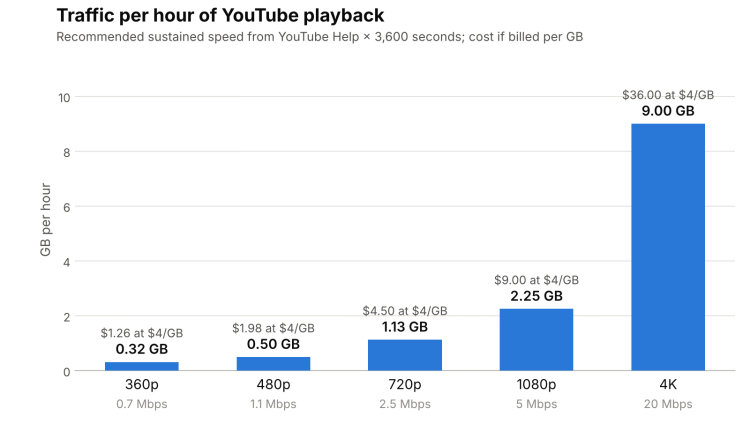
Two scenarios show where each model wins. A QA analyst who watches 20 hours of 1080p a month through a metered pool can use up to 45 GB, about $180 at $4 per GB.
Through one dedicated address the same month costs the rental, and through a VPN it costs the subscription. The opposite pattern favors metered traffic: forty two-minute checks of a watch page from 40 cities use about 3 GB at 1080p, roughly $12, while 40 static addresses at $1.60 each would cost $64 a month.
The break-even is easy to remember. Once a metered bill for one country passes about $10 a month, a static address is cheaper, because $10 buys 2.5 GB at $4, barely more than an hour of 1080p.
What a per-IP plan looks like in practice
Proxys.io, which has rented proxies since 2016, is one of the providers that sell datacenter, ISP, residential and mobile proxies from one account, and its published terms show what to check in any per-IP offer. Dedicated IPv4 addresses in more than 70 countries cost $2.30 each for one to four, $1.60 from five and from $1.47 at volume.
- Every address comes with both HTTP(S) and SOCKS5 ports, and access works by login and password or by an allowlist of client IPs.
- Channel speed is the number to read before planning 4K work.
- Static proxies there run on a 7 Mbit/s channel by default and 10 Mbit/s on request: enough for 1080p at 5 Mbps, not for 4K at 20 Mbps.
- The ISP line covers 25 countries, among them the US, UK, Canada, Germany, Japan and Australia, from $3.00 per IP with speeds up to 250 Mbit/s, though it doesn’t support allowlist authentication.
- Mobile proxies start at $56.79 a month for a private channel and run at 3 to 30 Mbit/s depending on carrier load.
Purchases can be returned within 24 hours. That window is short, so the 30-minute check described below belongs on the first day.
What goes wrong and where the error comes from
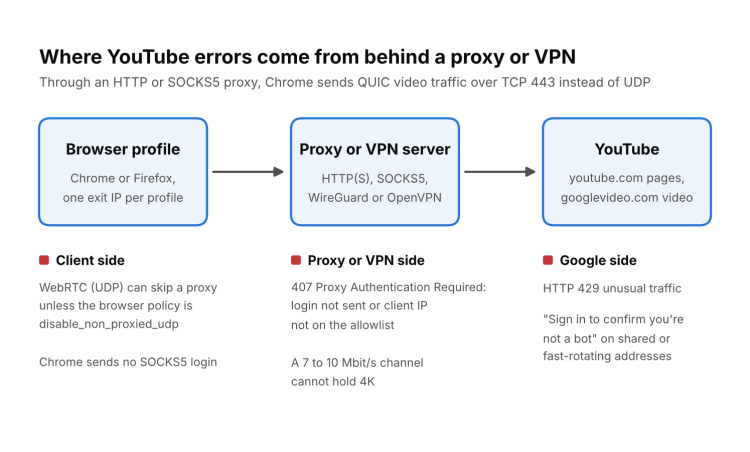
Most problems start at one of three points on the path: the browser, the proxy or VPN server, or Google’s side. The diagram shows where each common error appears.
Buffering and resolution drops
YouTube’s player uses adaptive bitrate streaming, so a slow route rarely produces an error. Playback steps down from 1080p to 720p or 480p, and the only symptom is a softer picture.
Right-click the player and open “Stats for nerds”: if Connection Speed stays below 5,000 Kbps on a 1080p video, the bottleneck is the route. On a VPN the usual cause is a distant or crowded server; on a proxy it is the channel cap.
Sign-in prompts and HTTP 429
Google limits addresses whose request pattern looks automated. The answer is either an HTTP 429 page about unusual traffic or the “Sign in to confirm you’re not a bot” prompt inside the player.
Shared addresses get there first because many users’ requests add up: busy VPN servers, shared datacenter proxies, even some home ISPs that put thousands of customers behind one carrier-grade NAT pool. Rotating IPs faster makes it worse, not better.
407 errors and SOCKS5 logins in Chrome
A 407 Proxy Authentication Required response comes from the proxy, not from YouTube. The login and password weren’t sent, or the client IP is missing from the allowlist.
Chrome has a trap of its own. Chromium’s documentation states that Chrome supports no authentication methods for SOCKS5, so a SOCKS5 port that needs a password fails with ERR_SOCKS_CONNECTION_FAILED and no login prompt.
In Chrome, use the HTTP(S) port when the proxy needs a password, or SOCKS5 with an IP allowlist.
QUIC and WebRTC
- Chrome doesn’t carry QUIC through a classic HTTP or SOCKS5 proxy, so video segments from googlevideo.com arrive over TCP port 443 instead of UDP. That is expected, and playback works normally.
- WebRTC is the opposite case. Its UDP traffic doesn’t pass through the proxy, so a page can learn the device’s real address from a STUN request unless the browser’s WebRTC policy is set to disable_non_proxied_udp.
- A full-tunnel VPN carries UDP as well, so neither issue appears there.
How to set up a proxy for YouTube and check it
- Give each browser profile one exit IP and keep it for the whole project. Chrome takes its proxy from the operating system by default, so per-profile proxies go through an extension. The ProxyControl extension from Proxys.io stores several proxies, switches between them in one click and fills in the login without pop-ups; it works with HTTP(S) proxies, the type Chrome signs in to with a password. With a VPN, pick one server and note it in the test log.
- Look up the exit IP in two geolocation databases, such as MaxMind GeoIP2 and IPinfo, and confirm that the country and network type (hosting, ISP or mobile) match the order.
- Open a 1080p video, open “Stats for nerds” and watch Connection Speed for a minute. It should stay above 5,000 Kbps for 1080p and 20,000 Kbps for 4K.
- Run a WebRTC and DNS leak test in the same profile. A WebRTC result that shows your home address means the WebRTC policy is still at its default.
- Watch for 30 minutes at a normal pace. A sign-in prompt or a 429 page this early on a dedicated address is a reason to ask the provider for a replacement; on a VPN, switch servers.
How to decide between a proxy and a VPN
Count two numbers before paying: hours of video per month and the number of countries needed at the same time. One person in one country who mainly wants privacy on public networks is served by a VPN. Several markets side by side, or one fixed IP per client profile, point to static proxies, datacenter addresses for viewing and ISP addresses for channel work. Dozens of cities with short visits point to a metered residential pool. Whichever you pick, start with one address or one VPN server for one profile, run the 30-minute check, and add more only after it passes.
Frequently Asked Questions
Is it legal to use a proxy or VPN with YouTube?
In most countries, yes, although a few restrict VPNs. What you do through either one is still governed by local law and YouTube's Terms of Service, including the regional restrictions rights holders set on their videos. Automated access and artificial engagement are prohibited with or without a proxy.
Does a proxy or VPN make YouTube faster?
Rarely. Every request takes an extra hop, and playback can only be as fast as the slower of your own line and the server's channel. A proxy on a 10 Mbit/s channel caps playback at 1080p however fast the office connection is.
Are free proxies and VPNs worth using?
Public free proxy lists are open to anyone who finds them, are often already rate-limited by Google and say nothing about who runs the server or what it logs. Free tiers from named VPN providers are a different case: fewer servers and lower speeds, but a known operator and a published privacy policy.