
What Is The IP Address On The Phone And Why Change It?
Everybody at least once has asked themselves a question: “How to change my IP address on my phone?”Every time you connect to the Internet from your phone, whether it’s Wi-Fi or mobile data, your device is automatically assigned an IP address. This is, in fact, your “network passport”, which sites and services use to find out where you came from, where you are and whether you should be allowed inside.
And that’s where the fun begins. An IP address is a useful thing, but not always secure or convenient. Sometimes you don’t want anyone to know where you’re from. It happens that access to the site is closed for your region. Or maybe you just want to increase your anonymity so that you don’t get bombarded with ads after one innocent search for “sneakers in installments.”
So changing the IP address is not just about masked hackers. It’s often about banal freedom and privacy in our time. So lets find out together how to change IP Address on Phone.
The First Step Is To Figure Out Which IP You Currently Have
Before you change anything, you should at least take a look at what you have now. It’s like cleaning a closet: first figure out what kind of things are there.
Here’s how to quickly check the current IP address on your phone:
- Through the browser, just go to any website address like whatismyip.com , 2ip.ru or iplocation.net and it will immediately show you the external IP.
- Through the phone settings, on Android and iPhone, there is a way to find out the local IP in the Wi-Fi network section. This is usually an address that starts with 192.168…, and it is needed to understand the operation of the router.
- Through applications, there are a lot of free utilities — for example, Fing, Net Analyzer or IP Tools. They show both the IP address and even information about your ISP.
This may seem like a small thing, but many confuse local and external IP. Therefore, before experimenting, make sure that you are looking at the right one.
Switch From Mobile Internet To Wi-Fi (Or Vice Versa)
The easiest way to change an IP address is to simply change the network. As soon as you switch from Wi-Fi to mobile data or vice versa, you will automatically receive another external IP address. It’s almost like changing a shirt— fast and effortless.
- Was on Wi-Fi? Turn on your mobile data
- Have you been on LTE or 5G? Connect to the nearest Wi-Fi connection, for example, in a cafe, at a friend’s place, or at work.
Each network has its own pool of IP addresses, so moving between them is guaranteed to change your footprint on the Internet.
But remember: this method is the most temporary. Your IP address can change by itself, and vice versa too. Therefore, this is not a reliable disguise, but rather an easy reboot.
Change Phone IP Using VPN Applications
If you’ve ever thought about changing the IP address on your phone, the first thing that most likely came to mind is a VPN. And for good reason. This is one of the most reliable, fastest and easiest ways. All you need is to download the app, press one button, and… voila! It’s like you’re somewhere else on the planet. You live in Yekaterinburg, and Google thinks you’re sitting on a balcony in Dublin. And this is not magic, but technology.
VPN stands for Virtual Private Network, or “virtual private network”. It creates an encrypted tunnel between your device and a server somewhere in the world. All requests go through this server, and it is its IP address that websites and applications see. At the same time, you yourself remain in the shadows. It’s like asking a friend to go to the store for you, and the salesman would remember his face, not yours.
Popular VPNs like NordVPN, Surfshark, and ProtonVPN offer dozens of countries to choose from. You can even choose a specific city. Connected, and you have a new IP address. Moreover, unlike many other methods, a VPN works with both Wi-Fi and mobile networks. It is a universal tool that can be used by anyone — from a student to an entrepreneur.
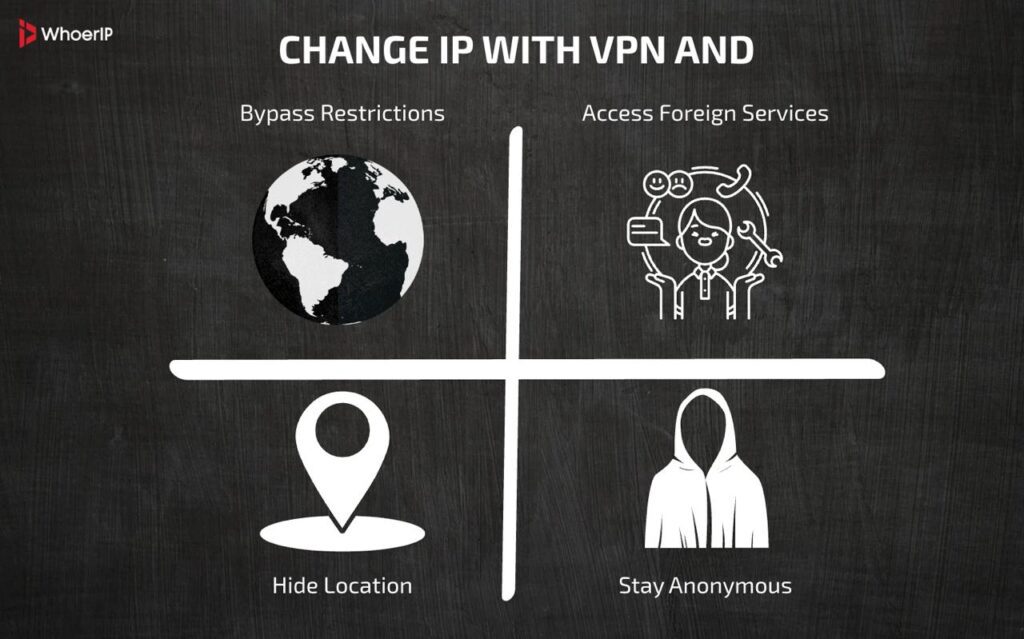
Especially useful if you want to:
- Bypass geo-blocking;
- Get access to foreign services;
- Hide your location from apps;
- Just stay anonymous.
So if you need a way to change your IP address quickly, conveniently, and with a flexible choice, a VPN almost always comes first.
How to Change IP on Phone Switching Between Mobile Networks
Sometimes the most effective solutions are the ones right under our noses. The IP address can be changed without any applications, paid subscriptions, or technical dancing with a tambourine. All you need is to use another mobile operator.
If you have two SIM cards installed on your phone, you are already armed. Different operators use different IP ranges. Even the same SIM can issue a new IP every time it reconnects, if the operator uses a dynamic scheme (and most of them do).
Let’s say you connected to the Internet via an MTS SIM card. I checked the IP address alone. Then I switched to Beeline, and it was completely different. And then back to MTS — and again a new one. It turns out to be a small digital game of “hide and seek” where you change your mask depending on which operator you trust to manage your traffic.
This method is especially good in situations where:
- One IP address was blacklisted by a website;
- Need a quick network change without third-party apps;
- You work in places with different cell towers and want to choose the best channel.
In addition, if you travel frequently or are on business trips, you probably use local SIM cards, which means that the IP address will automatically change. Simple and effective.
Flight Mode, A Tricky Little Trick
Airplane mode is usually associated with traveling — disabled and forgotten. But few people know that this modest functionality can be used as a mini-hack to change the IP.
How does it work? Very simple. When you turn on airplane mode, your phone is completely disconnected from all networks: Wi-Fi, mobile communications, Bluetooth, and everything else. But when you turn it off, the device reconnects. And at this moment, an interesting thing happens: the mobile operator can give you a new IP address. Especially if you use a dynamic IP (and in 99% of cases this is the case for regular users).
Here’s an example for you: You’re sitting at home, and you notice that a website has suddenly blocked you. I’m too lazy to install a VPN or rummage through the settings. You turn on flight mode, wait 10-15 seconds, then turn it off. Reconnecting to the mobile network — and voila, a new IP, a new attempt. Sometimes it helps, sometimes it doesn’t — it all depends on the operator’s policy. But at least it’s worth a try. It’s free, fast, and doesn’t require any technical knowledge.
This method is especially loved:
- Those who often face IP limits
- Mobile Internet users on trips
- Those who do not want to install a VPN, but want to change their digital fingerprint
And yes, if you’re in a Wi-Fi zone, this method won’t work. But in the world of the mobile Internet, it’s very even.
Distributing The Internet Through Another Device
Here’s a non—standard, but damn useful way to change your IP: connect not directly, but through another device that is already connected to another network – especially if it uses a VPN or proxy. This is called “tethering”, or simply distributing the Internet.
Let’s say you have a laptop with a VPN enabled. Connect to the Internet on it, turn on the Wi-Fi distribution, and connect your phone. What’s going to happen? The phone will take the IP address of the network that the laptop “planted” on it. If the VPN on the laptop is American, then the smartphone will be like in the USA.
You can do the same with another phone. For example, you’re on a mobile network, and a friend is on Wi—Fi with a proxy. It turns on the access point — you connect. That’s it, the IP has changed.
This method works for 5 out of 5 in situations where:
- your phone does not support VPN directly
- it is necessary to temporarily change the IP address without installing applications
- I just want to test another country without fuss
A little shamanism, a little logic, and you’re no longer yourself in the eyes of the Internet. It seems to have remained in the same place, but the digital footprint is completely different.
Change IP on Phone with Proxy Servers
And now about the good old proxy method. This is the “middleman” who goes online for you. You don’t interact with the site directly. Instead, you send a request through a proxy server, and it does the rest. And you don’t seem to have anything to do with it.
What does this mean? Of course, the new IP. There are different types of proxies: HTTP, SOCKS5, resident, mobile, and data center. You can configure them manually in the Wi-Fi settings on your phone or use special applications. Some VPN services even offer a proxy mode where you can connect not through a tunnel, but through an external server. To understand that suits you better you can read our “What Is Better Proxy or VPN?” article.
Proxies are especially useful:
- If you want to emulate a connection from a specific region
- If you need a large number of different IP addresses (for example, for parsing or testing)
- If you want to manage the traffic route yourself
On Android, the proxy setting may look like a field in the Wi-Fi settings where you specify the server’s IP and port. On the iPhone, it’s about the same. Yes, it is slightly less convenient than a VPN, and traffic is not always encrypted. But at least you know exactly which IP the connection is going through. NodeMaven is considered to be one of the best proxy providers.
| Method | Anonymity Level | Speed | Ease of Use | Security | Cost | Use Cases | Limitations |
|---|---|---|---|---|---|---|---|
| VPN | High | Fast (varies) | Easy | Encrypted | Free/Paid | Privacy, Geo-unblocking, Security | Some VPNs log data; may be blocked |
| Proxy | Low-Medium | Fast (varies) | Easy | No encryption | Free/Paid | Basic IP masking, Web scraping | Easily detectable; unreliable |
| TOR Browser | Very High | Slow | Moderate | Encrypted (layered) | Free | Maximum anonymity, Dark web | Very slow; some sites block TOR |
| Mobile Network Switch | Medium | Fast | Easy | Cellular encryption | Free (with plan) | Quick IP change | Limited to mobile; IP may not change fully |
| Public Wi-Fi | Low | Variable | Easy | Unsecured | Free | Temporary IP change | Risky (hacking, tracking) |
| Cloud Browser | Medium | Fast | Easy | Depends on provider | Paid/Subscription | Remote browsing, Testing | Limited control; may retain logs |
A proxy is about control. And if you want to be not just anonymous, but also manage your route, this method is perfect for you.
Using a TOR browser on a Mobile device
If it’s important for you not just to change your IP address, but to get off the radar so that no website understands who you are and where you’re from, welcome to the world of TOR. This browser literally routes you through a chain of several servers around the world, each of which encrypts traffic and passes it on. As a result, when you open the website, it sees only the last node of the route. Not you.
TOR works as a free mobile application. You’ve installed it, and you’re already on the anonymity network. However, you shouldn’t expect speed from it — it’s not a racing car, but rather an armored bike. But reliable. And your IP changes every time you start a new session.
TOR is especially appreciated:
- activists, journalists, and those who need to circumvent censorship
- users who are concerned about mass surveillance and targeting
- those who do not trust either browsers or providers
Yes, TOR is not for everyday surfing. But if you need complete anonymity and a unique IP address, no tool can match it in terms of privacy.
Reset Network Settings
Sometimes, to change the IP address on a mobile device, it is enough just to restart network processes. It’s like giving the phone a “shake up” and making it reconsider who it is and who it communicates with. This is especially helpful if the previous methods didn’t work.
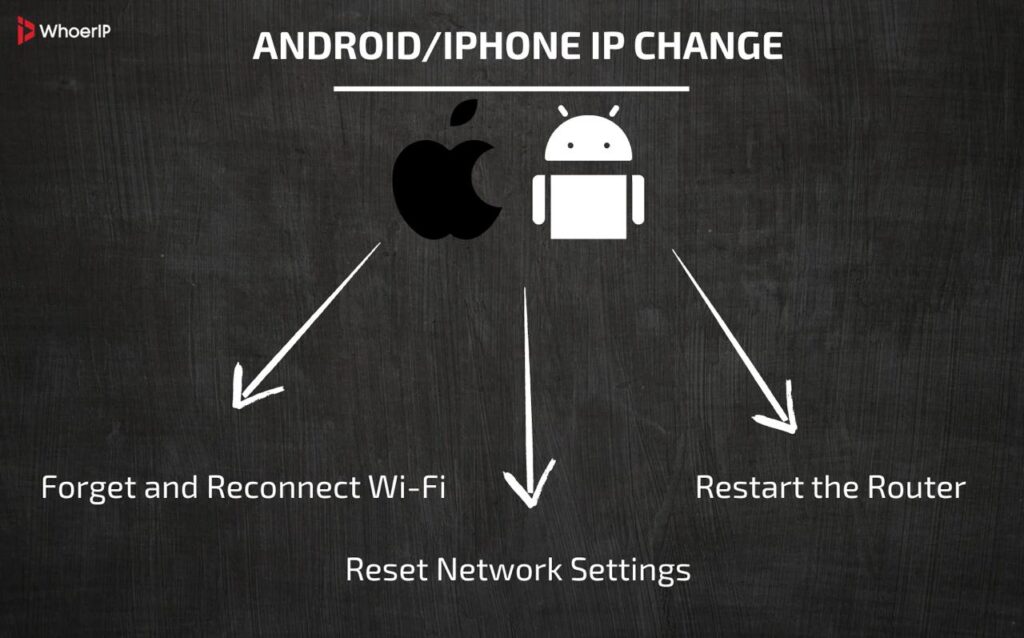
On Android and iPhone, you can:
- Forget and reconnect to Wi-Fi
- Reset network settings in system settings (attention: this will delete all saved passwords and networks)
- Restart the router if the IP is issued through it
Such a reset causes the device to forward a DHCP request, and possibly get a different IP. It’s not guaranteed, but it often works. Especially in home networks.
This method:
- It’s convenient if you don’t want to install a VPN.
- helps with connection problems
- It does not require third-party apps or subscriptions
Resetting the network is like reopening a door to the Internet, hoping that it now leads to another place.
Cloud Browsers Help Change Phone IP Address
There is a special category of browsers that run not on your phone, but somewhere in the data center. An example is the Puffin Browser. When you open a website, it is first uploaded to the server, and then it is rendered on your screen. It’s like a remote desktop, just for surfing.
What does this mean for IP? It’s very simple: the website sees the server’s IP address, not your phone. And it works even on an old smartphone. You can be in Kazan, but at the same time open the website as if from the USA.
Cloud browsers
- they allow you to bypass blockages
- they speed up the loading of heavy sites (sometimes)
- they hide your real IP address
The disadvantage is that they are not suitable for authorization or entering confidential information. But if you need to quickly view a website that is not working for some reason, this is the perfect solution.
Connecting to Public Wi-Fi Networks
Yes, it sounds simple. But connecting to another Wi-Fi network is one of the most straightforward ways to change your IP address. Each router and access point has its own external IP address. And by connecting to them, you automatically accept this IP.
I went into a cafe, opened my laptop, and you were no longer under your IP address. Or you connected at the airport, and your data goes through the airport’s IP address. Sometimes it even helps to access websites that were not allowed out of the house. But there is a downside: public Wi-Fi is a source of risk. It is easy to become a victim of MITM attacks or data interception here.
Use public Wi-Fi:
- when you need a fast IP switch;
- if there is no VPN at hand;
- if you want to check how the site works on another network.
But remember: changing your IP address does not always mean a secure Internet connection. Especially in the cafe.
Using Mobile Data from Different Carriers (eSIM)
And the last, but no less elegant way is eSIM. If your phone supports virtual SIM cards, you can connect multiple carriers at once and easily switch between them.
Each of them is a separate IP pool, separate routing, and a separate identity on the network. If you want to change your IP, activate another eSIM. And you can do this in just a couple of taps. Some eSIM’s give you internet access in another country without a physical SIM card at all.
This is especially convenient:
- for traveling and circumventing geo-restrictions;
- for testing applications in different regions;
- to protect personal information when working with sensitive services.
eSIM is like having multiple passports for the internet. You choose who you want to be at this moment: a Muscovite, a Parisian, or an anonymous person from a neutral zone.
How to Change My IP Address on My Phone Conclusion
Changing the IP address on a phone is no longer a story for hackers and IT specialists. It has become a common part of digital hygiene, like washing your face in the morning or closing the door when leaving home. Sometimes it’s about security. Sometimes it’s about anonymity. And sometimes it’s just about accessing the right site, which for some reason doesn’t work “right here and now.”
We have analyzed dozens of ways — from simple and familiar ones, like turning on airplane mode or changing the Wi-Fi network, to advanced ones: VPN, TOR, proxy, eSIM. Each method has its pros, cons, and nuances. The main thing is to understand why you are doing this. Do you want to protect yourself from surveillance? Or bypass the lock? Or just make fun of geolocation on TikTok?
Changing an IP address is like changing a mask in a theater. You’re the same person, but no one will recognize you anymore. And it is both a powerful tool and a great responsibility. So now, knowing all the details, you’re not just a phone user. You are the master of your digital footprint.
Frequently Asked Questions
How to change IP address to EU on iPhone?
Use a VPN (e.g., NordVPN, ExpressVPN) and connect to an EU server. Alternatively, use a EU-based proxy in Wi-Fi settings (HTTP/HTTPS).
How to change my IP address?
VPN/Proxy: Fastest method. Restart modem/router: Forces a new DHCP lease. Mobile data: Toggle airplane mode (for phones).
Does IP address change?
Dynamic IPs: Yes (resets periodically via DHCP). Static IPs: No (manually set, unchanged unless modified).
How to change IP address on Android?
VPN/Proxy: App or Wi-Fi settings. Mobile data: Enable airplane mode for 10 sec. Wi-Fi: Renew DHCP lease in network settings.
Will my IP address change?
Depends on your actions and tools.
How to change IP address Windows 11?
VPN/Proxy: Use software or browser extensions. Manual IP: Settings > Network > Ethernet/Wi-Fi > Edit IP assignment (set to manual).
How to change IP address on router?
DHCP Release/Renew: Access router admin panel (e.g., 192.168.1.1). ISP Change: Request new IP (may require modem restart).
How often do IP addresses change?
Dynamic IPs: Every few hours to days (depends on ISP). Mobile data: Changes per tower switch (or airplane mode).