
Let’s Start With The Simple: What Is An ISP?
Let’s skip the fancy definitions right away. An ISP is your Internet Service Provider, the one who gives you access to the network. Not literally “gives” it, of course – you usually pay them every month. But essentially, it’s the middleman between your device and the rest of the internet. Lets find an answer to the question what is ISP.
Imagine a huge, endless supermarket of knowledge, videos, memes, and likes. So, an ISP is like a security guard at the entrance, who lets you in and remembers where you went. He’s not the owner of the supermarket, but without him, you can’t get in.
The ISP provides you with an IP address, connects you to the network infrastructure, and routes your requests, ensuring that when you type “youtube.com” in your browser, you actually access YouTube instead of a blank screen. They do this 24/7, without any breaks for sleep or lunch.
Providers have names, like brands. It can be a well-known federal player like Rostelecom or Beeline, or a local operator that serves one area. But the essence is the same: they are a bridge between you and the Internet.
Why Do People Look for Their ISP at All?
It would seem that if you are already on the Internet, why look for who let you in? But in reality, there are many such reasons. The most obvious reason is internet problems. Something doesn’t load, YouTube lags, the VPN doesn’t connect — and the first thing you want to know is: “Is this my problem… or is the provider messing up?”
The second reason is security and privacy. Some users check who exactly connects them to understand where their data is leaking, who can see it, and how “transparent” their traffic is. This is especially relevant if you’re connected to some public Wi-Fi — for example, in a cafe or a hotel.
The third reason is interest and self-diagnosis. Many people just want to understand how the Internet works. What are those lines in the router settings? Why does my neighbor have a different IP? And is this Beeline really my ISP, when I’m paying to a completely different company?
The fourth reason is blocking and censorship. When you want to bypass restrictions (for example, to access a website that doesn’t open for some reason), it’s helpful to know who is blocking you from accessing that website. And most often, it’s your ISP.
So the question “What is my ISP?” is not idle. It’s like asking “Who manages my bank account?” – sometimes it’s important, even if everything works.
What is the difference between ISP and Wi-Fi?
This is where everyone gets confused. You ask someone, “What is your provider?” and they reply, “TP-Link123.” Or “MyHomeWiFi.” Or even “iPhone Hotspot.”
In fact, this is not the name of the provider, but just the name of the Wi-Fi network that you see on your phone or laptop. The name you (or someone else) could set manually. It can be at least “Petrovich Incorporated” – but this does not mean that you are connected to such a provider.
Wi-Fi is an internal network that is distributed from the router. And the router, in turn, receives the Internet from the provider. So, Wi-Fi is like a local power outlet, and the provider is like a power plant.
Your device connects to Wi-Fi, but the internet itself is not Wi-Fi. It’s like confusing a box with electricity inside with a wire that comes from a nearby power plant.
Understanding this difference is not only beneficial for personal growth but also helps in troubleshooting. If your internet connection is down but your Wi-Fi is working, it’s likely that the issue lies with your provider rather than your router.
What Does an ISP Look Like Technically
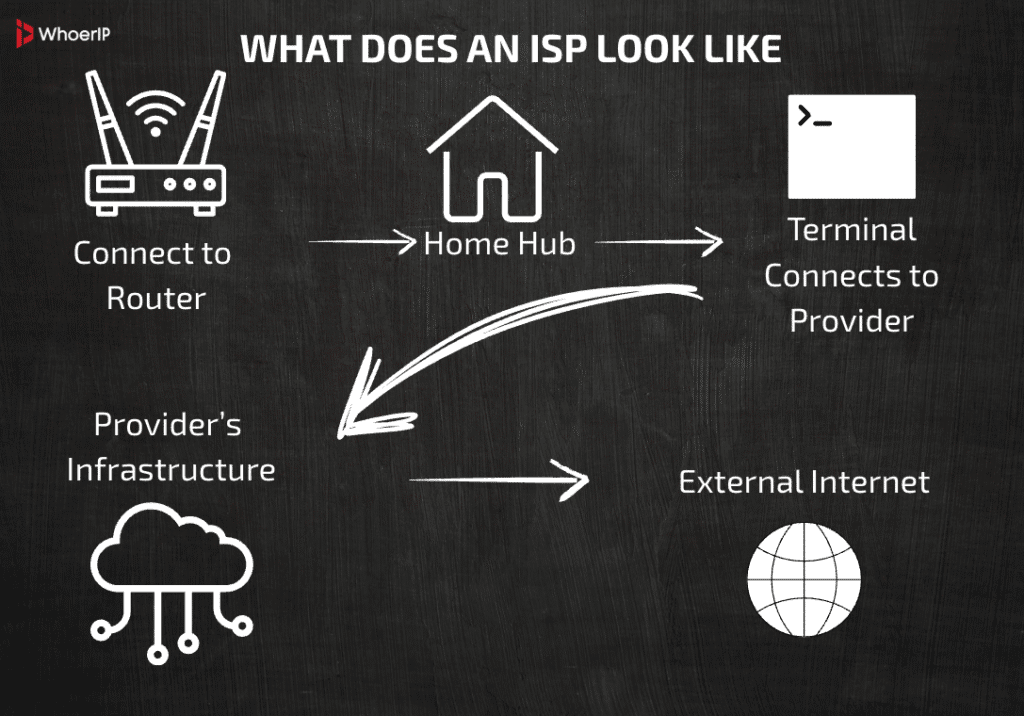
Now let’s imagine the entire chain. You open your laptop and access a website. What happens?
- Your device connects to a router via Wi-Fi or a cable.
- The router is your “home hub,” connecting everything within your apartment.
- Next comes a modem or a fiber terminal, connecting your home to the provider’s network.
- Then there is the provider’s infrastructure: servers, routers, DNS, and communication channels.
- And only then there is the external Internet, global data centers, websites, streams, and more.
The ISP becomes noticeable around step 4. It gives you an external IP address, passes your traffic through its DNS servers, and may use gateways or NAT (especially if you have CGNAT, which we will discuss later).
In practice, when you open a browser, you don’t directly “see” the provider. But they are literally the ones who decide where your request goes and where the response comes from. Without them, it’s like being without an airport controller: you might be on a plane, but without a route and coordination, you won’t get far.
How to See Your ISP Online – Without a Headache
The good news is that you can find out your provider in just a few clicks. It is enough to go to any website that determines the IP address and shows network information.
Here are three popular resources:
- whoerip.com
- whoer.net
- ipinfo.io
You open it and immediately see:
- your IP address
- Provider’s name
- location (approximate)
- sometimes — the type of connection and even the presence of a proxy or VPN
If you see something like MTS PJSC, Rostelecom, Megafon, Beeline, or AS123456, then that’s your provider. If the site shows a VPN or cloud infrastructure like Cloudflare, Google Cloud, or DigitalOcean, then you’re probably using a proxy or VPN. To find out more about residential proxies and the way they work you can read our article.
It’s convenient to use these sites to check how you’re being viewed. This is especially useful for setting up anonymity, diagnosing network issues, or just for curiosity.
What You Can Understand From the Name of the Provider
When you look at the name of your ISP through sites like whatismyip.com or ipinfo.io, something like: “Rostelecom PJSC”, “MTS PJSC”, “Beeline”, “T2 Mobile”, “ER-Telecom”, “Hetzner Online GmbH”, and sometimes something completely unfamiliar – for example, “Skynet Ltd.” or “ZeldaData-Transit” – may appear on the screen.
What is ISP name mean and why?
First of all, it’s not just a beautiful name. It can tell you about the region (for example, “Rostelecom Volga Branch”), the scale (a large national operator or a local niche player), and the type of connection: if it says “Mobile,” you’re probably using a SIM card, and if it says “DataCenter,” it’s a story about a server connection.
Sometimes, it’s not what you expected to see – for example, if you’re connected to Rostelecom and see “MSK-IX Peering Member.” This could mean that your traffic is currently being routed through an inter-exchange point (IXP), and the ISP itself is behind the scenes.
The name can be the face of the infrastructure. It reveals not only “who” but also “where” and “how.” Sometimes, it can be confusing if a VPN, proxy, or corporate network is hiding behind your home router.
Mobile Internet is Also an ISP
Nowadays, the habit of saying “I have MTS” or “I’m using Beeline” is not just about mobile communication. It’s about the internet in its truest sense. It’s the same ISP, but in your pocket.
Your mobile operator is your internet service provider. They provide you with an IP address, route your traffic, manage your DNS, and handle your connection just like traditional home internet providers. The difference lies in the technology. Instead of a twisted pair, there’s a radio frequency. Instead of a router, there’s a SIM card.
But here’s the catch: mobile operators often use CGNAT (more on that later), and your IP may be shared. Additionally, they strictly manage bandwidth, restrict P2P traffic, and throttle YouTube or torrents.
Mobile internet is an ISP with a personality: fast, flexible, but not always honest about network freedoms. It goes where there are no wires, but it leaves its traces in routing tables, logs, and traffic headers.
What is My ISP, Different Devices, Different Answers?
When you visit a website on your phone, you see one provider name. But when you visit it on your laptop, you see a different name. What is this magic?
It’s simple: each connection method represents a separate internet connection. A phone can be in an LTE network with an address from a mobile operator, and a laptop can be in Wi-Fi from a home router connected to a cable provider. Different interfaces — different IPs — different ISPs.
And if you use a VPN or proxy, your real ISP may disappear from view altogether, and instead of “Rostelecom” you will see “NordVPN S.A.” or “Cloudflare”. The reason is that your request goes through an intermediary.
Some devices use DNS-over-HTTPS or private proxies on their own, and even when they’re connected to the same Wi-Fi network, they can produce different results. Yes, gadgets are getting more independent these days.
So, one person = many devices = potentially many different ISPs in the same home. And all of this happens simultaneously.
ISP or Router: Who’s to Blame When Everything Stops Working
Is YouTube freezing? Are your game pings disappearing? The first thought is “damn the provider!” But don’t rush to call the entire telecom industry to the carpet.
Sometimes the problem is not at all in the ISP. A home router can simply overheat or not pull ten devices. The cable in the wall can be loose. The DNS server can be unstable.
How do you know where the plug is? If you connect directly with a cable and everything flies – then the problem is in the router. If on all devices there are brakes – already worth calling the technical support of the provider.
Sometimes, it’s the website or app itself that’s lagging. In this case, the ISP is not at fault, as you’re navigating through a long chain of servers where someone has stumbled.
A good example is when Google, Netflix, or Discord experience issues, leading you to believe that the internet is “glitching,” but in reality, it’s the CDN’s fault. The ISP is not a magician. They deliver the traffic, but they are not responsible for everything that happens at the other end of the cable or in the browser.
CGNAT: When You Think You Have an IP, But You Don’t
Carrier-Grade NAT (CGNAT) is when your ISP says, “We don’t have enough IP addresses for everyone, so you’ll be sharing.”
What happens is that you don’t get a real “white” IP, but an internal one like 100.64.x.x. And you share that address with dozens of other customers. At the exit from the network – a common external IP, under which you don’t sit alone.
Problem? Yes, especially if you want to open a port, make a server, connect via VPN or use remote access. Everything will come to a standstill in the inability to “get through” to you from the outside.
CGNAT is a forced measure. IPv4 ended, and the mass transition to IPv6 is somehow sluggish. Therefore, large providers use CGNAT to save money.
And here’s the funny part: when you visit a website like whatismyip.com, you don’t see your personal address, but rather this shared IP. Often, it’s the name of a large routing center rather than your local branch.
It’s like living in a communal apartment and trying to identify who opened the door based on the intercom call.
The History of Providers: From Dial-Up to Gigabit
If today you download movies in a couple of minutes and have forgotten what buffering on YouTube is, then in the 90s everything was… very different.
The first Internet providers appeared in the era when “to go online” meant to hear the nasty creaking of the modem, to wait for a connection with a city number and to make sure that no one picked up the phone. Yes, literally: the Internet went through the telephone line.
One of the very first commercial providers in the world was The World (USA, 1989). It gave people access to the Internet when the word “browser” didn’t even exist. In Russia, one of the first providers was Demos, which connected scientific institutions and companies in the early 1990s.
Then came prepaid cards, “overnight” connections (Internet was cheaper after midnight), and then the boom of ADSL, Ethernet, and by the 2010s, we had reached fiber optics in every apartment. Nowadays, providers offer speeds of up to 1 Gbps and higher. Although technically possible, the reality still sets its limits: infrastructure, load, economy.
The history of providers is a journey from a creaking modem to a smart home, from a single connection to the Internet of Things. And all this in three decades.
Different Types of Providers – Different Levels of Freedom
Not all providers are the same. Some give you the freedom to do whatever you want — stream, download, run servers. And others set limits: no YouTube, no Telegram, no even online games after 10 pm. Why?
It all depends on the type of provider. Here are the main ones:
- Private commercial ISP — those we usually call just “the Internet”. Home connections, tariffs, promotions, everything is clear. Freedom — maximum.
- Corporate providers — access is provided through a corporate network, often with restrictions such as white lists, content filters, DPI, and logging. An example is office internet access.
- Government or municipal networks — these can be either “paper” providers (such as in schools and institutions) or large-scale projects like the “digital village.” They often have restrictions.
- Educational networks — universities and schools. They have internet access, but YouTube, Twitch, and TikTok are often blocked. This is done for the sake of discipline.
Bottom line: not all of the Internet is equally free. A lot depends on who you’re connecting to it through – and what the goals of this “who” are.
How the ISP Knows More About Us Than We Think
Many people think: well, what does my ISP see? An IP address, a couple of sites – and that’s it. But in reality, it sees… almost everything.
Here’s a simple list:
- Connection logs: when you were online, from which IP, and how much traffic was sent.
- DNS requests: even if you visit websites using HTTPS, DNS reveals where you went — Google, Reddit, Netflix, etc.
- DPI (Deep Packet Inspection): a deep analysis of traffic. It allows you to not only see websites, but also understand what you’re doing — watching videos, torrenting, playing games, or simply reading Telegram.
- Behavioral analysis: based on the volume, time, geography, and habits, you can create a digital “fingerprint.”
In some countries, this is still officially logged. For example, in Russia, the “Yarovaya Package” has been in effect since 2016, requiring providers to store certain types of user activity data.
So, even if you’re just scrolling through TikTok, someone is recording your presence on the platform. No spies, no malice — just business (and a little government regulation).
Is It Possible to Change Your ISP?
Sometimes it’s as simple as “I’m tired of lagging, so I’m switching to a different provider!” However, it’s not that straightforward.
In cities, there is usually a choice. Especially in new buildings, where providers compete for every entrance. You can have 3-4 options at once: from mass players like Rostelecom and MGTS to small district networks.
But in rural areas, everything depends on the infrastructure. Sometimes, connecting to a single operator is the maximum you can squeeze out. In a village of 30 houses, no one will pull a gigabit at their own expense.
Factors that determine whether you can change your provider:
- Whether the cable is laid to the house.
- Is there a free port in the distribution cabinet.
- What technologies are available (Ethernet, optics, xDSL).
- Is there an alternative in the form of 4G or satellite.
So – yes, in theory, you can change. But in practice – not always. Especially if your home is in the zone of “digital game”.
Why Sometimes ISP Not One
Sometimes you think you’re connected to a provider, but it’s more complicated than that. This is called a multi-level provider model, or a “provider of a provider.”
For example:
- A small regional operator may rent a backbone from a larger provider. Your traffic first goes through the local operator and then enters Rostelecom’s backbone.
- Some providers use virtual connections, where they don’t physically install anything but sell traffic from other providers.
- There are “gray schemes”, especially in the business segment: it seems like you are connected to an official provider, but in the logs, a company pops up that you have not even heard of.
As a result, when you check your ISP, a completely unexpected name may appear on the screen. This is the “intermediate” provider through which all the traffic passes.
Legal Question: What Your Provider Can Tell About You
It sounds alarming, but yes – your provider knows a lot about you. And sometimes this knowledge can go “to the people.” The question is – who and on what grounds?
Who can request information:
- Police or special services. Usually – by court order, but in some countries (including Russia) there are mechanisms for “emergency access.” For example, if it’s about terrorism or a security threat.
- Courts. For civil lawsuits, especially in disputes about slander, piracy, threats. You can be identified by IP address, and the provider will reveal who it belonged to.
- Marketing agencies. Theoretically – only with your consent, but sometimes it is “embedded” in user agreements. Especially if you use the provider’s browser or personal account.
The legislation is very different:
- In the EU, there is the GDPR, under which the provider is obliged to protect your data.
- In the US, there is no general law, everything depends on the state. In some, it is possible to “sell” the history of visits to advertisers.
- In Russia, there is the “Yarovaya package” and the obligation to store traffic (in a simplified form) for up to 6 months.
The bottom line is that the provider is not a silent observer. Under certain conditions, it can and should speak. The question is — who, when and why.
| Requesting Party | Example Situations | Required Legal Basis |
|---|---|---|
| Police or Intelligence | National security, criminal investigations | Usually court order or emergency powers |
| Civil Courts | Copyright, defamation, fraud | Court-issued subpoena |
| Marketing Companies | Behavioral targeting, analytics | User consent (often hidden) |
| Government Agencies | Tax reporting, censorship, surveillance | Depends on jurisdiction |
VPN, Tor And Proxy: Is It Possible To Hide ISP
Now — to the main hack. If you don’t want sites to know who your provider is — is it possible to “disguise”?
Yes. VPN, Tor and proxy servers allow you to mask your real IP address. At the exit, the site sees not your house and not your operator, but a server somewhere in Iceland or Canada.
How it works:
- VPN creates an encrypted tunnel between you and the server. Your traffic goes through a different IP, and the site sees it.
- Tor uses several “hops” – your traffic is encrypted and walks through a network of voluntary nodes. It’s slow, but anonymous.
- Proxy is just a “middle server”. Less secure, but effective.
But: this does not cancel the very fact of connecting to the provider. You can hide it from external resources, but you’re still connected, and the system logs that you’ve “gone into a tunnel.”
And here’s an important point: if there’s any tunnel failure or DNS leak, everything will come back to the surface. So “hiding from everyone” is a bit of an exaggeration. However, it works for anonymity at the website and service level.
ISP Identification Errors
Sometimes you go to a website like whatismyip.com, and it shows an ISP that you’ve never heard of. Or it shows something strange like Amazon Technologies, Cloudflare, or Google. What is it?
These are detection glitches. There are several reasons for this:
- CDN (Content Delivery Network). If you’re connected through an accelerator or proxy cloud, the website may mistake it for your ISP.
- Browser cache. Sometimes the information is not taken from scratch, but from a saved session.
- Incorrect RIPE/ARIN data. IP address databases are not always updated. The same block may be transferred, but no one knows about it yet.
- Mobile internet. It often uses NAT, and websites may see not your operator, but the “head” backbone provider.
So, if you see a strange name – do not panic. These are not spies, it’s just the way routing works. If you want an accurate picture, use multiple sites at the same time and compare.
The Impact of ISP on Internet Convenience
Two people live in the same house. Both have 300 Mbps. One watches 4K without delays, the other can’t open Twitch. Why?
The answer lies in the provider and its routes. There are many nuances in connection speed:
- Routing. How does your traffic get to the YouTube or Discord server? How many “jumps” does it take, through which countries, and through which partners?
- Latency (ping). This is especially important for gamers. One person has 20 ms, while another has 120 ms, and now CS:GO is slowing down.
- Peer-to-peer agreements. If your provider is directly connected to Google, it will be faster.
- If not, the traffic will take a roundabout route.
- Load. In the evening, in “prime time”, cheap providers can slow down: the channel does not pull.
That is, the provider is not just a “pipe” with megabits. It is an entire ecosystem: with servers, with lines, with contracts. And it depends on how convenient, fast and stable you are on the Internet.
| Factor | What It Means | Impact on You |
|---|---|---|
| Routing Paths | How traffic travels between you and sites | More hops = higher latency |
| Peering Agreements | Direct connections with big services | Better deals = faster YouTube |
| Network Load | Evening congestion, bandwidth sharing | Slowdowns during peak hours |
| DNS Quality | Speed and accuracy of website lookups | Slow DNS = slower browsing |
| Geo-Location Accuracy | Where the site thinks you’re located | Affects access and performance |
What is an ISP Conclusion
Many people think, “A provider is someone who gives you the internet, and that’s it.” But in reality, it’s one of the most important aspects of your digital life.
A provider:
- Determines the routes your traffic takes;
- Affects ping, speed, and stability;
- Can (and must) disclose information under the law;
- “Sees” your DNS, habits, and preferences;
- filters, speeds, slows down, and even manages your traffic.
When you understand who your ISP is, what it can do, and how it works, you gain control. Over your connection, security, and privacy. The internet doesn’t start with a website or a browser. It starts with that small box in your hallway that connects to the wall. And the company that provided you with that cable. And if you know who she is, you know a lot more than you think.
Frequently Asked Questions
What is ISP?
An ISP (Internet Service Provider) is a company that provides internet access to users, connecting them to the global network.
What does ISP stand for?
ISP stands for Internet Service Provider.
Can ISP see VPN?
An ISP can detect if you're using a VPN but cannot see your actual internet activity—only encrypted traffic going to the VPN server.
How to switch ISP?
Check available ISPs in your area. Compare plans, speeds, and prices. Schedule installation with the new ISP. Cancel your old service (avoid overlap if possible).
Can my ISP see what I search?
Without a VPN, your ISP can see the websites you visit (domains) but not specific search queries if the site uses HTTPS.
Which ISP is best?
The "best" ISP depends on location, speed, and reliability. Popular options include Google Fiber, Xfinity, AT&T Fiber, Verizon Fios, and local providers.
What ISPs do?
ISPs provide internet access, assign IP addresses, route traffic, and may offer additional services like email, web hosting, or TV bundles.
How to become an ISP?
Obtain necessary licenses & permits. Secure network infrastructure (fiber, wireless, etc.). Lease bandwidth from a backbone provider. Set up customer support & billing systems. Market and sell internet plans to users.