
Why Is My IP on a Blacklist on Cloudflare
If you see a message about blocking, the short answer is: try clearing the browser cache, changing the network (for example, switching from Wi-Fi to mobile Internet), or checking your IP through a reputation service (Whoerip, AbuseIPDB or Spamhaus). In most cases, this solves the problem or helps to understand its source.
Now a little more detail. Cloudflare is a service that protects websites from attacks and suspicious traffic. When you encounter an IP blacklist on Cloudflare situation, it doesn’t always mean that your address is “permanently blacklisted.” This is often a temporary measure due to bot-like activity, or because your IP got into third-party databases of unwanted addresses.
It is important to distinguish:
- Local blocking — the administrator of a particular site added your IP to the blacklist himself;
- Global protection — Cloudflare has automatically restricted access due to suspicious signals or a bad address reputation.
That is why you should always start with simple steps: change the network, check your IP in online databases and make sure that the device is not infected. IP address can be blacklisted abywhere and anytime, so feel free to check our “How to Check If My IP Is Blacklisted Fast and Easy” simple guide
What Does It Mean If My IP Is Blacklisted on Cloudflare
If you see a message that your IP is blocked, it means that Cloudflare has decided that your behavior or address is unsafe. It is important to understand how this filtration system works.
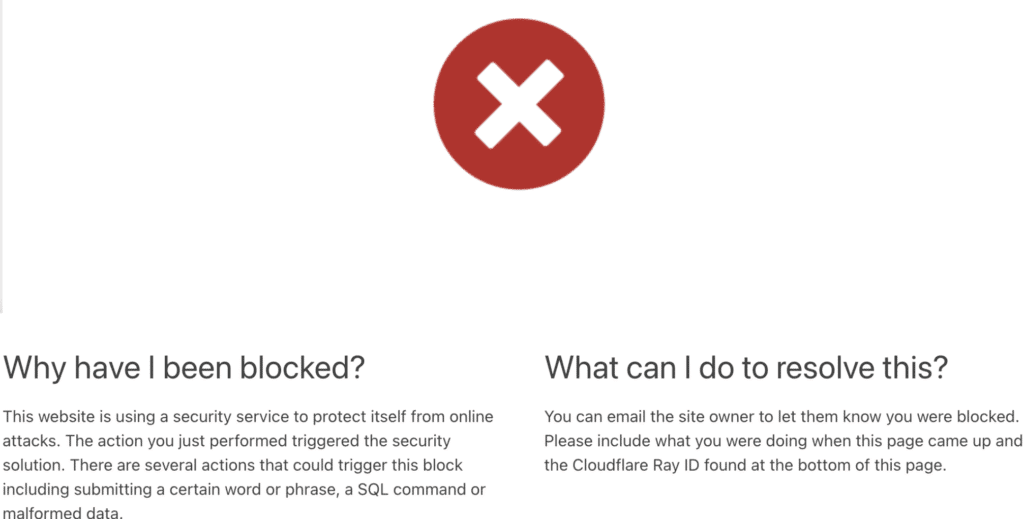
Cloudflare uses a combination of proprietary algorithms and third-party databases. If your IP has been detected in suspicious activity — for example, too many requests in a short time, attempts to circumvent security, or a “bad reputation” of the address — it may be blacklisted on Cloudflare.
But blocking can be different:
- Challenge (CAPTCHA) — you are offered to pass the “I am not a robot” check. This is a temporary restriction, and it does not always mean that the IP is blacklisted.
- Temporary block — the system temporarily prohibits access if the activity seems too aggressive.
- Deny (hard lock) — the website or Cloudflare completely blocks access from your address.
In other words, when you ask “what does it mean if my IP is blacklisted on Cloudflare”, the answer is: you or your device is under a security filter. But the degree and duration of the blockage can vary greatly.
Common Reasons Why Cloudflare Blocks an IP
Now about the main thing — why your IP was blacklisted on Cloudflare. There may be several reasons, and they are not always related to what exactly you did.
- Suspicious activity. If too many requests are sent from your IP in a row, the system decides that it is a bot or script. Even if you were just refreshing the page, the server may perceive this as an attack.
- Using a VPN, proxy, or TOR. Cloudflare is able to detect when a request is coming from an anonymizer. Some sites block all such traffic. In this case, the issue of “can I blacklist IP on Cloudflare” has already been resolved by the site administrator: he simply denied access through certain networks.
- Public blacklists. Your IP address could have ended up in the Spamhaus or AbuseIPDB databases. Then Cloudflare automatically trusts these sources and restricts your access too. This explains why the question arises, even though you yourself didn’t seem to do anything wrong.
- Errors and false positives. Sometimes filters are triggered due to coincidences, for example, if your address is dynamic and another person has previously used it for unwanted activity.
Thus, the answer to the question “why am I blacklisted on Cloudflare” is most often associated either with a real threat or with automation that secures the site. Want to know more about your IP address being blacklisted on other websites – read in our article.
How to Check If My IP Is on a Blacklist Used by Cloudflare
The first step in analyzing the situation is to understand whether your address is actually blacklisted. Online services are suitable for this: Whoerip, WhatIsMyIPAddress, AbuseIPDB. It performs an IP blacklist check on dozens of databases at once and show where your address appears. If at least one of them marks your IP as suspicious, there is a good chance that this is why you were blacklisted on Cloudflare.

Technically, you can also check the IP using the built—in commands ping or traceroute. These tools won’t give you a complete answer, but they will help you understand exactly where the connection is being disconnected: on your network’s side or already on Cloudflare’s protection. As a result, you will be able to clearly answer the question “how to check if my IP is on a blacklist used by Cloudflare” and determine whether you need to solve the problem yourself or contact the site owner.
How Website Owners Configure Cloudflare Rules
Sometimes the blocking is not related to the global blacklist. Everything could be simpler: the site owner set the rules himself in the Cloudflare firewall settings. The functions country blocking (blocking by geography), rate limiting (limiting the number of requests from one IP), as well as bot protection — protection against suspicious traffic are available there.
In this case, the question “why am I blacklisted on Cloudflare” means rather: “why is this particular site not letting me in?” It is important to understand here: Cloudflare acts as a “shield”, but it is managed by the owner of the resource. Sometimes it is enough to contact the site administrator and clarify whether your IP address was included in the list by mistake.
How to Fix the Problem If My IP Is Blacklisted on Cloudflare
When your IP address is blacklisted on Cloudflare, there are several working steps:
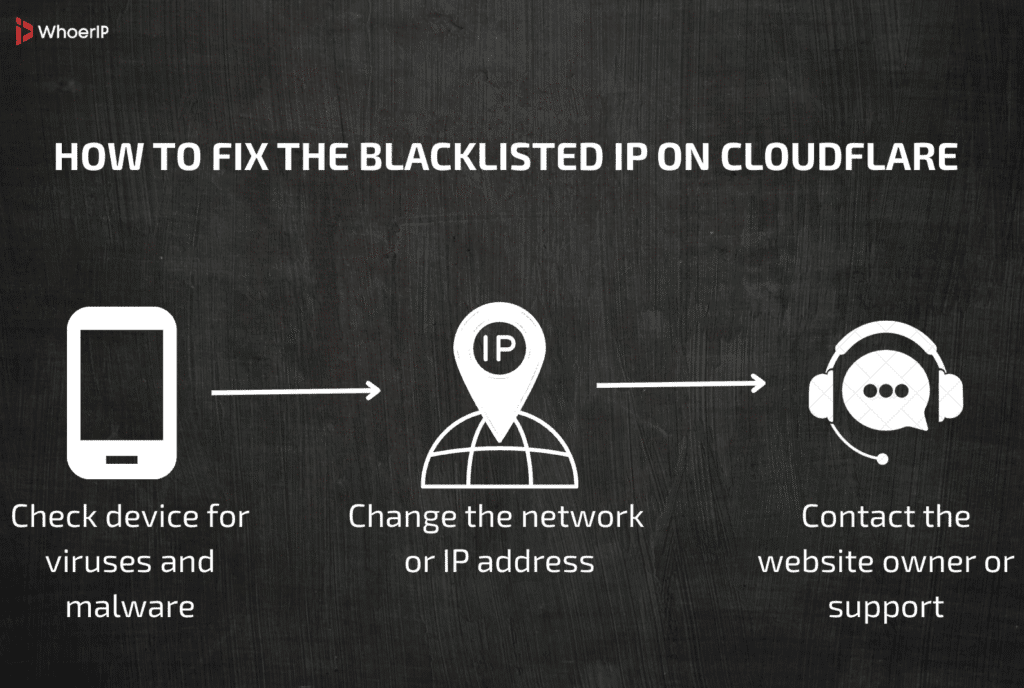
- Check your device for viruses and malware. Sometimes the cause is an infected computer or phone that generates suspicious traffic.
- Change the network or IP address. The fastest way is to reconnect to the Internet, restart your router, or try mobile internet. Many people are wondering: can I blacklist IP on Cloudflare? Yes, the site administrator can do this, and sometimes the only way is to change the address.
- Contact the website owner or support. Specify the date, time of the block, and your IP address. If you are sure that everything is in order, the admin can exclude the address from the filter.
Thus, the answer to the question “why is my IP blacklisted on Cloudflare” often lies in a combination of these steps: checking the device, changing the network, and communicating with administrators.
How to Make Sure My IP Doesn’t Get Blacklisted Again
In order not to return to the question “why is my IP blacklisted on Cloudflare” over and over again, it is worth paying attention to prevention. It is based on basic digital hygiene. Always keep your antivirus turned on, and update your operating system and browser. Very often, the IP gets blocked not because of your actions, but because the computer is infected and sends suspicious requests on its own.
The second important thing is to be careful with VPNs and proxies. Yes, they help to circumvent regional restrictions, but these addresses are most often included in the general IP blacklist check. If you use a VPN, choose services with a good reputation and avoid free solutions with questionable servers.
| Reason for Blacklist | How to Prevent It |
|---|---|
| Malware or infected device | Keep antivirus updated, install system/browser updates, run regular scans |
| Using free or low-quality VPN/proxy | Choose reputable VPN providers, avoid suspicious or overcrowded IP ranges |
| Too many requests (scraping, bots) | Limit frequency of automated queries, use APIs when available |
| Suspicious login attempts | Use 2FA, avoid logging in from multiple regions at the same time |
| Shared/dynamic IP with bad history | Request a new IP from your ISP, set up static IP or use a private VPN IP |
And finally, online behavior. If you run scripts, parse websites, or send too many requests of the same type, Cloudflare security will perceive this as a “bot”. Minimize such actions or use a more gentle pace. It’s easier to prevent blacklisted on Cloudflare than to restore access later. Remember to use only quality VPNs, even the free ones can be a good choice – check out our top 10 picks for free VPN services.
Conclusion
As a result, the answer to the question “why am I blacklisted on Cloudflare” consists of three parts: understand the reason (suspicious activity, VPN, viruses), perform an IP address blacklist check, and then apply a solution (network change, device cleaning, contact with the administrator).
It is important to remember that Cloudflare does not block IP addresses for no reason. Most often, this is to protect websites from overloading or attacks. The fact that you see “Access Denied” or a CAPTCHA means only one thing — the system is doing its job.
But you always have a choice: check your device, change the network, and take care of prevention. Then the issue of “IP blacklisted on Cloudflare” will remain a one-time occurrence for you, not a permanent problem. Ultimately, the cleaner and safer your digital footprint, the less likely you will have to deal with such blockages.
Frequently Asked Questions
Why is my IP blacklisted on Cloudflare?
Because Cloudflare flagged suspicious activity from your address (too many requests, VPN/proxy use, malware, or site owner rules).
IP blacklisted on Cloudflare
It means your IP was temporarily or permanently blocked from accessing a site protected by Cloudflare.
Blacklisted on Cloudflare
This happens when Cloudflare or the site owner decides your IP poses a security risk.
Can I blacklist IP on Cloudflare?
Yes, if you’re a site owner using Cloudflare, you can block specific IPs through firewall rules.
Why am I blacklisted on Cloudflare?
Usually because of spam-like activity, automated scraping, suspicious logins, or because you share an IP with others who misused it.