

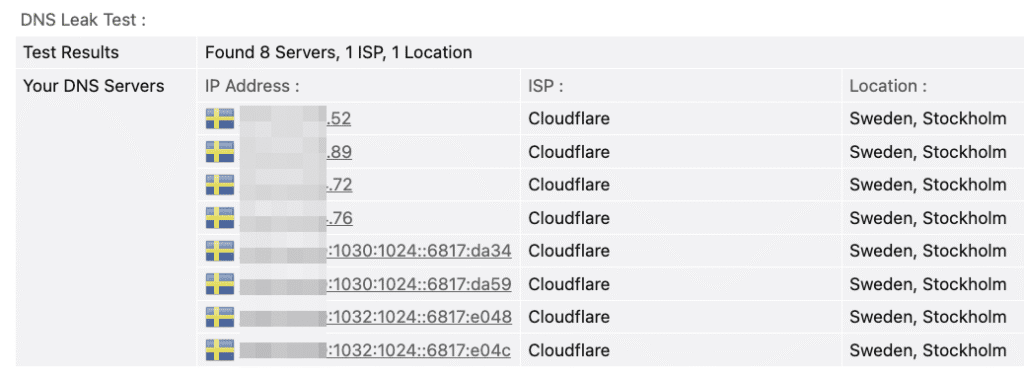
A DNS leak means your real DNS requests are being exposed instead of staying securely inside your VPN or proxy tunnel. In simple terms, websites or apps can still see where your computer is asking for domain lookups. And when you run a DNS leak test, it’s not unusual to see Cloudflare servers appear.
TL;DR
DNS leak test shows Cloudflare up because your browser or system bypasses the VPN with its own DNS (usually DoH – DNS over HTTPS). Disable it, lock DNS to your VPN, and the leak disappears.
Quick fix:
- Disable DNS-over-HTTPS in your browser (Firefox/Chrome/Edge often force Cloudflare).
- Force your VPN’s own DNS in settings.
- Flush DNS cache
On Windows (win + R and type):
ipconfig /flushdnsOn macOS (cmd + space or ctrl + space, then type “terminal” and launch)
dscacheutil -flushcache Why Cloudflare? Because Cloudflare runs one of the world’s biggest DNS resolvers (1.1.1.1). Many systems, browsers, and even VPNs use it by default. So if you see Cloudflare in a leak test, it usually means your system is sending DNS queries outside your VPN-protected channel — or your VPN itself is routing through Cloudflare.
What Exactly Is a DNS Leak?
A DNS leak happens when your DNS requests (the lookups that turn a domain like google.com into an IP address) travel outside the encrypted tunnel of your VPN. Even if your IP address is masked, these leaks can reveal your activity to your ISP or other intermediaries.
Think of it like closing your curtains but leaving the window open a crack. Outsiders might not see you directly, but they can still hear the conversations inside.
Why it matters:
- Your ISP can still log which websites you visit.
- Geo-blocked services may catch that your DNS doesn’t match your VPN location.
- Privacy tools lose effectiveness when DNS leaks happen.
FYI: Some apps, like Chrome or Windows 10+, may use their own DNS settings (e.g., DoH – DNS over HTTPS) and bypass your VPN entirely.
Why Does Cloudflare Appear in DNS Leak Tests?
Cloudflare shows up in DNS leak results because it provides a free, fast, privacy-focused DNS resolver — 1.1.1.1. Your device, browser, or even VPN provider may be set up to use it.
Here are the most common reasons:
- System default: Some operating systems now prefer Cloudflare DNS by default.
- Browser override: Chrome, Firefox, and Edge often use Cloudflare via DNS-over-HTTPS.
- VPN configuration: Many VPNs intentionally use Cloudflare’s 1.1.1.1 for DNS resolution.
- Fallback behavior: If your VPN fails to tunnel DNS, your system may fall back to Cloudflare.
Pro Tip: If you always see Cloudflare in your DNS leak test, check your browser’s DNS settings. Disabling DNS-over-HTTPS may solve the issue.
Is Seeing Cloudflare Always a Problem?
Not always. Seeing Cloudflare in a DNS leak test can mean two very different things:
- Safe scenario: Your VPN is routing all DNS traffic through Cloudflare securely. In this case, no real leak.
- Unsafe scenario: Your system is bypassing the VPN tunnel and talking directly to Cloudflare. That’s a real leak.
How to tell the difference?
- If the IP matches your VPN location, you’re fine.
- If the IP is your ISP region or real city, it’s a leak.
How to Test and Confirm a DNS Leak
Testing for DNS leaks is simple:
- Connect to your VPN.
- Visit a DNS leak test website like Whoerip.com (recommended).
- Run an extended test.
- Look at the DNS server list.
If you see your ISP or servers outside your VPN’s country, that’s a problem. If you see Cloudflare but with VPN location IPs, you’re safe.
Related article: How to check your IP address.
How to Fix a DNS Leak (Cloudflare Case)
Fixing DNS leaks often requires tweaking a few settings:
FYI: Even if you hide your IP, a DNS leak exposes your browsing. Fixing it is as important as changing your IP.
- Force VPN DNS: Many VPNs let you lock DNS to their own resolvers.
- Disable browser DNS-over-HTTPS: Especially in Firefox or Chrome.
- Manually set DNS: Use your VPN provider’s DNS or a trusted one.
- Block IPv6: Many leaks come from IPv6 requests not tunneled properly.
- Firewall rules: Advanced users can block outbound DNS except via VPN.
Pro Tip: After changes, rerun a leak test at least twice — once in normal browsing and once in incognito/private mode.
Cloudflare DNS: Trust and Privacy Concerns
Cloudflare markets 1.1.1.1 as the “fastest and most private DNS.” They promise not to log browsing data permanently. Still, some privacy advocates argue: using a big centralized DNS like Cloudflare just shifts trust away from your ISP to another company.
That’s why it’s essential to understand the balance:
- Pro: Encrypted DNS, faster resolution, no selling data (as they claim).
- Con: Centralized, U.S.-based provider, not fully transparent.
Related article: How to hide your IP address.
Conclusion
Seeing Cloudflare in a DNS leak test isn’t always bad news. It might be your VPN using Cloudflare by design, or just your browser pushing DNS-over-HTTPS. The real danger is when your ISP or actual location appears.
The fix is quick: turn off DoH, force your VPN’s DNS, flush the cache, and test again. If only your VPN servers remain, you’re safe.
Remember — hiding your IP isn’t enough. DNS leaks are tiny cracks that reveal more than you think. Check often, patch fast, and keep Cloudflare from showing up where it shouldn’t.
Frequently Asked Questions
Why use Cloudflare for DNS?
Because it’s fast, reliable, and supports privacy-focused features like DNS-over-HTTPS.
Should I trust Cloudflare DNS?
It’s generally safer than ISP DNS, but remember: you’re trusting Cloudflare with your data instead of your ISP.
What are Cloudflare DNS servers?
The most common are 1.1.1.1 and 1.0.0.1.
Is Cloudflare safe?
For most users, yes. But “safe” doesn’t mean invisible — they still see your DNS queries.
Is 1.1.1.1 Cloudflare safe?
Yes, but it depends on your privacy model. They keep some temporary logs.
Who uses Cloudflare?
Millions of websites, ISPs, and individuals use it as a DNS resolver.
Does Cloudflare change DNS?
Yes — if your system or browser defaults to it. You can change it back manually.