
What Is AI Detection and How to Easily Avoid It
To put it simply, AI detection is a system that tries to “catch” text written by artificial intelligence by analyzing its style, structure, and predictability. Algorithms are looking for patterns, perfect punctuation, repetition, and too smooth a rhythm, something that is rare in a living person. Let’s find out together the best how to avoid AI detection.
To avoid AI detection, the text needs to be “animated”. Add a little chaos: change the pace of speech, use conversational phrases, and allow for slight imperfections. Artificial intelligence writes without emotion, but humans, on the contrary, leave a trace of their feelings, reactions, and moods.
A quick solution:
- Rewrite the keywords in your own words.
- Add personal experience or observation.
- Insert a question, interjection, short broken sentence.
Use these special tools for content improvements
- GPTZero, Sapling AI, Copyleaks – AI detectors that estimate how likely a text was generated by artificial intelligence. Great for quick checks.
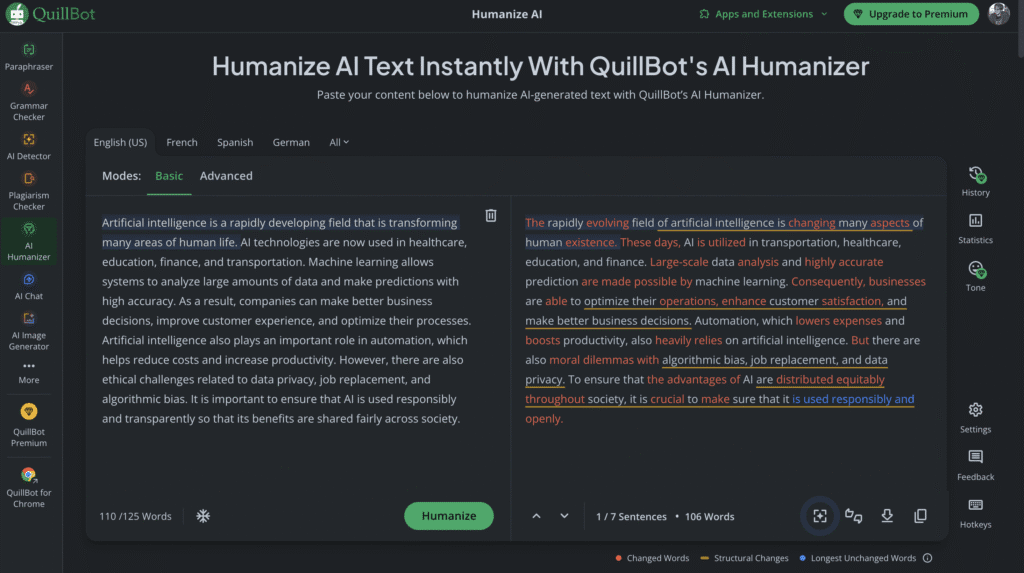
- QuillBot, Grammarly, Wordtune – rewriting tools that help rephrase, polish style, and add a more natural human tone.
- Undetectable AI, AI Humanizer – specialized platforms that adjust structure and word flow to make AI text sound fully human.
| Tool / Service | Purpose | Type | Example Use |
|---|---|---|---|
| GPTZero | Detects AI-written text | Detector | Checking if your essay looks “too AI-like” |
| Copyleaks | Finds AI or plagiarized sections | Detector | Academic or business content audits |
| Sapling AI | Measures text probability & style | Detector | Testing tone or naturalness |
| QuillBot | Rewrites & humanizes sentences | Rewriter | Making AI text sound more natural |
| Wordtune | Adjusts tone & rhythm | Rewriter | Adding a conversational style |
| Undetectable AI | Removes AI-like patterns | Humanizer | Making AI text pass detectors |
| AI Humanizer | Edits syntax for human flow | Humanizer | Final polish before publishing |
When a text sounds like you’re speaking, rather than reading from a prompter, no detector can confidently call it “written by AI.” By the way, in some countries chatGPT service may be blocked due to geographical restrictions, in our article you can find out how to unblock chatGPT.
How AI Detection Works – The Science Behind It
AI decoders don’t “read” text like humans do, they measure it. The main indicators are perplexity (unpredictability of words) and burstiness (variety of sentence lengths). If the text is too smooth and rhythmic, the machine decides, “The robot wrote it.”
Services like GPTZero or Copyleaks analyse thousands of parameters. They calculate how common rare words are, how phrases are repeated, and where the author might have used the neural network. Some systems even compare your text with the “handwriting” of popular models like GPT or Claude.
But it’s important to understand that even the best tools make mistakes. Human text sometimes looks “too correct” especially for people with an academic style. Therefore, the result of an AI check is a probability, not a verdict.
Common Triggers That Reveal AI-Written Text
There are several “signals” by which the AI text can be recognized almost immediately.
Firstly, the rhythm is the same: all sentences are the same length, with the same pauses. This makes the text monotonous, like a metronome. Secondly, sterility. Such texts do not argue, do not doubt, do not joke. They are correct, but soulless.
AI often abuses universal phrases: “In conclusion”, “Overall”, “To sum up”, these patterns are found in every second machine essay. Another marker is the same punctuation. In humans, it is more chaotic: somewhere there is a long dash, somewhere there is a short “well”.
And finally, the absence of “noise”. People insert parasitic words, colloquial phrases, and sometimes lose their way. The car doesn’t do that. Therefore, if the text sounds too perfect, without roughness, this is a reason to think.
How to Make AI Text Undetectable – Natural Writing Practices
The most reliable way to make a text “human” is to add a person there. No AI knows how tired, happy, or annoyed you feel, which means that personal details make the text vivid and unique.
Use emotional accents: “I remember the first time I came across this,” “honestly,” “come to think of it.” These are not just decorations, but natural traces of thinking that are not found in machine writing.
The second trick is syntactic “heterogeneity”. Change the length of phrases: alternate long arguments with short strokes. Add questions and even incomplete thoughts – all the things that the algorithm avoids.
And most importantly, don’t be afraid of imperfections. A mistake in punctuation, an unexpected metaphor, or an emotional word like “damn it” can play in your favor. People don’t write perfectly, and that’s what makes the text authentic.
How to Bypass AI Detection In the Correct Way
When they say “how to bypass AI detection”, they often don’t mean deception, but editing. The goal is not to “outsmart the system,” but to bring the text back to a living voice.
Use the neural network as a draft, let it build a structure and formulate ideas. And then the person turns on: adds emotions, observations, examples, personal phrases. This way you don’t mask the AI, but turn the text into collaboration.
The ethical approach is not to “re-write without traces”, but to improve what was written.
For example:
- Remove the template bundles like “In today’s world”.
- Add your thoughts and associations.
- Double-check the style to make it sound like you.
Then the AI detector will not just “not recognize” the text, it will understand that this is a human work inspired by technology, and not a copy of it.
Special Tools and Services to Check and Improve Your Text
Today, there are many tools that help avoid AI detection in writing and improve text without violating ethics.
Here are the most useful ones:
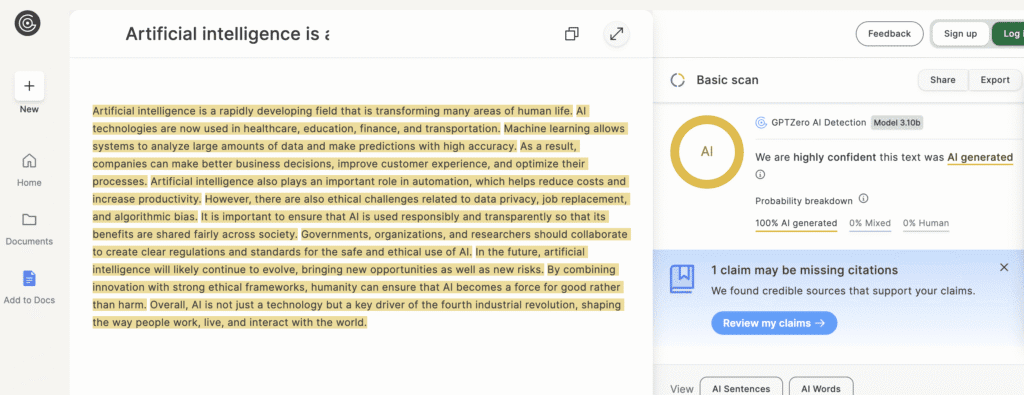
- GPTZero, Sapling AI, Copyleaks detectors that show the probability that the text was created by AI. They are convenient to use for initial verification.
- QuillBot, Grammarly, and Wordtune are assistants for reformulation, stylistic alignment, and adding a “human rhythm.”
- Undetectable AI and AI Humanizer are services specifically designed to “make AI text undetectable” by adapting style and syntax.
How to work with them correctly:
- First, check the text through detectors.
- Then manual revision and reformulation.
- The final touch is reading aloud. If it sounds natural, then it’s done.
Such services do not violate the rules they help to make the text truly human, while preserving the meaning and quality.
How to Avoid AI Detection in Writing for Different Contexts
There are different ways to avoid AI detection – it all depends on where and why you write. One universal recipe doesn’t work, but there are effective practices for every case.
- Academic environment. If you are writing for a university or research paper, add real sources, links to articles, authors, and research. Use your own formulations instead of templates like “The aim of this paper is…”. And most importantly, draw unique conclusions, showing that you understand the material. The algorithm can generate reasoning, but not personal insight.
- Blogs and media. In blogs and journalistic materials, tone and character are important. Add irony, emotions, colloquial phrases, short pauses, even light sarcasm. Write as if you’re telling a story to a friend, not defending a thesis. The more vivid the language, the more difficult it is for an AI detector to attribute it to a machine. For example in blogs like ours, for example, top 10 best free VPN services.
- Business texts. In business documents, a combination works: a structure from a neural network + edits from a person. Add company context, project details, and real-world cases. This makes the text unique and “irreplaceable”.
In order to avoid AI detection in writing, you need to write like a human, not like an ideal algorithm.
How to Detect AI Yourself – Reverse Perspective
To learn how to bypass AI detection, you should first see the text through the eyes of the detector. It’s almost like learning to be an actor by looking from the stage to the audience.
The first step is to check your texts through AI detectors: GPTZero, Writer.com , Sapling AI. They will show you where your style looks “too smooth” or “too predictable.”
The second is to analyze the signs that AI most often gives out:
- Perfect punctuation and the same length of sentences.
- Lack of emotion or individual words.
- Repetitive turns and patterned bundles.
When you see this in your text, it means it’s time to add a little noise: vivid details, emotional outbursts, unique associations. Understanding how AI detection works helps you write not only naturally, but also more interestingly.
| Aspect | AI-Generated Text | Human-Like Revision Tips |
|---|---|---|
| Sentence Structure | Predictable rhythm and identical length | Mix short and long sentences; add pauses and questions |
| Tone & Emotion | Neutral, formal, emotionless | Add feelings, irony, humor, or mild exaggeration |
| Vocabulary | Repetitive or too polished | Use personal words, slang, or metaphors |
| Logic & Flow | Perfectly ordered, linear reasoning | Allow slight digressions or side comments |
| Details & Experience | Abstract, generic examples | Insert personal observations or specific cases |
| Punctuation | Ideal punctuation, robotic patterns | Add dashes, ellipses, or short breaks for rhythm |
| Errors & Imperfections | Grammatically flawless | Leave minor stylistic quirks or natural inconsistencies |
| Word Variety | Overuse of common connectors (“Therefore”, “In conclusion”) | Replace with natural transitions (“Anyway”, “That said”, “So yeah…”) |
How to Avoid AI Detection Conclusion
The phrase “how to remove AI detection” often sounds like a challenge to the system, but the point is not to bypass it, but to return the personality to the text.
Always use special tools for AI content optimisation.
- GPTZero, Sapling AI, Copyleaks detect AI-generated text.
- QuillBot, Grammarly, Wordtune rephrase and humanize writing.
- Undetectable AI, AI Humanizer make AI text undetectable.
The main rule is simple: don’t try to be a better car than the car itself. AI may help with ideas, structure, and routine, but the voice is always yours.
Edit manually, insert observations, and play with words. Add a little chaos, contradictions, humor, everything that makes writing alive.
As a result, you are not “hiding” AI, but creating a text that cannot be confused with an artificial one.
AI is a tool, not a mask. And the more of you there are in words, the less likely it is that someone will suspect, “It was written by a bot.”
Frequently Asked Questions
What is AI detection?
AI detection is the process of identifying whether a piece of text, image, or other content was created by artificial intelligence rather than a human. It analyzes writing patterns, word predictability, and structure to find signs of machine generation.
How to bypass AI detection?
To bypass AI detection, you can rewrite or edit text manually adding natural mistakes, emotional tone, personal details, and varied sentence lengths. The goal isn’t to cheat but to make AI-generated content sound more human and authentic.
How to detect AI?
You can detect AI-generated text using tools like GPTZero, Copyleaks, or Sapling AI. They measure metrics such as perplexity (how unpredictable text is) and burstiness (variation in sentence length and style).
How to avoid AI detection in writing?
Write naturally: include your own opinions, personal examples, and emotional cues. Mix short and long sentences, use contractions, and avoid overly perfect grammar or repetitive phrasing.
How to remove AI detection?
To remove AI detection flags, rephrase and humanize the text change wording, add personality, and reduce robotic phrasing using tools like QuillBot or Undetectable AI.
Why is AI detection important?
AI detection protects academic integrity, combats misinformation, and helps organizations verify authenticity ensuring that human creativity and accountability remain transparent in the digital age.