
Whether we’re browsing the web, streaming movies, or interacting on social media, our devices are always sending and receiving data. Every device connected to the internet has a unique IP address—a numerical label assigned to it to identify it on the network. While it may seem like just a technical detail, the reality is that your IP address can reveal more about you than you might expect.
What could someone do if they have your IP address:
- Approximate location: An IP address can reveal the user’s city, state, and country, but not the exact street address for regular users.
- ISP information: An IP address shows which Internet Service Provider the user is using.
- Online activity tracking: With enough resources, someone could track online activity linked to an IP address.
So, what exactly can someone do with your IP address, and why should you care? In this article, we’ll answer the question What Can Someone Do With Your IP Address, explore five potential risks that come with having it exposed, and explain how you can protect yourself. Sometimes an IP puller can be used so for a good and important decision it is important for us to understand what to do if an IP puller is used on you.
1. Tracking Your Location With Your IP Address: A More Invasive Form of Targeting
The first thing that most people think of when considering the risks of exposing their IP address is location tracking. Just like your physical address refers to where you live, your IP address reveals your general location when you access the internet. Websites can easily use this information to estimate where you are located, often with surprising accuracy. For instance, services like Google or Facebook may determine your city, state, and even your neighborhood based on your IP address.
Many companies use this information to tailor ads to you, serving you location-based promotions that are often too precise for comfort. While this may seem harmless in the context of receiving local restaurant ads, the fact remains that it can be used to target you in more invasive ways.
The Risk:
- Targeted Advertising: Marketers can bombard you with location-specific ads, which, over time, can become a privacy concern. Imagine every website you visit knowing exactly where you are, just because of your IP address.
- Geo-blocking: Some services—especially streaming platforms like Netflix or Hulu—use your IP address to restrict access to content based on your location. If your IP address is associated with a region where the content is blocked, you may not be able to access it.
How to Avoid This: A VPN (Virtual Private Network) masks your real IP address and makes it look like you’re browsing from a different location. By connecting to a VPN server in another country, you can spoof your IP address and bypass geographical restrictions while keeping your location hidden from marketers. For a detailed comparison between using a VPN and a proxy, check out this helpful guide on Proxy vs. VPN.
2. DDoS Attacks: A Malicious Disruption of Your Online Activity With Your IP
One of the most common and damaging ways of using your IP address is for DDoS (Distributed Denial of Service) attacks. A DDoS attack is when a malicious actor sends an overwhelming amount of traffic to your device or network to render it unusable. If someone knows your IP address, they can flood it with traffic, essentially shutting down your internet connection or causing your devices to crash.
People mostly associate DDoS attacks with gaming communities (think of the classic scenario where gamers intentionally target each other’s IP addresses during multiplayer sessions). However, they can happen to anyone. Even businesses can be at risk, especially if they have online platforms, websites, or services that are vital to their operations.
The Risk:
- Service Disruption: If your device or network becomes flooded with unwanted traffic, it may slow down or completely shut down. It becomes impossible to use your internet connection or online services.
- Financial Impact: For businesses, a DDoS attack can result in significant downtime, loss of revenue, and damage to reputation—sometimes taking hours or even days to resolve depending on the scale of the attack. For practical advice on how to protect your organization from such threats, see this guide on defending against DDoS attacks.
How to Avoid This: Protecting yourself from a DDoS attack starts with securing your home network and devices. Firewalls can block incoming malicious traffic, while a VPN can help obscure your real IP address. As a result, it becomes more difficult for hackers to target you.
3. Hacking and Data Breaches: Using Your IP Address For Direct Access to Your Devices
Now, this is where things get serious. If someone has your IP address, they could use it to attempt to hack into your devices. While this doesn’t necessarily mean they can immediately steal your data, it does give them the first point of entry into your network. Many hackers target home networks to gain unauthorized access to personal devices, including smartphones, laptops, and even security cameras.
The use of your IP address could be a starting point for more aggressive types of attacks, like exploiting vulnerabilities in your router or devices. In the worst-case scenario, hackers could gain access to sensitive personal data—photos, passwords, or even financial information like credit card numbers. For tips on how to better protect your IP address, check out this guide on how to hide your IP address.
The Risk:
- Data Theft: If hackers get into your devices, they could steal personal information, passwords, or even files containing private information. This data could then be sold on the dark web or used for further malicious activity.
- Spyware and Malware: Hackers could install malware, spyware, or ransomware on your devices, allowing them to track your every move or hold your data hostage until you pay a ransom.
How to Avoid This: Securing your home network is crucial. Use strong, unique passwords for your Wi-Fi and any connected devices, enable encryption like WPA3 for your router, and keep your software and firmware up to date. Additionally, consider using a VPN to hide your IP address and protect yourself from remote attempts to breach your security.
4. IP Spoofing and Identity Fraud: Impersonating You Online With Your IP
Have you ever heard of IP spoofing? This is a method attackers use to impersonate someone else by falsifying the source of their internet traffic. When an attacker spoofs your IP address, they can make it appear as though the malicious traffic is coming from you. This can have serious implications, especially if they use your IP address to engage in illegal or fraudulent activities online.
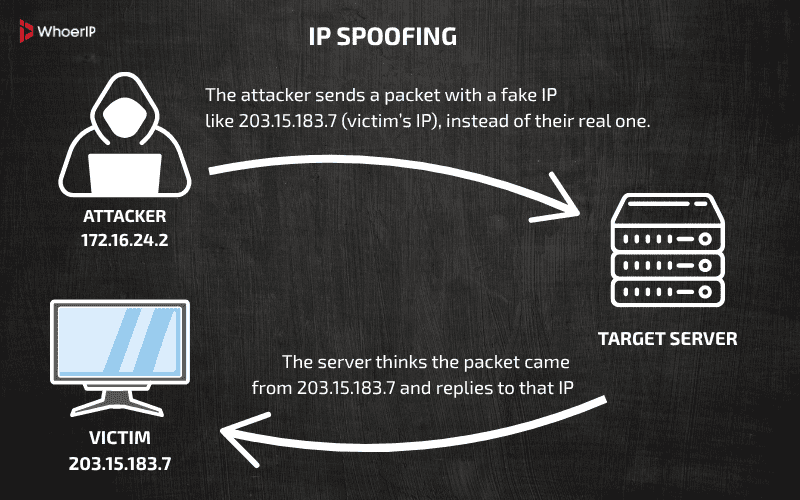
For example, if someone uses your IP address to engage in fraudulent activities, you could be wrongfully blamed for their actions. Identity fraud through IP spoofing is a real risk. It can be rather difficult to resolve once your IP address has been linked to malicious activity.
The Risk:
- False Accusations: If your IP address is used to commit a crime or hack into a system, you could be held liable for something you didn’t do.
- Financial Loss: Cybercriminals could use your IP address to commit fraudulent transactions and trace them back to you.
How to Avoid This: Use a VPN or proxy server to mask your IP address whenever you’re online. This can significantly reduce the likelihood of someone using your IP address to impersonate you or commit fraud in your name.
5. Unauthorized Access to Your Home Network With Your IP Address
Think about how much of your personal life relies on your home network. You likely have sensitive files on your devices, conduct banking transactions online, and connect important devices like security cameras to your network. With your IP address, an attacker could potentially gain access to your home network.
Once inside, the hacker could monitor your online activity, steal files, install malicious software, or use your connected devices for their purposes. This can lead to serious privacy breaches or worse—they can turn your smart devices against you.
The Risk:
- Privacy Invasion: Hackers could monitor your online activity, eavesdrop on your conversations, or track your internet history.
- Compromised Devices: Any connected device—like smart speakers, security cameras, or even a smart fridge—could be hacked and exploited for malicious purposes.
How to Avoid This: Ensure your router has strong security settings, such as using WPA3 encryption and setting up a unique, strong password. Additionally, consider setting up a firewall to prevent unauthorized access to your home network. Use a VPN to hide your IP address from anyone who might be snooping.
How to Protect Your IP Address and Secure Your Online Activity
By now, you’ve seen just how much someone can do with your IP address. From tracking your location and launching cyberattacks to impersonating you online, the potential risks are significant. However, there are several simple and effective ways to protect your IP address and secure your online activities:
- Use a VPN: A VPN encrypts your internet traffic and hides your real IP address, making it difficult for anyone to track your location or launch attacks.
- Enable Two-Factor Authentication (2FA): Protect your accounts by enabling 2FA, which adds an extra layer of security even if someone gains access to your IP address.
- Use Strong Passwords: Always use complex, unique passwords for your Wi-Fi and online accounts to make it harder for attackers to gain access to your network.
- Keep Your Software Up-to-date: Regularly update your devices, routers, and apps to patch any vulnerabilities that hackers could exploit.
- Use a Proxy Server: A proxy can help mask your IP address and offer another layer of protection.
- Use an AntiDetect Browser: Antidetect browsers (like Multilogin, GoLogin, or Dolphin{anty}) can help disguise your digital fingerprint, making it harder for websites and trackers to identify or profile you online.
Important considerations
- Difficulty in identifying individuals: An IP address points to a network connection rather than a specific person, and several people on the same home or office network may share one public IP.
- Dynamic vs. static IP addresses: Many home internet connections use dynamic IPs that change periodically, making long-term tracking more difficult.
- Need for additional information: To launch more serious attacks or confirm someone’s identity, an IP address is often combined with other data gathered through tactics like social engineering or malware.
- VPNs for enhanced privacy: A Virtual Private Network (VPN) can hide your IP address and encrypt your internet traffic, offering a significant boost to privacy and security.
Final Thoughts
From invasion of privacy to identity theft, the risks are real and growing. Thankfully, with the right tools and practices—like using a VPN, securing your home network, and enabling two-factor authentication—you can take control of your online security and protect your privacy.
By staying informed about “What Can Someone Do With Your IP Address” and remaining vigilant about your digital footprint, you can safeguard your data and enjoy the benefits of the internet without worrying about becoming a target for malicious actors. In the modern world even you can track someone’s IP address and in our other article you can find out how to find an internet protocol.
Frequently Asked Questions
How do I know if my IP has been hacked?
If your IP has been hacked, you may notice signs like: 1. Unusual network activity or sudden service disruptions, such as a DDoS attack, where your internet connection or devices are flooded with traffic. 2. Unauthorized access to your accounts, including login alerts from unknown locations or suspicious activities. 3. Data breaches or signs that personal information has been compromised, such as unexpected changes in files or device behavior. 4. Malware or spyware installed on your devices, which can monitor your activity or even steal sensitive data.
Should I be worried if someone has my IP address?
Yes, you definitely should be worried! Someone having your IP address can lead to several risks, such as location tracking and targeted advertising and being vulnerable to DDoS attacks, which can disrupt your internet and cause financial losses for businesses. This also may imply hacking attempts where your IP can be used as a starting point to access your devices or network. Another risks include identity fraud and IP spoofing, where attackers impersonate you online, potentially causing legal or financial trouble. Hackers may also get unauthorized access to your home network, allowing them to exploit personal data or devices like cameras.
Can I change my IP address?
Yes, you can change your IP address in several ways: 1. Reset your router, which may assign a new dynamic IP address if you're using a standard ISP connection. 2. Use a VPN or proxy to mask your real IP address and appear to be browsing from a different location. 3. Request a new IP address from your internet service provider (ISP) if you need a permanent change. 4. Connect to a different Wi-Fi network to get a different IP address assigned to you, since each network has its own unique address.